Corn Electronics
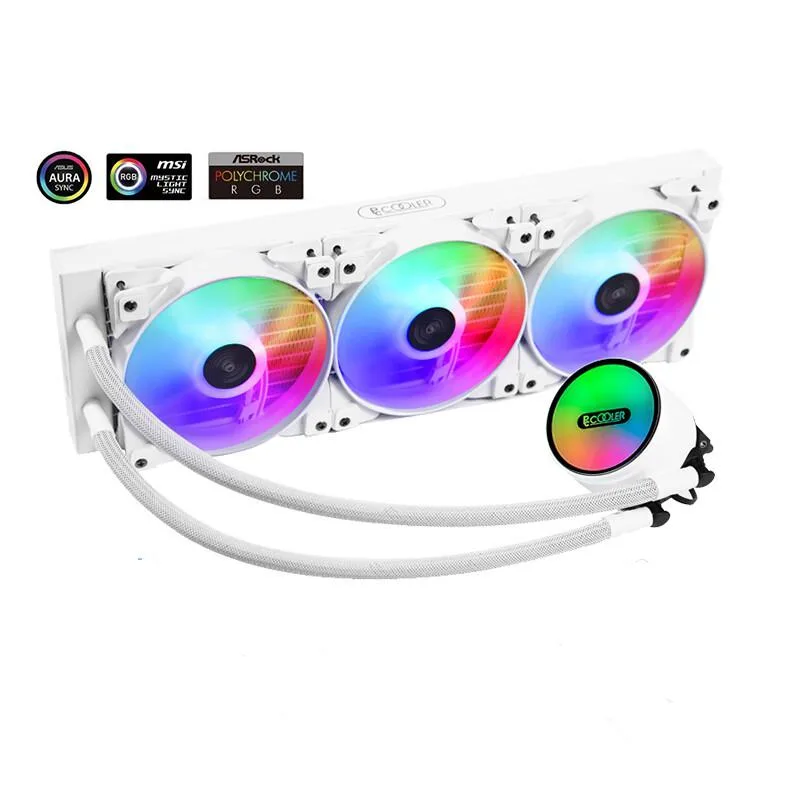
Corn Electronics laptop cooling pad white 360 mm 3 fan 120 mm ARGB
- White
- 3
$162.99
0.00188208BTC
In stockWe take cryptocurrency — so the coins you hold can buy real hardware.Pay in crypto, spend it on real hardware. Free insured shipping worldwide over $399. Plain, unbranded boxes, sent from Germany.Free insured shipping over $399. Your rate is locked for 30 minutes once checkout opens.Rate locked 30 minutes. Every item sealed, serial-checked and covered by a 24-month warranty.Sealed, 24-month warranty.


Diamond Multimedia
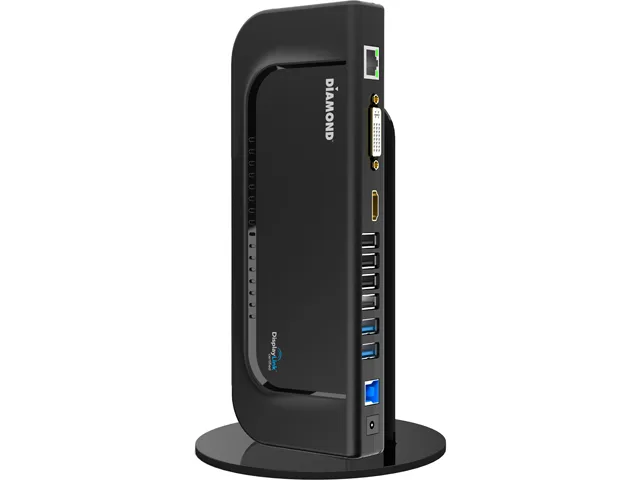
Connects a notebook or tablet to dual displays, gigabit Ethernet, audio and six USB ports through a single USB 3.0 cable
The Diamond Multimedia DS3900V2 connects to a notebook or desktop PC through a single USB 3.0 B port and adds two external displays via HDMI and DVI. It also provides four USB 2.0 ports, two USB 3.0 ports, gigabit Ethernet, 3.5 mm line-out and microphone input, plus a DC power jack for the included adapter. The DisplayLink DL-3900 chipset handles video over the USB link, so no native video output on the host is required.
The enclosure measures 1.30 x 3.40 x 8.80 inches and weighs 1.00 lbs with no moving parts, so it runs silently on a desk. Each USB 2.0 port delivers up to 2.0 A and each USB 3.0 port up to 3.0 A for charging phones or powering portable drives. The gigabit Ethernet port negotiates at line rate without adding audible coil whine, and the external power adapter keeps the dock within its thermal envelope during typical office workloads.
Under continuous dual-monitor use the DisplayLink driver compresses video over the USB 3.0 link, so sustained throughput depends on host CPU capacity and available USB bandwidth rather than a dedicated GPU. Heavy file transfers across the two USB 3.0 ports and the gigabit Ethernet port share the same 5 Gbit/s upstream connection, which can become the limiting factor. The dock supports Windows 7, 8, 8.1 and macOS with a 1.2 GHz processor, SSE2 support and 30 MB free disk space for the driver package.
| Brand | Diamond Multimedia |
|---|---|
| Model | DS3900V2 |
| Ports Spec | Connectors: DVI HDMI RJ-45 Gigabyte Ethernet Port USB 2.0 Ports x 4 DC Power Jack USB 3.0 Ports x 2 USB 3.0 B Female 3.5mm Lineout/Mic input Chipset: DisplayLink DL-3900 Number of Displays Supported: 2 Max resolution: 2048 ×1152 HDCP: Yes, Protected video playback HDCP 2. |
| Dimension | 1.30" x 3.40" x 8.80" |
| Weight | 1.00 lbs. |
| Features | System Requirements: Compatible with Microsoft Windows 8.1, 8, Windows 7 and MAC OS Processor: 1.2 GHz or faster with SSE2 support One USB 3.0/2.0 port 30 megabytes (MB) of free disk space 10MB Hard Disk space 1GB System Memory Available CD-ROM or DVD-ROM Drive The Diamond DS3900V2 Ultra Dock Dual Video USB 3.0/2.0 Docking Station enables multiple USB devices to be connected to the computer using a single USB3.0 cable. Now with one simple cable connection to your computer, you can have access to large screen displays, stereo speakers, external hard drive, optical disk drive, printers |
| Shipping weight | 1.04 kg |
| Package size | 25 × 25 × 25 mm |
Connect the dock to your notebook using the USB 3.0 B cable, install the DisplayLink DL-3900 driver before attaching monitors, then plug the DC power adapter into the jack. The step most people skip is installing the driver first — without it the DVI and HDMI outputs stay dark.
The unit has no user-serviceable parts or internal battery. Maintenance is limited to keeping the RJ-45 Gigabit Ethernet, six USB ports (four USB 2.0, two USB 3.0), DVI, HDMI and 3.5 mm audio connectors free of dust. If the external power supply fails, replace it with an equivalent DC adapter.
The DisplayLink DL-3900 chipset shares the host's single USB 3.0 uplink, so continuous high-resolution video on both displays plus heavy USB 3.0 disk traffic will saturate that 5 Gbps link before the dock's own ports or Gigabit Ethernet reach their individual ceilings.
Also in this aisle
Same shelf, same checkout — eight coins and a 30-minute rate lock.
What you pay in, and what you read prices in.
Sent from your wallet at checkout
Display only — the catalogue is priced in USD
No currency matches that.
Pick the language the site speaks to you in.
No language matches that.
New here?
Already have one?
There is no automatic reset: this shop sends no mail, so there is no one-time link to ask for. Leave the address on the account and it gets picked up by hand.
Request noted
Nothing is on its way to your inbox — this shop sends no mail at all. Someone picks these up by hand.
Remembered it?