

DELL
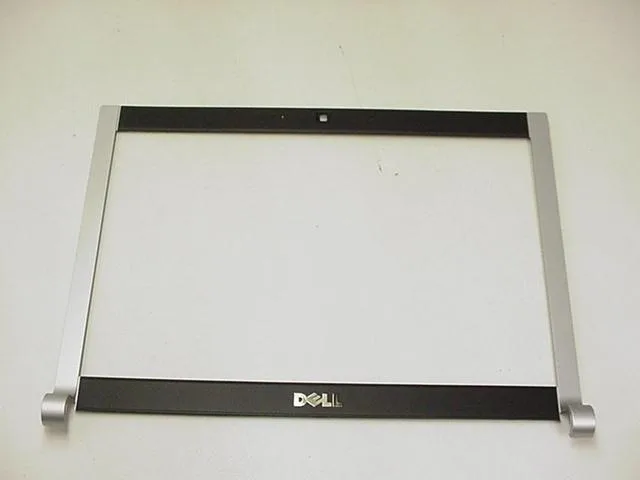
DELL XPS M1330 13.3" LCD Front Bezel XK074
Replacement LCD front bezel with camera window for 13.3" CCFL-backlit Dell XPS M1330 laptops
- Genuine Dell replacement part ensures exact fit
- Designed for 13.3" XPS M1330 models
- Includes camera window for webcam function
- Compatible with CCFL backlit displays only
- New condition ready for immediate installation
Dell XPS M1330 13.3" LCD Front Bezel
This replacement front bezel is designed for the Dell XPS M1330 13.3" laptop. It suits owners who need to repair a cracked or missing front trim piece on a CCFL-backlit display assembly. The part includes the integrated camera window cutout. It is not suitable for LED-backlit variants of the same chassis.
CCFL backlight compatibility only
The single specification that decides fitment is the backlight type: this bezel fits M1330 systems with CCFL backlit displays only. It will not align or function correctly on models equipped with LED backlighting. Buyers must verify their display type using the service manual or service tag before ordering.
Simple snap-on installation
Installation involves removing the old bezel and snapping the new trim into the display lid clips. The camera window aligns with the webcam module automatically. The most common issue is ordering this part for an LED-backlit model, which results in misaligned clips and an improper fit.
Highlights
- Genuine Dell replacement part ensures exact fit
- Designed for 13.3" XPS M1330 models
- Includes camera window for webcam function
- Compatible with CCFL backlit displays only
- New condition ready for immediate installation
Specifications
| Brand | Dell |
|---|
Questions about this item
Does the 13.3 inch bezel fit every XPS M1330 screen?
The trim fits only CCFL-backlit displays on the XPS M1330; it will not fit LED-backlit versions of the same model.
What does the camera window on the XK074 part allow?
The cut-out aligns with the integrated webcam so the lens sits flush behind the bezel without obstruction.
How does the front bezel attach to the laptop lid?
It snaps onto the display assembly using the original mounting clips; no screws or adhesive are required for installation.
Also in this aisle
People compared these
Same shelf, same checkout — eight coins and a 30-minute rate lock.


Kensington
Kensington Desk Mount Cable Anchor K64613WW accessory
- Black
- Provides a secure a…
$19.99
0.00023402BTC
In stock
Panasonic
Panasonic CF-VDR291U laptop cooling pad
- Optical Drive
- Buffer Size: 2 MB B…
$213.99
0.00250518BTC
In stock
eReplacements
eReplacements PB992A-ER laptop battery 14.4V
- Battery
- Lithium-Ion
$65.99
0.00077254BTC
In stock