


DELL
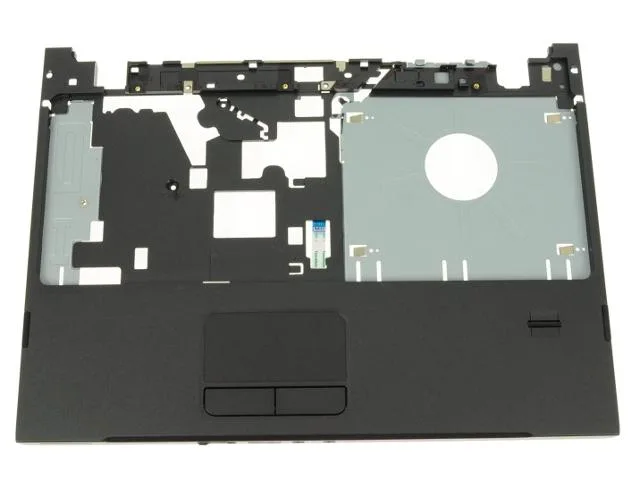
DELL Vostro 1220 Palmrest Touchpad Assembly Fingerprint Reader H533P
Replacement palmrest with touchpad and fingerprint reader for Dell Vostro 1220 laptops
- Genuine Dell replacement fits Vostro 1220 perfectly
- Integrated fingerprint reader secures logins biometrically
- Complete palmrest assembly includes touchpad circuitry and buttons
- Ready-to-install module with fingerprint cable pre-attached
Palmrest assembly for Vostro 1220
This palmrest touchpad assembly fits the Dell Vostro 1220 laptop. It replaces the original top cover section that houses the touchpad and integrated fingerprint reader module. The part carries Dell part number H533P and is supplied new.
Complete touchpad and fingerprint module
The assembly includes the touchpad circuitry, touchpad buttons, fingerprint module and its connecting cable. Buyers who need a different layout or a palmrest without biometric hardware will not find that option here.
Highlights
- Genuine Dell replacement fits Vostro 1220 perfectly
- Integrated fingerprint reader secures logins biometrically
- Complete palmrest assembly includes touchpad circuitry and buttons
- Ready-to-install module with fingerprint cable pre-attached
Specifications
| Brand | Dell |
|---|
Questions about this item
Will the H533P palmrest assembly fit and function with the original Vostro 1220 chassis and motherboard connectors?
The H533P is the Dell original part number for the Vostro 1220, so it aligns with the existing screw posts and uses the same motherboard header for the touchpad and fingerprint reader cable.
After installing the H533P assembly, how can I verify the fingerprint reader is recognised by the system?
Open Device Manager and check Biometric Devices for a listed fingerprint sensor; then enrol a finger in Windows Hello to confirm the reader captures and matches prints correctly.
Also in this aisle
People compared these
Same shelf, same checkout — eight coins and a 30-minute rate lock.


Kensington
Kensington Desk Mount Cable Anchor K64613WW accessory
- Black
- Provides a secure a…
$19.99
0.00023712BTC
In stock
Panasonic
Panasonic CF-VDR291U laptop cooling pad
- Optical Drive
- Buffer Size: 2 MB B…
$213.99
0.00253834BTC
In stock
eReplacements
eReplacements PB992A-ER laptop battery 14.4V
- Battery
- Lithium-Ion
$65.99
0.00078277BTC
In stock