

DELL
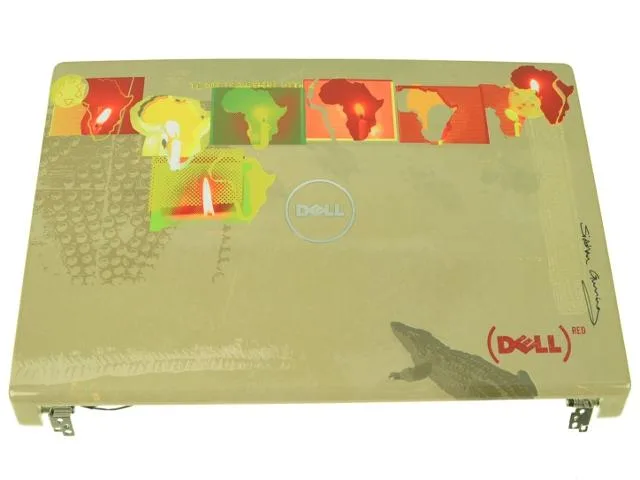
DELL Studio 1555 1557 1558 15.6" LCD Back Cover with Hinges JWDFN
Genuine Dell 15.6" LCD back cover assembly with hinges, wireless antenna cables and power button for Studio 1555, 1557 and 1558 laptops
- Genuine Dell OEM part ensures exact fit for Studio 1555 1557 1558
- 6 inch LCD back cover restores original laptop lid appearance
- Integrated left and right hinges simplify complete lid replacement
- Wireless antenna cables included maintain factory signal reception
- Power button with cable transfers easily to your original cover
Genuine Dell Studio 15.6" LCD Back Cover Assembly
This genuine Dell original back cover assembly fits Studio 1555, 1557 and 1558 laptops. It arrives with left and right hinges, wireless antenna cables and a power button with cable already installed. The part carries Dell part number JWDFN and features the Shine Within colour design.
Replaces cracked or loose original lid assemblies
Swap this assembly in when the existing lid is physically damaged, hinges have become stiff or the wireless antennas no longer maintain a solid connection. The jump is worth it when the chassis is otherwise sound and a full screen replacement is not required. The integrated hinges and cables restore structural rigidity and signal paths in one step.
Fits directly into the existing chassis mounting
No additional brackets or adapters are needed; the assembly aligns with the factory screw locations on the base. The pre‑routed antenna cables and power button connector plug into the motherboard without modification. If the original power button is preferred, it can be transferred from the old cover to this unit.
Highlights
- Genuine Dell OEM part ensures exact fit for Studio 1555 1557 1558
- 6 inch LCD back cover restores original laptop lid appearance
- Integrated left and right hinges simplify complete lid replacement
- Wireless antenna cables included maintain factory signal reception
- Power button with cable transfers easily to your original cover
Specifications
| Brand | Dell |
|---|
Questions about this item
Will the 15.6" LCD back cover with hinges fit my Studio 1557 without modification?
The cover is a genuine Dell original assembly built for Studio 1555, 1557 and 1558 models, so it aligns with the existing mounting points on those chassis.
Which screws or clips must be released first when swapping the lid assembly on a Studio 1558?
Remove the hinge covers, then unscrew the left and right hinge brackets from the base before lifting the old lid; the wireless antenna cables route through the hinge wells and are often forgotten.
If the power button fails later, can I replace it without buying another full back cover for my Studio 1555?
Yes — the power button and its cable are separate components that unclip from the lid, so you can swap just the button module while keeping the original cover.
Also in this aisle
People compared these
Same shelf, same checkout — eight coins and a 30-minute rate lock.


Kensington
Kensington Desk Mount Cable Anchor K64613WW accessory
- Black
- Provides a secure a…
$19.99
0.00023699BTC
In stock
Panasonic
Panasonic CF-VDR291U laptop cooling pad
- Optical Drive
- Buffer Size: 2 MB B…
$213.99
0.00253699BTC
In stock
eReplacements
eReplacements PB992A-ER laptop battery 14.4V
- Battery
- Lithium-Ion
$65.99
0.00078235BTC
In stock