
DELL
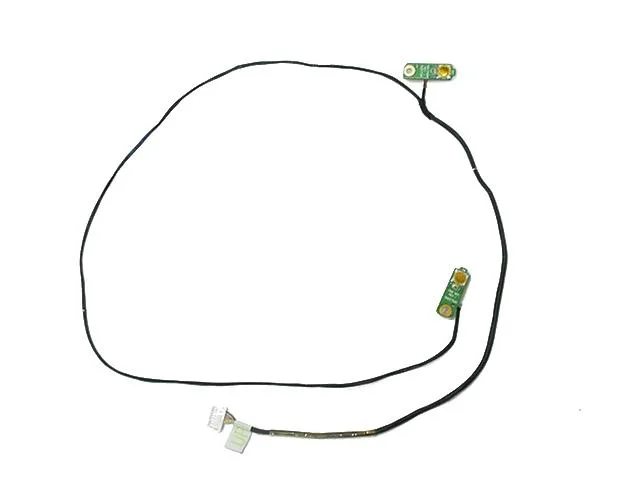
DELL Studio 1535 1536 1537 Power & Wi-Fi Button Cable
Genuine Dell OEM power and Wi-Fi button cable for Studio 1535, 1536 and 1537 laptops
- Genuine Dell OEM replacement ensures exact fit
- Restores power and Wi-Fi button function on Studio 1535 1536 1537
- Tested working pull from a verified system
- Cable harness integrates both switches in one part
- Matches the buttons at the left and right hinge areas
Genuine Dell OEM power and Wi-Fi button cable
This genuine Dell OEM part combines the power on/off switch and Wi-Fi button with its cable harness for Dell Studio 1535, 1536 and 1537 laptops. It sits on either side of the back cover near the left and right hinge areas. The unit is a working pull from a tested system and guaranteed to function perfectly. You receive exactly what is pictured.
Replaces a failed or damaged switch assembly
If the power button no longer turns the laptop on or the Wi-Fi button fails to toggle wireless, this cable assembly restores both functions in one step. The jump is worth it when either button becomes intermittent or physically broken, avoiding a full top-cover replacement. It fits the three listed Studio models directly with no adaptation required.
Limited to Dell Studio 1535, 1536 and 1537
This cable harness is not compatible with other Dell series or later Studio revisions. Buyers needing a different connector layout or a part for another chassis cannot use it. No other laptop models are supported by this specific OEM design.
Highlights
- Genuine Dell OEM replacement ensures exact fit
- Restores power and Wi-Fi button function on Studio 1535 1536 1537
- Tested working pull from a verified system
- Cable harness integrates both switches in one part
- Matches the buttons at the left and right hinge areas
Specifications
| Brand | Dell |
|---|
Questions about this item
Will this cable assembly fit my Dell Studio 1535 laptop?
Yes, this genuine Dell OEM cable assembly is listed as compatible with the Studio 1535, Studio 1536, and Studio 1537 models.
How do I install the power and Wi-Fi button cable, and what step is often missed?
You must remove the top cover to access the hinge areas, then route the cable harness through the chassis and connect it to the motherboard header before reassembling.
Will I need to replace the top cover when changing this cable later?
The cable is a separate component, but the supplier notes it is also included with each Studio 1535 top cover they sell if the standalone part is unavailable.
Also in this aisle
People compared these
Same shelf, same checkout — eight coins and a 30-minute rate lock.


Kensington
Kensington Desk Mount Cable Anchor K64613WW accessory
- Black
- Provides a secure a…
$19.99
0.00023125BTC
In stock
Panasonic
Panasonic CF-VDR291U laptop cooling pad
- Optical Drive
- Buffer Size: 2 MB B…
$213.99
0.00247545BTC
In stock
eReplacements
eReplacements PB992A-ER laptop battery 14.4V
- Battery
- Lithium-Ion
$65.99
0.00076338BTC
In stock