


DELL
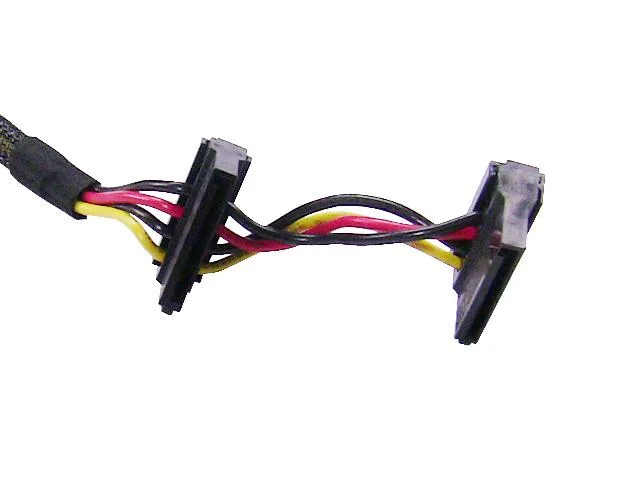
DELL PowerEdge T130 4-HDD 1-ODD Cable J71RG
Genuine Dell cable connects four hard drives and one optical drive in PowerEdge T130 servers
- Accessory TypeCable
- ColorBlack
- Genuine Dell cable connects four hard drives and one optical drive
- Part number J71RG ensures exact fit for PowerEdge T130 servers
- Black cable assembly matches original server aesthetics
- OEM replacement restores factory storage connectivity
- Designed specifically for Dell PowerEdge T130 systems
Dell PowerEdge T130 Drive Cable
Genuine Dell OEM cable J71RG connects four hard drives and one optical drive inside a PowerEdge T130 server. The black assembly routes data and power between the backplane and motherboard without adapters. It is a direct replacement for the original factory harness.
For PowerEdge T130 maintenance
Technicians restoring or expanding drive bays in a T130 chassis will find the correct pin-out and length. Builders using other Dell servers or non-Dell cases cannot use this harness because the connector layout is model-specific.
Single cable replaces two runs
The combined 4-HDD and 1-ODD design reduces clutter and eliminates the need for separate signal and power looms. Installers gain cleaner airflow and faster service time when swapping drives.
Highlights
- Genuine Dell cable connects four hard drives and one optical drive
- Part number J71RG ensures exact fit for PowerEdge T130 servers
- Black cable assembly matches original server aesthetics
- OEM replacement restores factory storage connectivity
- Designed specifically for Dell PowerEdge T130 systems
Specifications
| Brand | Dell |
|---|---|
| Model | PowerEdge T130 |
| Part Number | J71RG |
| Accessory Type | Cable |
| Color | Black |
Questions about this item
Which Dell server must I already own for the J71RG cable to connect its drives?
The cable is built for the Dell PowerEdge T130 server and fits its internal drive bays.
Will the J71RG cable work if I keep the original backplane in my PowerEdge T130?
Yes, it plugs into the existing backplane and routes signals for four hard drives plus one optical drive.
How can I confirm the J71RG cable is seated correctly after installation?
The server should detect all connected drives in the BIOS and the optical drive should read media without errors.
Also in this aisle
People compared these
Same shelf, same checkout — eight coins and a 30-minute rate lock.


Kensington
Kensington Desk Mount Cable Anchor K64613WW accessory
- Black
- Provides a secure a…
$19.99
0.00023168BTC
In stock
Panasonic
Panasonic CF-VDR291U laptop cooling pad
- Optical Drive
- Buffer Size: 2 MB B…
$213.99
0.00248007BTC
In stock
eReplacements
eReplacements PB992A-ER laptop battery 14.4V
- Battery
- Lithium-Ion
$65.99
0.0007648BTC
In stock