


DELL
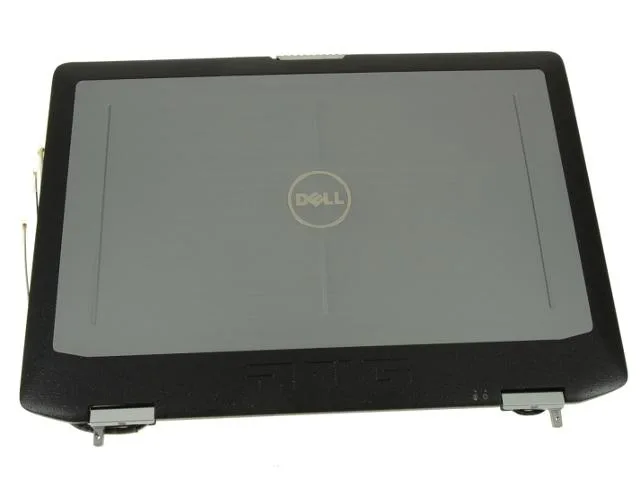
DELL Latitude E6420 ATG 14" LCD Back Cover A10A28 Touchscreen accessory
Genuine Dell OEM LCD back cover assembly with hinges, antenna cables and touchscreen ribbon cable for Latitude E6420 ATG 14″ rugged touchscreen models
- Genuine Dell OEM part ensures exact fit
- Designed for Latitude E6420 ATG with touchscreen
- Includes hinges and antenna cables for complete assembly
- Touchscreen ribbon cable MK89K supplied ready to install
- Dell part number A10A28 confirms correct replacement
Genuine Dell OEM replacement cover
This genuine Dell OEM LCD back top cover assembly carries part number A10A28 and is built for the Latitude E6420 ATG rugged laptop. It arrives with hinges, wireless antenna cables and the MK89K touchscreen ribbon cable already fitted.
For ATG owners with touchscreen models
The assembly fits Latitude E6420 ATG systems that shipped with a touchscreen enabled display. It will not suit non-ATG variants or ATG units that lack the touchscreen option.
Direct-fit repair for a 14 inch rugged lid
The cover restores the factory lid structure on a 14 inch ATG chassis and includes the routing paths for antenna cables and the touchscreen flex. Damage to the magnesium alloy frame or missing mounting points would require a different repair approach.
Highlights
- Genuine Dell OEM part ensures exact fit
- Designed for Latitude E6420 ATG with touchscreen
- Includes hinges and antenna cables for complete assembly
- Touchscreen ribbon cable MK89K supplied ready to install
- Dell part number A10A28 confirms correct replacement
Specifications
| Brand | Dell |
|---|
Questions about this item
Which Dell laptop models accept the A10A28 back cover with the MK89K touchscreen ribbon cable?
The A10A28 back cover is built for the Latitude E6420 ATG with a touchscreen-enabled display.
Will the hinges and wireless antenna cables from this assembly fit a non-ATG Latitude E6420?
This assembly is specific to the ATG rugged chassis; the hinges and antenna cables are not guaranteed to align with a standard E6420 lid.
After installing the A10A28 cover, how can I confirm the touchscreen and wireless antennas are connected correctly?
Verify touch response on the 14" panel and check that Wi-Fi networks appear at normal signal strength once the system boots.
Also in this aisle
People compared these
Same shelf, same checkout — eight coins and a 30-minute rate lock.


Kensington
Kensington Desk Mount Cable Anchor K64613WW accessory
- Black
- Provides a secure a…
$19.99
0.00023231BTC
In stock
Panasonic
Panasonic CF-VDR291U laptop cooling pad
- Optical Drive
- Buffer Size: 2 MB B…
$213.99
0.00248681BTC
In stock
eReplacements
eReplacements PB992A-ER laptop battery 14.4V
- Battery
- Lithium-Ion
$65.99
0.00076688BTC
In stock