


DELL
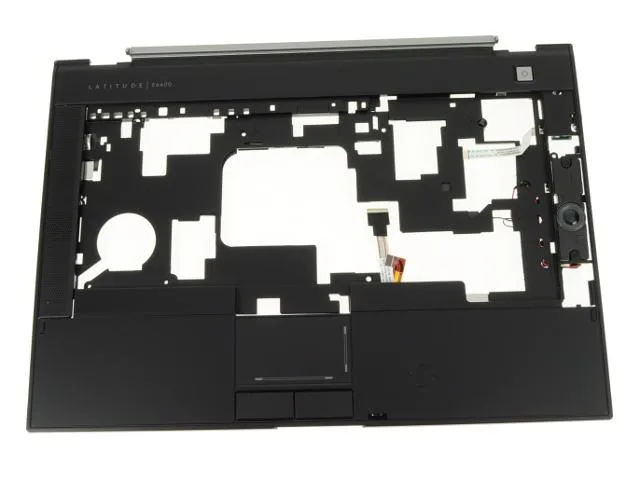
Dell Latitude E6400 Palmrest Touchpad Assembly TN281
A replacement palmrest and touchpad assembly with contactless smart card reader for the Dell Latitude E6400 laptop
- Accessory TypePalmrest and Touchpad Assembly
- Genuine Dell replacement ensures exact fit for Latitude E6400
- Integrated contactless smart card reader enables secure authentication
- Complete assembly includes touchpad, speakers and spring latch
- New OEM part guarantees reliable performance from installation
- Part number TN281 matches original manufacturer specifications
Genuine Dell Latitude E6400 palmrest assembly
This genuine Dell replacement palmrest and touchpad assembly is built for the Latitude E6400 laptop. It integrates the touchpad circuitry, left and right speakers, a smart-card slot and a contactless smart-card reader. The spring latch is included, while the power-button board and right speaker grill are not.
Thermals noise and power draw
As a passive mechanical part, the assembly produces no heat, emits no noise and draws no power during normal laptop operation. It simply replaces the original chassis section without adding any active components.
Behaviour under sustained load
Because the unit contains no electronics that generate heat, its physical properties do not change during prolonged use. The touchpad, speakers and smart-card reader continue to function exactly as they do in short bursts.
Highlights
- Genuine Dell replacement ensures exact fit for Latitude E6400
- Integrated contactless smart card reader enables secure authentication
- Complete assembly includes touchpad, speakers and spring latch
- New OEM part guarantees reliable performance from installation
- Part number TN281 matches original manufacturer specifications
Specifications
| Brand | Dell |
|---|---|
| Model | Dell Latitude E6400 |
| Part Number | TN281 |
| Accessory Type | Palmrest and Touchpad Assembly |
Questions about this item
How do I install the TN281 palmrest assembly on my Latitude E6400 without damaging the smart card reader?
Remove the battery, keyboard, and display hinge covers; disconnect the old palmrest ribbon cables, then connect the new touchpad and smart card reader flexes before securing the spring latch screws.
Which parts of the TN281 assembly will need replacement after extended use?
The touchpad buttons and contactless smart card reader slot see the most wear; speakers and spring latch rarely fail unless physically damaged.
What is the first limitation that appears when using the contactless smart card reader continuously?
The reader requires the card to stay within a few millimetres of the antenna; any metal object or thick case between them stops the read instantly.
Also in this aisle
People compared these
Same shelf, same checkout — eight coins and a 30-minute rate lock.


Kensington
Kensington Desk Mount Cable Anchor K64613WW accessory
- Black
- Provides a secure a…
$19.99
0.00023237BTC
In stock
Panasonic
Panasonic CF-VDR291U laptop cooling pad
- Optical Drive
- Buffer Size: 2 MB B…
$213.99
0.0024875BTC
In stock
eReplacements
eReplacements PB992A-ER laptop battery 14.4V
- Battery
- Lithium-Ion
$65.99
0.00076709BTC
In stock