


DELL
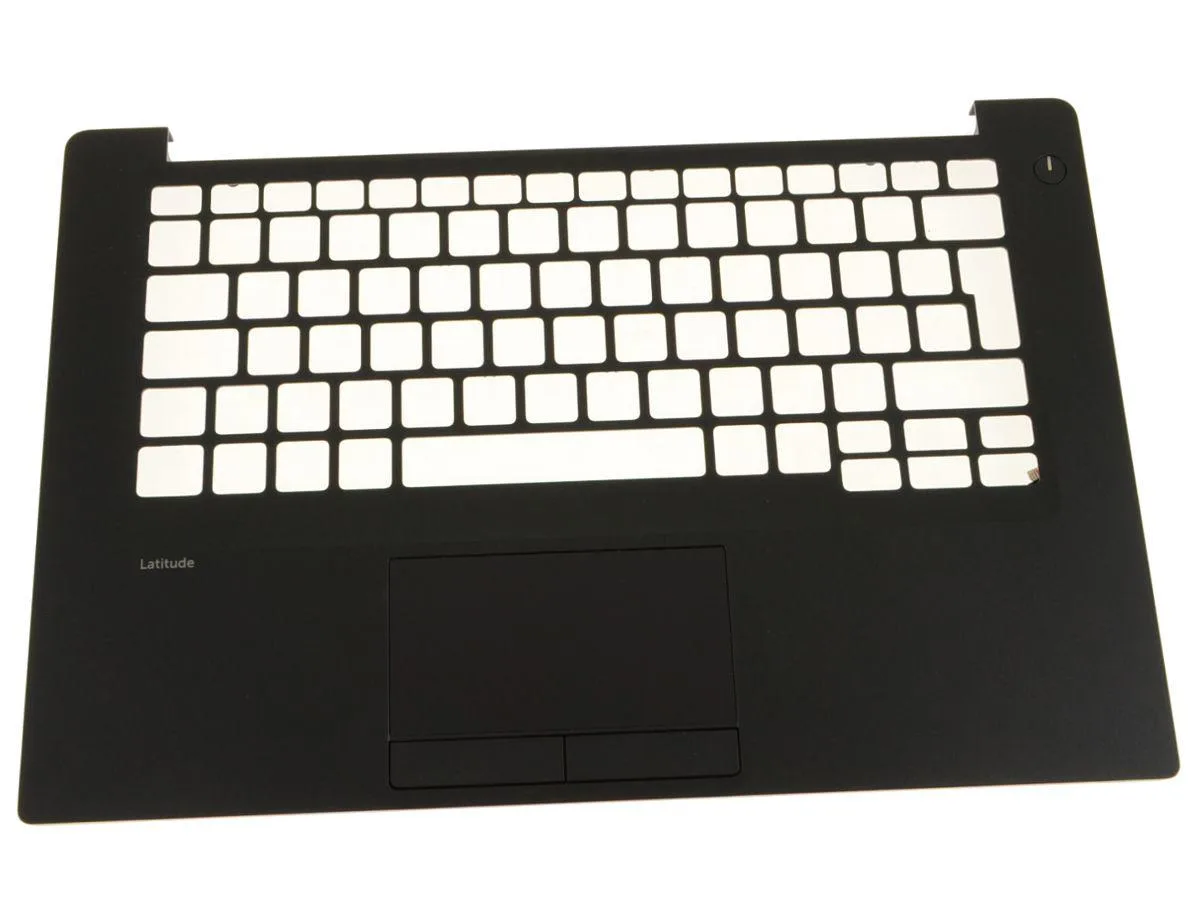
DELL Latitude 7480 EMEA Touchpad Palmrest Assembly 18F10
Genuine Dell OEM touchpad palmrest assembly for Latitude 7480 with EMEA single-point keyboard layout, part 18F10
- Genuine Dell OEM part ensures exact fit for Latitude 7480
- EMEA single-pointing layout matches European, Middle East and Africa keyboards
- Includes status lights board Y81KR, touchpad sensor 5PK1M and mouse buttons XKYX9
- New condition guarantees unused components with full factory specification
- Not compatible with US-English keyboards — verify layout before ordering
Genuine Dell OEM palmrest for Latitude 7480
This genuine Dell OEM palmrest assembly is built for the Latitude 7480 laptop. It integrates the touchpad sensor module, status lights board and mouse buttons in a single replacement unit. The part carries Dell part number 18F10 and is supplied new.
For Latitude 7480 owners
This assembly fits Latitude 7480 units that use the EMEA (Europe, the Middle East and Africa) single-pointing keyboard layout. It will not support US-English layout keyboards, so buyers with that layout must source a different palmrest.
EMEA single-pointing keyboard compatibility
The deciding specification is the keyboard layout: this palmrest only works with EMEA single-pointing keyboards on the Latitude 7480. If your laptop uses a US-English keyboard, this part is not compatible.
Highlights
- Genuine Dell OEM part ensures exact fit for Latitude 7480
- EMEA single-pointing layout matches European, Middle East and Africa keyboards
- Includes status lights board Y81KR, touchpad sensor 5PK1M and mouse buttons XKYX9
- New condition guarantees unused components with full factory specification
- Not compatible with US-English keyboards — verify layout before ordering
Specifications
| Brand | Dell |
|---|
Questions about this item
What Dell Latitude model does the 18F10 palmrest assembly fit?
The 18F10 palmrest assembly is compatible only with the Dell Latitude 7480 when equipped with an EMEA single-pointing keyboard layout.
Which internal boards and modules come pre-installed on this palmrest?
The assembly includes the Y81KR status lights board, the 5PK1M touchpad sensor module and the XKYX9 lower left and right mouse buttons already fitted.
What is the correct sequence for replacing the palmrest on a Latitude 7480?
Power off, remove the battery, detach the keyboard and disconnect the touchpad and status-light cables before lifting the old palmrest; a common mistake is forgetting to unplug the status-light cable first.
Also in this aisle
People compared these
Same shelf, same checkout — eight coins and a 30-minute rate lock.


Kensington
Kensington Desk Mount Cable Anchor K64613WW accessory
- Black
- Provides a secure a…
$19.99
0.00023154BTC
In stock
Panasonic
Panasonic CF-VDR291U laptop cooling pad
- Optical Drive
- Buffer Size: 2 MB B…
$213.99
0.00247857BTC
In stock
eReplacements
eReplacements PB992A-ER laptop battery 14.4V
- Battery
- Lithium-Ion
$65.99
0.00076434BTC
In stock