


DELL
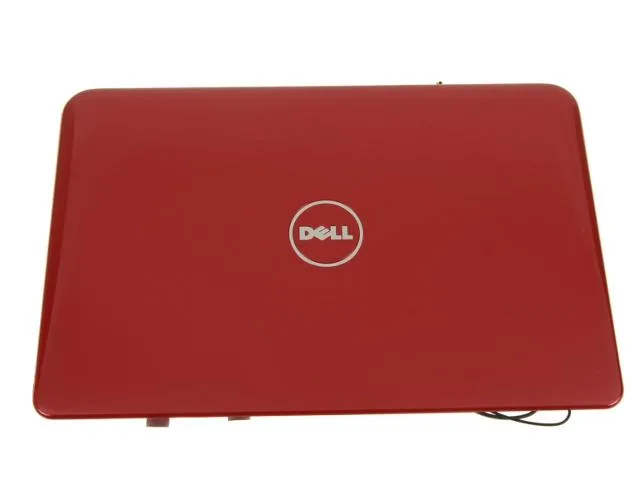
DELL Inspiron Mini 10 1012 LCD Back Cover Red PF3XP
Red replacement LCD back cover lid with wireless antenna cables for Inspiron Mini 10 (1012)
- Accessory TypeLCD Back Cover
- Genuine Dell replacement part ensures perfect fit
- OEM quality matches original laptop specifications exactly
- Red colour restores original Mini 10 1012 appearance
- Includes wireless antenna cables for complete installation
- Part number PF3XP confirms exact model compatibility
Dell Inspiron Mini 10 1012 Red LCD Back Cover
This genuine Dell replacement part restores the exterior lid of an Inspiron Mini 10 1012 netbook. It arrives in a red finish matching the original chassis colour. The assembly includes the integrated wireless antenna cables required for Wi-Fi connectivity. Buyers receive a complete lid unit ready for installation.
Replaces cracked or faded original lid on the 1012
Swap this cover when the existing lid is physically damaged, discoloured or missing antenna cables. The jump is worth it if the hinge mounts are intact and the display panel itself still functions. No other Dell models are supported by this specific part number PF3XP.
Verify the exact model number before ordering
Confirm the service tag reads Inspiron Mini 10 1012 to guarantee fitment. Check that the current hinge brackets and display bezel are undamaged so the new cover seats correctly. Ensure you are comfortable disconnecting and routing the antenna cables during the swap.
Highlights
- Genuine Dell replacement part ensures perfect fit
- OEM quality matches original laptop specifications exactly
- Red colour restores original Mini 10 1012 appearance
- Includes wireless antenna cables for complete installation
- Part number PF3XP confirms exact model compatibility
Specifications
| Brand | Dell |
|---|---|
| Part Number | PF3XP |
| Accessory Type | LCD Back Cover |
Questions about this item
Does the PF3XP back cover fit the Inspiron Mini 10 1012 chassis without modification?
Yes, the PF3XP is a genuine Dell OEM lid assembly made for the Inspiron Mini 10 1012 and aligns with the original screw posts and hinge brackets.
What is the correct order for routing the wireless antenna cables during installation?
Feed both antenna cables through the hinge channel before snapping the lid onto the base, then seat the connectors on the wireless card; reversing the order traps the cables.
When should the antenna cables included with the PF3XP be replaced?
Replace them if the insulation is kinked, the coaxial cores are exposed, or Wi-Fi signal drops persist after reseating the connectors on the wireless card.
Also in this aisle
People compared these
Same shelf, same checkout — eight coins and a 30-minute rate lock.


Kensington
Kensington Desk Mount Cable Anchor K64613WW accessory
- Black
- Provides a secure a…
$19.99
0.00023042BTC
In stock
Panasonic
Panasonic CF-VDR291U laptop cooling pad
- Optical Drive
- Buffer Size: 2 MB B…
$213.99
0.00246666BTC
In stock
eReplacements
eReplacements PB992A-ER laptop battery 14.4V
- Battery
- Lithium-Ion
$65.99
0.00076067BTC
In stock