


DELL
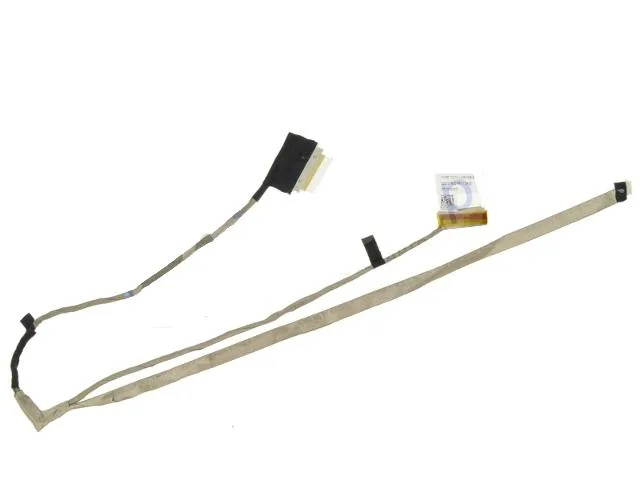
DELL Inspiron 3521 5537 3537 5521 15.6" LCD Ribbon Cable TC8Y3
Genuine Dell OEM 15.6-inch LCD ribbon cable with webcam and touchscreen connectors for Inspiron 3521, 5521, 3537 and 5537 models
- Typelaptop-computer-replacement-parts
- Genuine Dell OEM part ensures exact fit and reliable video signal
- Compatible with Inspiron 3521, 5521, 5537 and 3537 touchscreen models
- 6 inch ribbon cable includes webcam and touchscreen connectors
- Direct replacement for Dell part numbers TC8Y3 and WPKRG
- New condition guarantees pristine connectors and undamaged flex circuitry
Genuine Dell OEM LCD Ribbon Cable
This genuine Dell OEM ribbon cable carries the video signal between the motherboard and the 15.6 inch LCD panel on Inspiron 3521, 3537, 5521 and 5537 models that are equipped with a touchscreen and integrated webcam. It is the exact part Dell shipped in those laptops.
Passive Flex Cable With No Active Electronics
The ribbon contains only copper traces and connectors, so it draws no power, generates no heat and produces no noise during normal operation. Installation simply routes the flexible strip through the hinge area and seats the ends in their ZIF sockets.
Touchscreen And Webcam Connector Layout Required
This part fits only systems whose display assembly includes both a touchscreen digitiser connector and a webcam connector on the same ribbon; laptops with a non-touch panel or a separate camera cable are not compatible.
Highlights
- Genuine Dell OEM part ensures exact fit and reliable video signal
- Compatible with Inspiron 3521, 5521, 5537 and 3537 touchscreen models
- 6 inch ribbon cable includes webcam and touchscreen connectors
- Direct replacement for Dell part numbers TC8Y3 and WPKRG
- New condition guarantees pristine connectors and undamaged flex circuitry
Specifications
| Brand | Dell |
|---|---|
| Type | laptop-computer-replacement-parts |
Questions about this item
How do I install the TC8Y3 ribbon cable on a 15.6" Inspiron 5521 touchscreen, and which connector is most often misaligned?
Route the cable through the hinge channel, seat the wide display connector first, then lock the narrower webcam and touchscreen ZIF sockets — the touchscreen flex is the one most often inserted crooked.
What maintenance or replacement will the TC8Y3 cable need after extended use on a 3537 system?
The cable itself has no service interval; replace it only if the display flickers, the webcam drops out, or touch input fails due to hinge-area fatigue.
What is the first limitation that appears when the TC8Y3 cable is flexed repeatedly during daily lid opening on a 3521?
The copper traces at the hinge fold work-harden first, causing intermittent video lines or touchscreen dead zones before the connectors themselves loosen.
New to this? Which coin should you pay with — what to check, what it costs to pay, and what is never asked for.
Also in this aisle
People compared these
Same shelf, same checkout — eight coins and a 30-minute rate lock.



Black Box Corporation
Black Box Corporation CAT6 EZ-RJ45 Modular Plugs 100-Pack
$95.99
0.00115093BTC
In stock
