

DELL
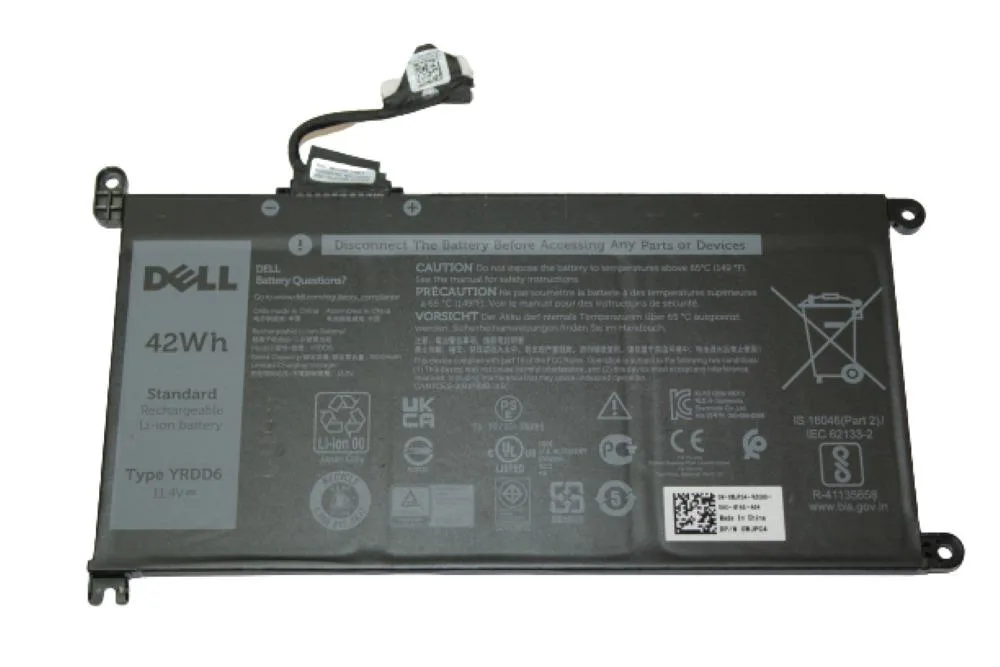
DELL Inspiron 15 3501 Laptop Battery 11.4V 42Wh WJPC4
Genuine 11.4 V, 42 Wh lithium-ion battery with three cells for the Inspiron 15 3501
- Genuine Dell replacement restores original runtime
- 42Wh capacity matches factory specification for Inspiron 15 3501
- 4V output ensures stable power delivery
- Three-cell Li-Ion design balances weight and endurance
- Grade A condition verified at 100% working order
Genuine Dell Inspiron 15 3501 Battery
This genuine Dell battery is built for the Inspiron 15 3501 laptop. It restores original runtime for owners whose factory cell no longer holds a charge. The 42 Wh lithium-ion pack delivers 11.4 V through three internal cells. Buyers needing a different voltage or form factor should look elsewhere.
Thermals noise and power in normal use
The battery operates silently and adds no active heat beyond normal cell warmth during charging or discharge. Power draw matches the laptop’s original specification so the existing cooling solution remains adequate. No extra fan noise or thermal throttling is introduced by this replacement. Users expecting active cooling on the battery itself will not find it.
Upgrade context and when it is worth it
This unit replaces a worn or failed original battery in the Inspiron 15 3501. The jump is worth it when the old pack drops below usable capacity or triggers a permanent service alert. It does not increase capacity beyond the factory 42 Wh rating. Owners wanting longer runtime than the original design provided cannot achieve it with this part.
Highlights
- Genuine Dell replacement restores original runtime
- 42Wh capacity matches factory specification for Inspiron 15 3501
- 4V output ensures stable power delivery
- Three-cell Li-Ion design balances weight and endurance
- Grade A condition verified at 100% working order
Specifications
No published specifications for this item yet.
Questions about this item
How do I install the 11.4V 42Wh battery into my Inspiron 15 3501 and which step is often missed?
Power off the laptop, remove the bottom cover screws, disconnect the old battery cable before lifting it out, connect the new WJPC4 cable firmly, then replace the cover and screws. The step most people miss is disconnecting the battery cable before removing the old pack.
What maintenance or replacement will this 3-cell Li-Ion battery need over time?
The 3-cell Li-Ion pack will gradually lose capacity; expect to replace it once runtime drops below your needs, typically after several hundred charge cycles. No user-serviceable parts exist inside the sealed unit.
What limit appears first when the 42Wh battery runs under sustained load?
The 42Wh capacity is the first limit; continuous high draw depletes the charge quickly, so runtime shrinks before any thermal or voltage threshold is reached.
Also in this aisle
People compared these
Same shelf, same checkout — eight coins and a 30-minute rate lock.


Kensington
Kensington Desk Mount Cable Anchor K64613WW accessory
- Black
- Provides a secure a…
$19.99
0.00023884BTC
In stock
Panasonic
Panasonic CF-VDR291U laptop cooling pad
- Optical Drive
- Buffer Size: 2 MB B…
$213.99
0.00255678BTC
In stock
eReplacements
eReplacements PB992A-ER laptop battery 14.4V
- Battery
- Lithium-Ion
$65.99
0.00078846BTC
In stock