


DELL
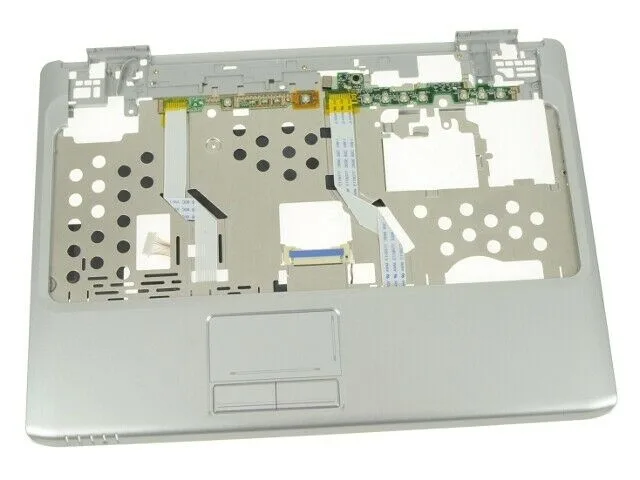
Dell Inspiron 1420 Palmrest Touchpad Assembly UX289 NR438 accessory
Replacement palmrest and touchpad assembly for Dell Inspiron 1420 laptops, supplied new with Dell part numbers UX289 and NR438
- Genuine Dell replacement for Inspiron 1420
- New OEM palmrest with integrated touchpad
- Part numbers UX289 and NR438 compatible
- Ready to install, includes only pictured components
Replacement palmrest for Dell Inspiron 1420
This genuine Dell palmrest assembly includes the integrated touchpad for the Inspiron 1420 laptop. It carries Dell part numbers UX289 and NR438 for direct compatibility. The unit is supplied new and contains only the components shown in the product image. Buyers needing a different model or additional keyboard parts will not find them here.
Passive component with no thermal or power demands
As a structural replacement part, this palmrest has no active electronics, fans or power draw. It produces zero noise and adds no heat to the system during normal use. Installation simply restores the original chassis feel without affecting thermals or acoustics. No power supply consideration is required for this accessory.
Highlights
- Genuine Dell replacement for Inspiron 1420
- New OEM palmrest with integrated touchpad
- Part numbers UX289 and NR438 compatible
- Ready to install, includes only pictured components
Specifications
| Brand | Dell |
|---|
Questions about this item
How do I install the palmrest touchpad assembly on my Inspiron 1420, and which step is often missed?
Remove the keyboard and hinge covers, disconnect the old touchpad ribbon cable, then connect the new cable fully before snapping the palmrest into place; the step often missed is ensuring the ribbon cable seats completely in the connector.
What maintenance or replacement will the UX289 NR438 palmrest touchpad assembly need later?
The touchpad surface may wear over time; if tracking degrades or buttons stick, the whole palmrest assembly will need replacement as the touchpad is integrated.
Also in this aisle
People compared these
Same shelf, same checkout — eight coins and a 30-minute rate lock.


Kensington
Kensington Desk Mount Cable Anchor K64613WW accessory
- Black
- Provides a secure a…
$19.99
0.00023553BTC
In stock
Panasonic
Panasonic CF-VDR291U laptop cooling pad
- Optical Drive
- Buffer Size: 2 MB B…
$213.99
0.00252127BTC
In stock
eReplacements
eReplacements PB992A-ER laptop battery 14.4V
- Battery
- Lithium-Ion
$65.99
0.00077751BTC
In stock