

DELL
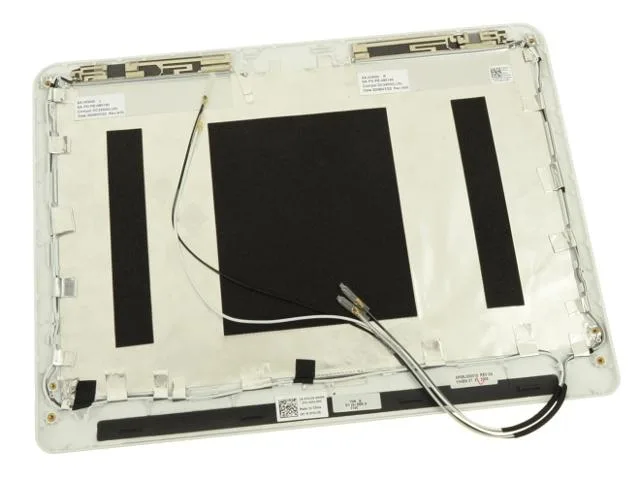
DELL Inspiron 1110 Pearl White LCD Back Cover T613R
Genuine Dell LCD back cover with wireless antenna cables for the Inspiron 1110 in pearl white
- Accessory TypeLCD Back Cover
- Package ContentsInclude: LCD Back Cover Only- In Brown Box
- Genuine Dell replacement restores original laptop appearance
- Part number T613R ensures exact fit for Inspiron 1110
- White finish matches the Pearl White chassis colour
- Includes wireless antenna cables for complete signal integrity
- New condition guarantees flawless surface without scratches
Genuine Dell LCD Back Cover
This genuine Dell LCD back cover lid is a direct replacement for the Inspiron 11z (1110) laptop. It restores the original Pearl White finish and structural integrity of the display assembly. The part carries the manufacturer number T613R for exact compatibility verification.
Thermals Noise and Power
As a passive structural component, this back cover generates no heat, consumes no power and produces no operational noise. It requires no electrical connection to function and adds no thermal load to the laptop chassis.
Build Fit and Integration
The assembly includes the wireless antenna cables pre-routed within the lid, simplifying installation during a screen repair. It is designed exclusively for the Inspiron 1110 11Z model and does not fit other Dell laptop series. Buyers needing a complete display panel or hinges must source those parts separately.
Highlights
- Genuine Dell replacement restores original laptop appearance
- Part number T613R ensures exact fit for Inspiron 1110
- White finish matches the Pearl White chassis colour
- Includes wireless antenna cables for complete signal integrity
- New condition guarantees flawless surface without scratches
Specifications
| Brand | DELL |
|---|---|
| Model | Compatible Model: Dell Inspiron 1110 11Z |
| Part Number | T613R |
| Accessory Type | LCD Back Cover |
| Package Contents | Include: LCD Back Cover Only- In Brown Box |
Questions about this item
How is the LCD back cover installed on the Inspiron 1110, and which step is often missed?
Remove the bezel and hinge screws, lift the old lid, route the wireless antenna cables through the hinge channels, then secure the new cover — forgetting to reseat the antenna cables causes weak Wi‑Fi.
What maintenance or replacement will this part need later?
The cover itself is a structural shell; only the antenna cables inside may fatigue from repeated lid opening and require replacement if signal drops.
What limit appears first under sustained daily opening and closing?
The hinge mounting points on the plastic lid can develop stress cracks before the antenna cables or finish wear out.
Also in this aisle
People compared these
Same shelf, same checkout — eight coins and a 30-minute rate lock.


Kensington
Kensington Desk Mount Cable Anchor K64613WW accessory
- Black
- Provides a secure a…
$19.99
0.00023817BTC
In stock
Panasonic
Panasonic CF-VDR291U laptop cooling pad
- Optical Drive
- Buffer Size: 2 MB B…
$213.99
0.00254959BTC
In stock
eReplacements
eReplacements PB992A-ER laptop battery 14.4V
- Battery
- Lithium-Ion
$65.99
0.00078624BTC
In stock