


DELL
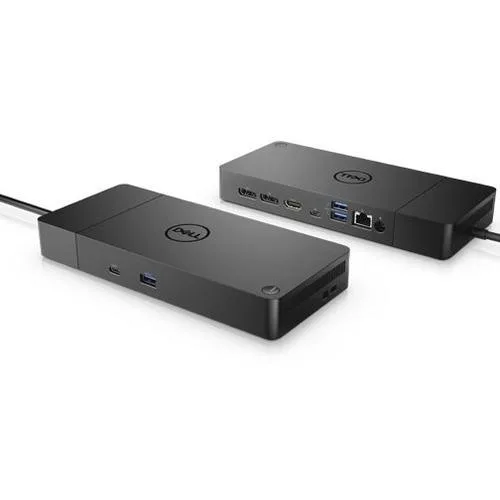
DELL Dell-WD19S130W Docking Station 130W
Connects a Dell notebook to two DisplayPort monitors, one HDMI display, gigabit Ethernet and five USB ports while delivering 90 W of power
- ColorBlack
- CompatibilityDell
- Ports Spec2 x display / video - DisplayPort - 20 pin DisplayPort 1 x d
- Dimension1.10" x 8.10" x 3.50"
- Weight20.63 oz.
- Features0 DVI Output |1 HDMI Output |0 S-Video |0 USB 2.0 |3 USB 3.0
- Connect two external monitors via dual DisplayPort and HDMI outputs
- Deliver up to 90 W power to a compatible notebook over USB-C
- Add three USB 3.1 Gen 1 Type-A ports for peripherals
- Include a Gigabit Ethernet port for wired network access
- Compact 1.1 x 8.1 x 3.5 inch design weighs 20.63 oz
Docking station for Dell notebooks
The WD19S 130W is a USB-C docking station built for Dell notebooks. It connects through a single USB-C cable and supplies up to 90 W of power to the host while running from a 130 W AC adapter. The compact black chassis measures 1.1 x 8.1 x 3.5 inches and weighs 20.63 oz.
Suits single-cable desk setups.
This dock suits users who want one cable for video, data, network and charging on a compatible Dell notebook. It does not suit buyers who need to switch between two different laptops, who require more than 90 W of charging power, or who depend on legacy DVI or VGA monitors.
90 W USB-C power delivery decides fit
The single specification that decides fit is the 90 W USB-C power delivery rating. If the notebook demands more than 90 W over USB-C, this dock cannot charge it while in use.
Highlights
- Connect two external monitors via dual DisplayPort and HDMI outputs
- Deliver up to 90 W power to a compatible notebook over USB-C
- Add three USB 3.1 Gen 1 Type-A ports for peripherals
- Include a Gigabit Ethernet port for wired network access
- Compact 1.1 x 8.1 x 3.5 inch design weighs 20.63 oz
Specifications
| Brand | Dell |
|---|---|
| Model | WD19S 130W |
| Part Number | WD19S-130W-N |
| Color | Black |
| Compatibility | Dell |
| Ports Spec | 2 x display / video - DisplayPort - 20 pin DisplayPort 1 x display / video - HDMI - 19 pin HDMI Type A 1 x USB-C 3 x USB 3.1 Gen 1 - 9 pin USB Type A 2 x USB-C 3.1 Gen 2 1 x network - Ethernet 1000 - RJ-45 |
| Dimension | 1.10" x 8.10" x 3.50" |
| Weight | 20.63 oz. |
| Features | 0 DVI Output |1 HDMI Output |0 S-Video |0 USB 2.0 |3 USB 3.0 |0 VGA |
| Function | Notebook |
| Shipping weight | 1.41 kg |
| Package size | 305 × 287 × 61 mm |
Questions about this item
How do I install the Dell WD19S 130W dock and what step do people often miss?
Connect the 130W AC adapter to the dock, then plug the single USB-C cable into the notebook's USB-C port that supports 90W Power Delivery and DisplayPort 1.4 alt mode; the step often missed is confirming the laptop port carries both power and video.
What maintenance or replacement will the Dell WD19S 130W dock need later?
The 130W AC adapter and the USB-C host cable are the only field-replaceable parts; keep the vents on the 1.1 x 8.1 x 3.5 inch chassis clear of dust so the internal fan can cool the 90W power-delivery circuitry.
What limit appears first when the Dell WD19S 130W dock runs under sustained load?
The 90W Power Delivery ceiling is reached before the 130W AC input maxes out, so a notebook drawing more than 90W will throttle or drain its battery while docked.
Also in this aisle
People compared these
Same shelf, same checkout — eight coins and a 30-minute rate lock.


Kensington
Kensington Desk Mount Cable Anchor K64613WW accessory
- Black
- Provides a secure a…
$19.99
0.00023088BTC
In stock
Panasonic
Panasonic CF-VDR291U laptop cooling pad
- Optical Drive
- Buffer Size: 2 MB B…
$213.99
0.00247156BTC
In stock
eReplacements
eReplacements PB992A-ER laptop battery 14.4V
- Battery
- Lithium-Ion
$65.99
0.00076218BTC
In stock