


DELL
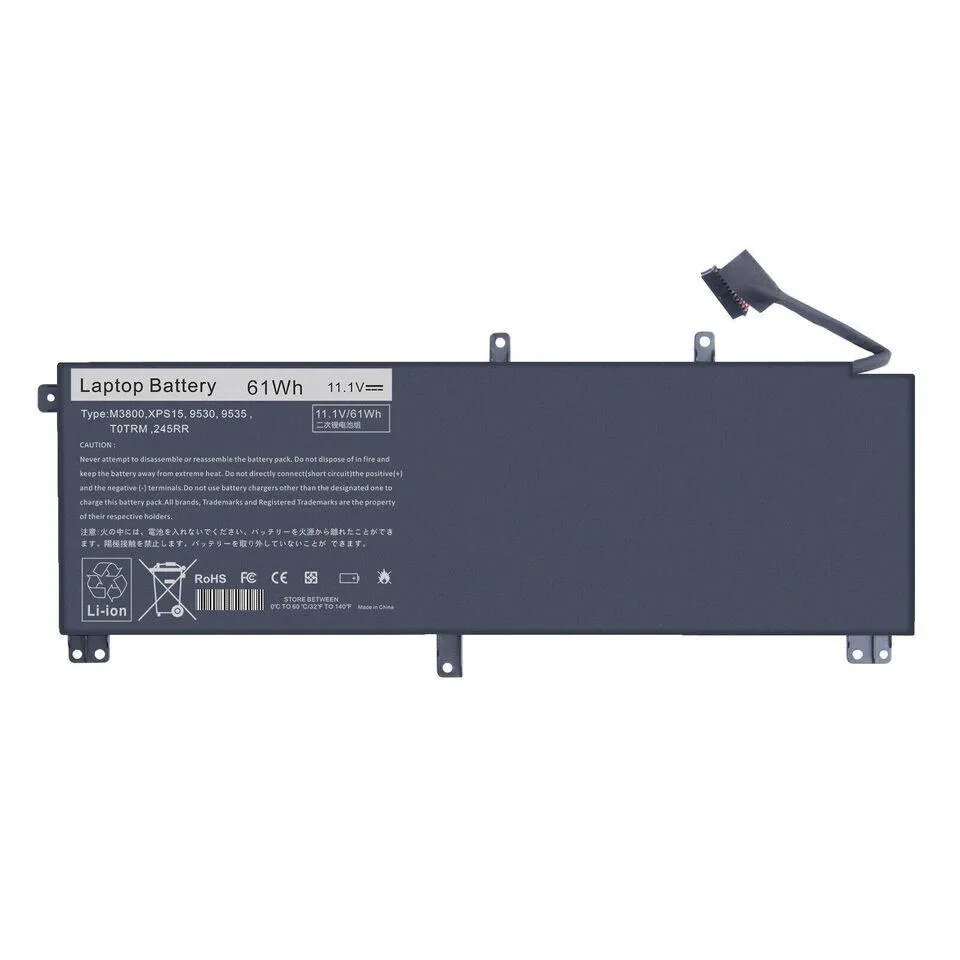
DELL 61Wh Battery for XPS 15 9530 Precision M3800
A 61 Wh lithium-ion battery with six premium cells for the XPS 15 9530 and Precision M3800
- CompatibilityCompatible with Dell XPS 15 9530 Precision M3800
- Battery TypeLithium-Ion
- 61 Wh capacity extends runtime between charges
- 6-cell lithium-ion design delivers 11.1 V output
- 100 % compatible with XPS 15 9530 and Precision M3800
- CE and RoHS certified for safety compliance
- One-year replacement warranty covers manufacturing defects
Purpose-Built Replacement
This 61Wh lithium-ion battery is engineered for the Dell XPS 15 9530 and Precision M3800. It serves owners of those specific models who need a direct replacement for a depleted original pack.
Build and Fit
The six-cell design uses premium lithium-ion cells rated at 11.1V and carries CE and RoHS certification for safety and environmental compliance. Physical dimensions match the factory unit, so installation requires no modification to the chassis.
Upgrade Context
It replaces the original equipment battery when runtime has fallen below usable levels. The jump is worth it when the existing pack no longer holds enough charge for a typical work session away from mains power.
Highlights
- 61 Wh capacity extends runtime between charges
- 6-cell lithium-ion design delivers 11.1 V output
- 100 % compatible with XPS 15 9530 and Precision M3800
- CE and RoHS certified for safety compliance
- One-year replacement warranty covers manufacturing defects
Specifications
| Compatibility | Compatible with Dell XPS 15 9530 Precision M3800 |
|---|---|
| Battery Type | Lithium-Ion |
Questions about this item
What voltage does the 11.1V lithium-ion battery deliver to the XPS 15 9530?
The battery operates at 11.1 volts, matching the original specification for the Dell XPS 15 9530 and Precision M3800.
Which screw pattern or chassis cut-out must match for the 6-cell pack to seat in the XPS 15 9530?
Compare the replacement battery to your original unit using the supplier photos; the 6-cell pack must align with the XPS 15 9530 screw holes and battery-bay outline.
What is the first installation step after removing the bottom cover of the Precision M3800?
Disconnect the old battery cable from the motherboard before lifting out the 61Wh pack, then connect the new battery before refitting the cover.
Also in this aisle
People compared these
Same shelf, same checkout — eight coins and a 30-minute rate lock.


Kensington
Kensington Desk Mount Cable Anchor K64613WW accessory
- Black
- Provides a secure a…
$19.99
0.00023712BTC
In stock
Panasonic
Panasonic CF-VDR291U laptop cooling pad
- Optical Drive
- Buffer Size: 2 MB B…
$213.99
0.00253828BTC
In stock
eReplacements
eReplacements PB992A-ER laptop battery 14.4V
- Battery
- Lithium-Ion
$65.99
0.00078275BTC
In stock