

DBTLAP
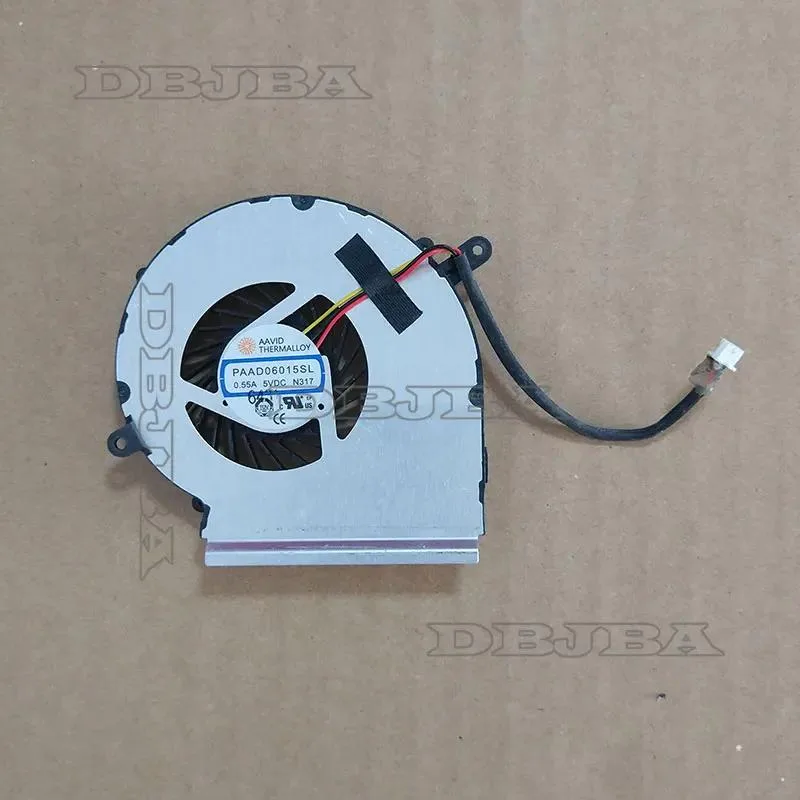
DBTLAP PAAD06015SL N317 5V .55A laptop cooling pad
Replacement cooling fan rated at 5V and .55A for compatible laptop coolers
- Accessory TypeCooler
- Cools your laptop with a 5 V .55 A fan
- Exact replacement for PAAD06015SL N317 part number
- Tested before shipping for reliable operation
- Includes one fan ready to install
- Verify compatibility using your model number
Replacement fan for PAAD06015SL N317
This 5V .55A cooling fan is a direct replacement component for the DBTLAP PAAD06015SL N317 laptop cooler. It suits owners who need to restore airflow after the original fan fails or becomes noisy. The part is sold individually and is not a complete cooling pad assembly.
Tested unit with simple wire connection
Each fan is tested before shipping to confirm operation. The unit arrives as a bare motor and blade assembly with a lead that plugs into the existing cooler header. No mounting screws or frames are included, so the original hardware must be reused during installation.
Verify part number and photos before ordering
Compatibility depends on an exact match to the PAAD06015SL N317 designation. Compare the product images with the fan currently in your cooler to confirm dimensions, connector orientation and mounting hole layout. Buyers who need a full cooling pad with stands or USB power will not be served by this spare part.
Highlights
- Cools your laptop with a 5 V .55 A fan
- Exact replacement for PAAD06015SL N317 part number
- Tested before shipping for reliable operation
- Includes one fan ready to install
- Verify compatibility using your model number
Specifications
| Accessory Type | Cooler |
|---|
Questions about this item
What power connector does the PAAD06015SL N317 5V .55A fan use?
The fan runs on a 5 V supply rated at .55 A; match that voltage and current when connecting it to the laptop's fan header.
What physical checks ensure the PAAD06015SL N317 fan fits my laptop?
Compare the replacement fan against the original using the product photos — verify screw-hole positions, cable length and connector orientation before fitting.
How is the PAAD06015SL N317 fan installed, and what step is often missed?
Remove the old cooler, align the new fan's mounting holes and connector, secure it, then test spin-up before reassembling the chassis — skipping the test is the common error.
Also in this aisle
People compared these
Same shelf, same checkout — eight coins and a 30-minute rate lock.


Kensington
Kensington Desk Mount Cable Anchor K64613WW accessory
- Black
- Provides a secure a…
$19.99
0.00023642BTC
In stock
Panasonic
Panasonic CF-VDR291U laptop cooling pad
- Optical Drive
- Buffer Size: 2 MB B…
$213.99
0.00253084BTC
In stock
eReplacements
eReplacements PB992A-ER laptop battery 14.4V
- Battery
- Lithium-Ion
$65.99
0.00078046BTC
In stock