
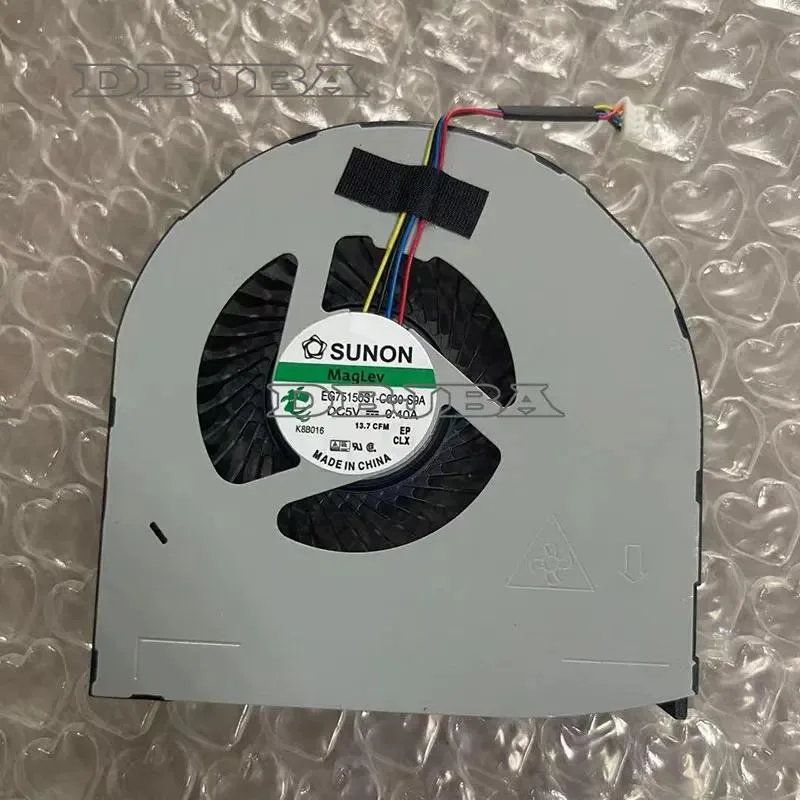
DBTLAP
DBTLAP laptop cooling fan for Dell Precision M7710 M7720
Replacement CPU cooling fan for Dell Precision M7710 and M7720 laptops, 5 V 0.4 A
- Accessory TypeCooler
- Cools Dell Precision M7710 and M7720 CPUs
- 5V .4A power draw matches original spec
- Direct replacement for part EG75150S1-C030-S9A
- Each unit tested before dispatch for reliability
- Photo verification and model check ensure fit
Replacement CPU Cooling Fan
This new DBTLAP cooling fan is built for Dell Precision M7710 and M7720 laptops. It operates at 5V and draws 0.4A to dissipate processor heat. The package contains a single fan unit tested before shipping. It matches part number EG75150S1-C030-S9A for direct installation.
Who This Suits and Who Should Look Elsewhere
This suits owners of the listed Precision models needing an exact replacement for a worn or noisy original cooler. Buyers with different Dell series or other laptop brands cannot use this part. Technicians seeking a universal cooler or a different form factor should look elsewhere.
Critical Compatibility Specification
The decisive specification is the part number EG75150S1-C030-S9A stamped on the original fan. You must verify this code against your existing hardware before ordering. Visual comparison with the supplied photos is also required to confirm the connector and mounting layout match exactly.
Highlights
- Cools Dell Precision M7710 and M7720 CPUs
- 5V .4A power draw matches original spec
- Direct replacement for part EG75150S1-C030-S9A
- Each unit tested before dispatch for reliability
- Photo verification and model check ensure fit
Specifications
| Accessory Type | Cooler |
|---|
Questions about this item
How do I install the DBTLAP cooling fan in my Dell Precision M7710 or M7720, and which step is most often missed?
Disconnect the battery, remove the bottom cover, unplug the old fan cable, swap the fan, then reconnect the cable before reassembling; the step most often missed is reconnecting the 5V 0.4A power cable securely.
What maintenance or replacement will this EG75150S1-C030-S9A fan need over time?
Clean dust from the heatsink fins and fan blades every few months with compressed air; replace the fan if bearing noise appears or airflow drops noticeably.
What limit appears first when this cooling fan runs continuously under heavy load?
The 5V 0.4A power rating sets the maximum sustained airflow; if the CPU thermal output exceeds what this fan can move at that power level, temperatures will rise despite the fan spinning at full speed.
Also in this aisle
People compared these
Same shelf, same checkout — eight coins and a 30-minute rate lock.


Kensington
Kensington Desk Mount Cable Anchor K64613WW accessory
- Black
- Provides a secure a…
$19.99
0.00023712BTC
In stock
Panasonic
Panasonic CF-VDR291U laptop cooling pad
- Optical Drive
- Buffer Size: 2 MB B…
$213.99
0.00253828BTC
In stock
eReplacements
eReplacements PB992A-ER laptop battery 14.4V
- Battery
- Lithium-Ion
$65.99
0.00078275BTC
In stock