
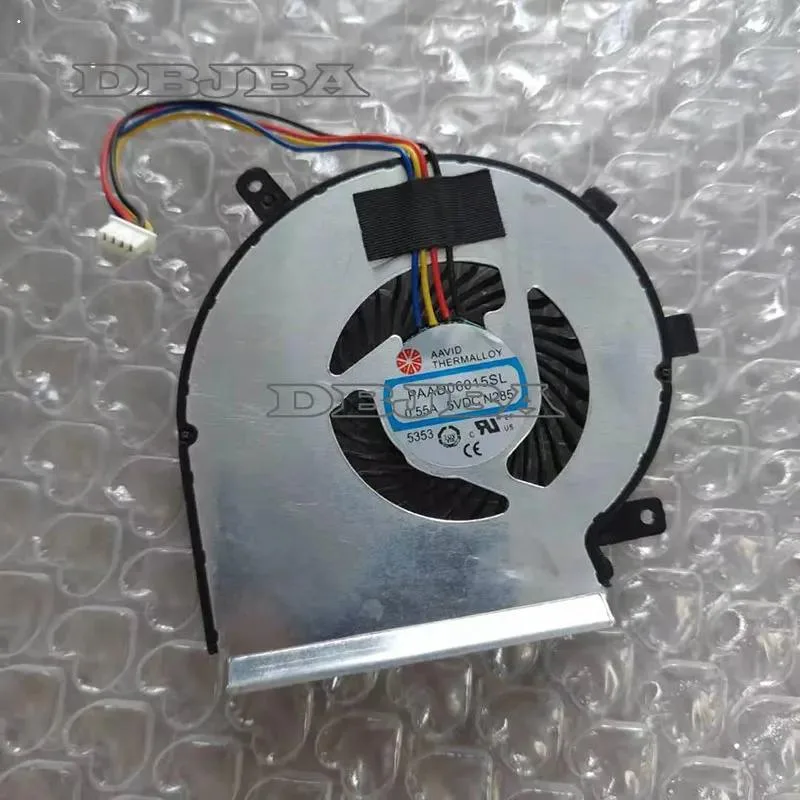
DBTLAP
DBTLAP GPU Cooling Fan PAAD06015SL N285 0.55A 5VDC 4PIN
Replacement GPU cooling fan rated 0.55A at 5VDC with a four-pin connector for PAAD06015SL N285 models
- Accessory TypeCooler
- Direct GPU replacement restores cooling performance
- 55 A draw at 5 VDC limits power draw
- Four-pin connector enables PWM speed control
- Exact match for PAAD06015SL N285 part number
- Brand-new unit tested before shipment
Replacement GPU Cooling Fan
This replacement GPU cooling fan carries part number PAAD06015SL N285 and is intended for laptop owners whose original fan has failed or become noisy. It operates at 5 VDC with a 0.55 A draw and connects via a four-pin header. The unit is sold new and individually tested before dispatch.
Cooling Capacity and Limits
The fan is designed to move air across a laptop GPU heatsink and can handle typical thermal loads for the supported models. It will not fit other part numbers or chassis layouts, so buyers who need a different connector pin-out, voltage or physical mounting pattern must source an alternative component.
Build and Connector Details
The package contains only the fan itself without brackets, screws or cables, so existing mounting hardware must be reused. A four-pin PWM connector allows speed control by the system board, and the 5 VDC rating matches the original specification. Buyers who cannot verify the exact part number against photos or their service manual should confirm compatibility before ordering.
Highlights
- Direct GPU replacement restores cooling performance
- 55 A draw at 5 VDC limits power draw
- Four-pin connector enables PWM speed control
- Exact match for PAAD06015SL N285 part number
- Brand-new unit tested before shipment
Specifications
| Accessory Type | Cooler |
|---|
Questions about this item
Will the 4-pin connector on this fan fit the motherboard header on my existing laptop cooling pad?
The fan uses a 4-pin connector rated at 5 VDC and 0.55 A; match that pin-out and voltage against your pad's header before installing.
How can I verify the N285 fan is spinning correctly after I replace the old unit?
Power the laptop and listen for the fan to start; the unit is tested before shipping, so it should reach operating speed immediately.
Does the package include mounting screws or a power adapter, or just the fan itself?
Only the fan is included; screws, cables or any adapter needed for your specific laptop model must be sourced separately.
Also in this aisle
People compared these
Same shelf, same checkout — eight coins and a 30-minute rate lock.


Kensington
Kensington Desk Mount Cable Anchor K64613WW accessory
- Black
- Provides a secure a…
$19.99
0.00023597BTC
In stock
Panasonic
Panasonic CF-VDR291U laptop cooling pad
- Optical Drive
- Buffer Size: 2 MB B…
$213.99
0.00252606BTC
In stock
eReplacements
eReplacements PB992A-ER laptop battery 14.4V
- Battery
- Lithium-Ion
$65.99
0.00077898BTC
In stock