

DBTLAP
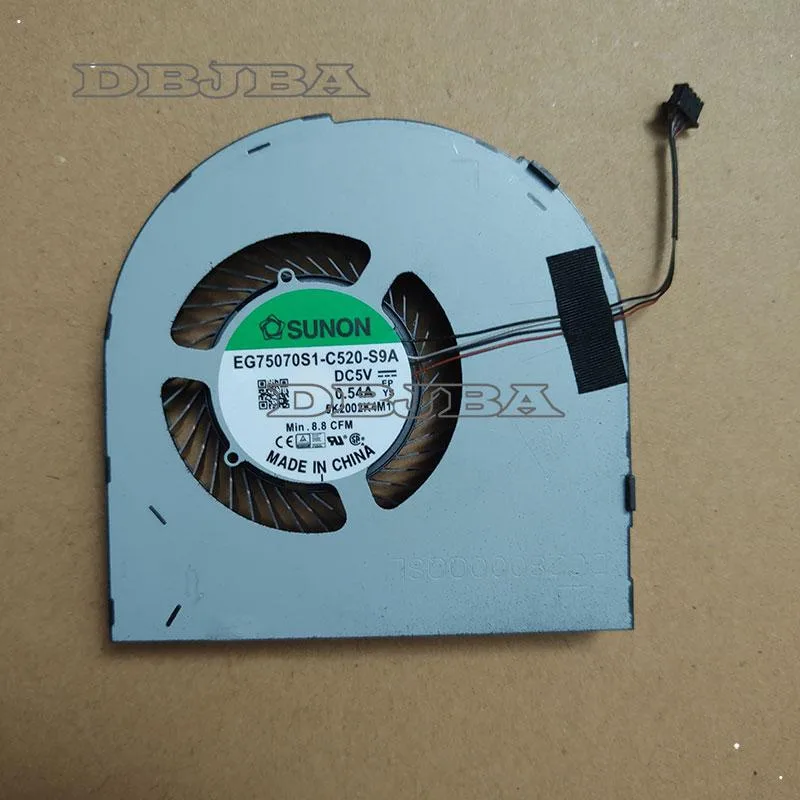
DBTLAP CPU GPU Cooling Fan for DELL Precision 7550 M7550 EG75070S1-C520-S9A
Replacement CPU and GPU cooling fan for compatible Dell Precision 7550 laptops
- Accessory TypeCooler
- Keeps your Precision 7550 running cool with a direct-replacement CPU GPU cooling fan
- Ensures 100% compatibility when you match part number EG75070S1-C520-S9A
- Ready to install immediately — each unit tested before shipping
- Extends laptop lifespan by preventing thermal throttling on the M7550 chassis
- Confident ordering with real-item photos and model-number verification support
Replacement Cooling Fan for Precision 7550
This new cooling fan replaces the CPU and GPU cooler in Dell Precision 7550 and M7550 mobile workstations. It matches part number EG75070S1-C520-S9A and ships as a single tested unit. Buyers who need a complete thermal module with heatsinks or heat pipes will not find them here.
Upgrading From a Failed or Noisy Original Fan
The swap is worthwhile when the original fan spins loudly, rattles, or stops reporting speed to the firmware. Thermal throttling under sustained loads is another clear signal. If the laptop still runs cool and quiet, there is no reason to open the chassis.
Fits Inside the Existing Precision 7550 Chassis
The fan mounts directly to the motherboard using the original screw points and connector. No adapter cables, external power, or case modifications are required. It frees the system from overheating shutdowns but does not add extra airflow paths or change the factory thermal design.
Highlights
- Keeps your Precision 7550 running cool with a direct-replacement CPU GPU cooling fan
- Ensures 100% compatibility when you match part number EG75070S1-C520-S9A
- Ready to install immediately — each unit tested before shipping
- Extends laptop lifespan by preventing thermal throttling on the M7550 chassis
- Confident ordering with real-item photos and model-number verification support
Specifications
| Accessory Type | Cooler |
|---|
Questions about this item
Will the EG75070S1-C520-S9A fan fit my DELL Precision 7550 chassis?
Match the part number EG75070S1-C520-S9A and compare the supplied photos to your existing fan; the connector layout and screw positions must be identical for a proper fit.
What is the common mistake when installing the EG75070S1-C520-S9A fan?
Forgetting to reconnect the fan cable to the motherboard header before reassembling the laptop, which leaves the CPU and GPU without active cooling.
When should I replace the EG75070S1-C520-S9A cooling fan?
Replace the fan if it becomes noisy, spins irregularly or stops spinning, as reduced airflow will cause the Precision 7550 to throttle under load.
Also in this aisle
People compared these
Same shelf, same checkout — eight coins and a 30-minute rate lock.


Kensington
Kensington Desk Mount Cable Anchor K64613WW accessory
- Black
- Provides a secure a…
$19.99
0.00023663BTC
In stock
Panasonic
Panasonic CF-VDR291U laptop cooling pad
- Optical Drive
- Buffer Size: 2 MB B…
$213.99
0.00253309BTC
In stock
eReplacements
eReplacements PB992A-ER laptop battery 14.4V
- Battery
- Lithium-Ion
$65.99
0.00078115BTC
In stock