


DBTLAP
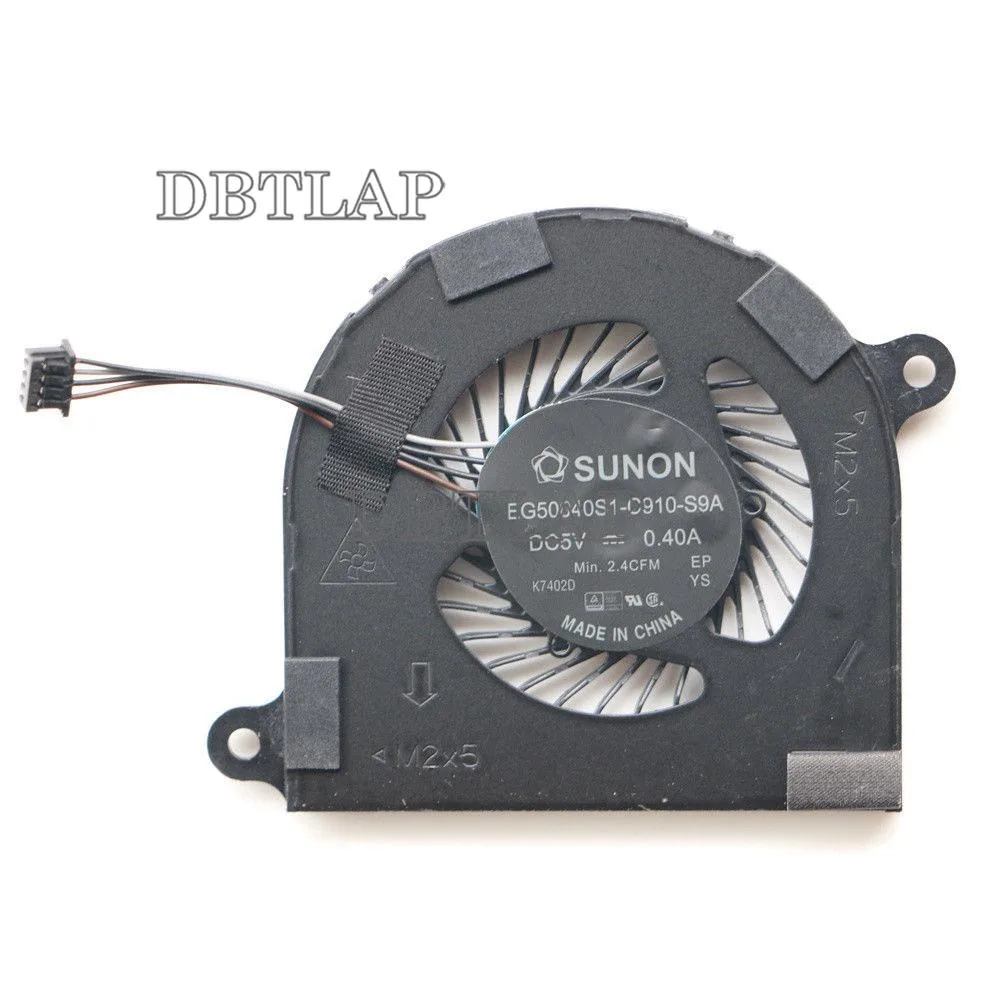
DBTLAP CPU Fan for Dell Latitude 7480 E7480 P73G laptop cooling pad
Replacement CPU cooling fan for Dell Latitude 7480 and E7480 laptops, rated DC5V 0.4A
- Accessory TypeCooler
- Direct replacement for Dell Latitude 7480 E7480
- DC5V 0.4A power draw matches original spec
- Tested individually to ensure 100% function
- Compatible with part numbers P73G001 EG50040S1-C910-S9A 02T9GV 2T9GV
- Sourced from Forcecon ADDA Sunon or Kipo manufacturers
Direct replacement fan for Dell Latitude 7480
This CPU cooling fan is built as a direct replacement for Dell Latitude 7480 and E7480 laptops. It matches the original P73G, P73G001 and EG50040S1-C910-S9A part numbers. Each unit is tested individually before dispatch to confirm it spins correctly.
4-pin connector and screw mounting for simple swap
The fan uses a standard 4-pin power connector that plugs straight onto the motherboard header. Mounting holes align with the existing heatsink screws so the swap requires only a screwdriver. The package includes one fan without extra brackets or cables.
DC5V 0.4A rating keeps power draw low
Rated at DC5V and 0.4A, the fan draws minimal power from the laptop supply. In normal operation it maintains steady airflow while staying quiet enough for office use. Buyers needing higher airflow for heavy sustained loads should verify the original specification first.
Highlights
- Direct replacement for Dell Latitude 7480 E7480
- DC5V 0.4A power draw matches original spec
- Tested individually to ensure 100% function
- Compatible with part numbers P73G001 EG50040S1-C910-S9A 02T9GV 2T9GV
- Sourced from Forcecon ADDA Sunon or Kipo manufacturers
Specifications
| Accessory Type | Cooler |
|---|
Questions about this item
What voltage and current does the DC5V 0.4A fan draw?
It runs on DC 5 V at 0.4 A, so the power draw is capped at 2 W.
Which Dell Latitude models does the P73G001 fan fit?
It fits the Latitude 7480 and E7480 chassis; verify the P73G001 sticker on your original fan before ordering.
How is the fan installed and what step is often missed?
Remove the bottom cover, disconnect the old 4-wire connector, swap the fan, then reconnect the cable and reseat the heatsink screws evenly.
Also in this aisle
People compared these
Same shelf, same checkout — eight coins and a 30-minute rate lock.


Kensington
Kensington Desk Mount Cable Anchor K64613WW accessory
- Black
- Provides a secure a…
$19.99
0.0002395BTC
In stock
Panasonic
Panasonic CF-VDR291U laptop cooling pad
- Optical Drive
- Buffer Size: 2 MB B…
$213.99
0.0025638BTC
In stock
eReplacements
eReplacements PB992A-ER laptop battery 14.4V
- Battery
- Lithium-Ion
$65.99
0.00079062BTC
In stock