

DBTLAP
DBTLAP CPU Cooling Fan for HP EliteBook x360 1040 G6 i5-8265U
Replacement CPU cooling fan for HP EliteBook x360 1040 G6 with i5-8265U processor
- Accessory TypeCooler
- Designed for HP EliteBook x360 1040 G6 compatibility
- Supports Intel Core i5-8265U processor cooling
- Includes one replacement CPU cooling fan
- Tested before shipping for reliable operation
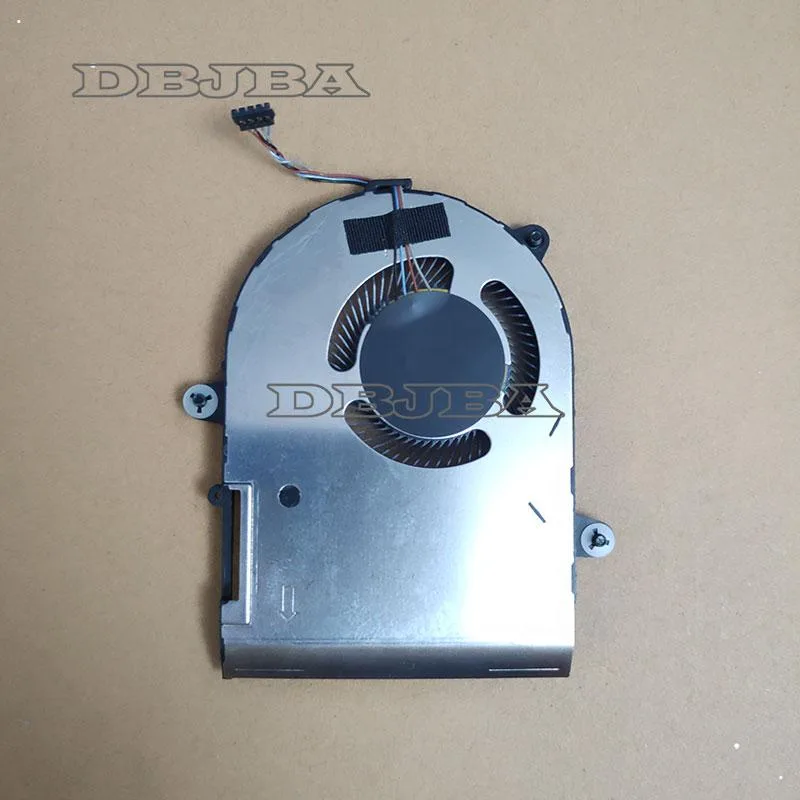
- Verify part number using supplied photos
Direct replacement fan for EliteBook x360 1040 G6
This new DBTLAP cooling fan is built for the HP EliteBook x360 1040 G6 equipped with the i5-8265U processor. It serves owners who need to swap out a worn or noisy original unit. The package includes one tested fan ready for installation.
Swaps the original factory cooler when airflow
The part replaces the stock cooler fitted to this specific convertible model. The jump is worth it when the existing fan spins loudly, runs constantly or fails to keep temperatures down during normal workloads. Compatibility is limited to the exact chassis shown in the product photos.
Maintains steady airflow during extended sessions
Under sustained load the fan continues moving air across the heatsink without the rattle or slowdown that develops in aged bearings. Each unit is tested before shipping to confirm consistent rotation. Buyers needing a second fan for a different laptop or a universal external pad should look elsewhere.
Highlights
- Designed for HP EliteBook x360 1040 G6 compatibility
- Supports Intel Core i5-8265U processor cooling
- Includes one replacement CPU cooling fan
- Tested before shipping for reliable operation
- Verify part number using supplied photos
Specifications
| Accessory Type | Cooler |
|---|
Questions about this item
Will this fan fit inside the HP EliteBook x360 1040 G6 chassis?
The fan is made for the HP EliteBook x360 1040 G6 with i5-8265U; check the photos against your original part to confirm the mounting holes and connector match.
How do I install the replacement fan and what step is often missed?
Remove the bottom cover, disconnect the old fan cable, swap the unit, then reconnect the cable and secure the screws; the step often missed is verifying the cable seats fully before reassembly.
When will this cooling fan need replacement again?
Expect several years of service; replace it if bearing noise appears, airflow drops, or the laptop throttles under load.
Also in this aisle
People compared these
Same shelf, same checkout — eight coins and a 30-minute rate lock.


Case Logic
Case Logic 3203990 briefcase for 15.6 in laptop with 10.1 in tablet pocket
$30.99
0.00037241BTC
In stock