

DBTLAP
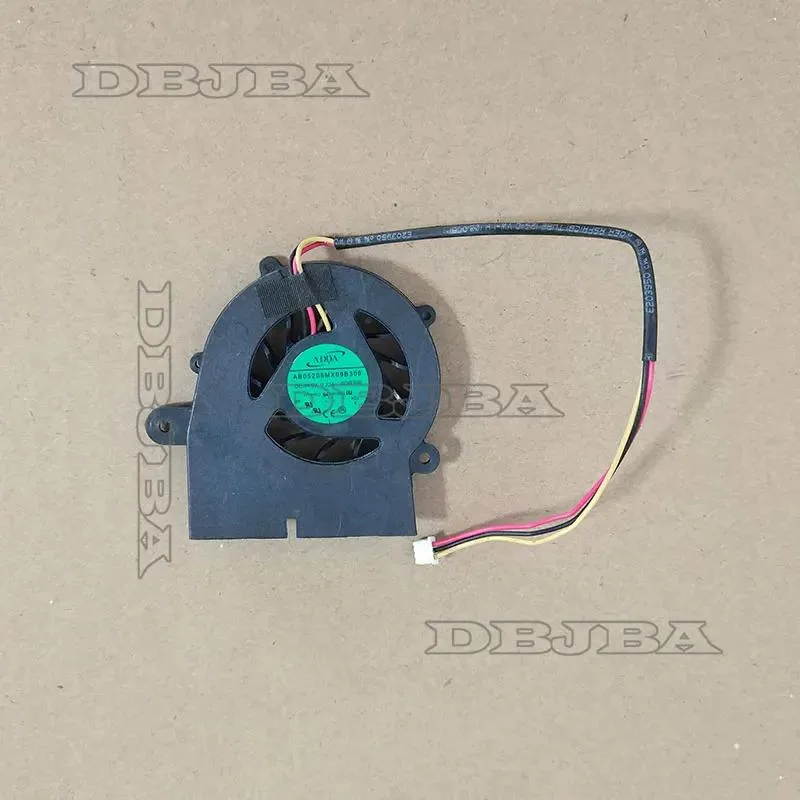
DBTLAP CPU Cooling Fan for ADDA AB05205MX09B300 5V 0.22A
Replacement CPU cooling fan for ADDA AB05205MX09B300 running at 5V and 0.22A
- Accessory TypeCooler
- Direct replacement for ADDA AB05205MX09B300 fans
- Operates on 5V power with .22A current draw
- Pre-shipping test confirms 100% functional reliability
- Real-item photos let you verify exact match
- Model-number check service prevents compatibility errors
DBTLAP Replacement Fan for ADDA AB05205MX09B300
This new DBTLAP cooling fan replaces the ADDA AB05205MX09B300 unit in compatible laptops. It operates at 5V with a 0.22A current draw. The part is intended for repair technicians or owners servicing a specific model. Each unit is tested before shipping to confirm function.
Direct Swap for Original ADDA Cooler
The fan serves as a direct replacement when the original cooler fails or becomes noisy. Verify the part number and photos against your existing component before ordering. The supplier offers model-number checks if compatibility is uncertain. The upgrade is worth it only when the exact ADDA part is required.
5V 0.22A Cooling Capacity and Limits
The cooler provides airflow for the designated laptop thermal zone at the rated 5V 0.22A specification. It handles the heat load designed for the original ADDA assembly. It cannot cool higher-wattage CPUs or fit other chassis without modification. Buyers needing different voltage, connector pinout, or mounting holes must source a different part.
Highlights
- Direct replacement for ADDA AB05205MX09B300 fans
- Operates on 5V power with .22A current draw
- Pre-shipping test confirms 100% functional reliability
- Real-item photos let you verify exact match
- Model-number check service prevents compatibility errors
Specifications
| Accessory Type | Cooler |
|---|
Questions about this item
Will the ADDA AB05205MX09B300 fan fit my laptop's existing mounting points?
Compare the photos with your current fan to confirm identical dimensions and screw-hole layout before ordering.
What is the correct way to install this 5 V 0.22 A replacement fan?
Disconnect power, remove the old fan, connect the new unit's cable to the same header, and secure it using the original mounting screws.
How long before the AB05205MX09B300 fan needs replacement?
Each unit is tested before shipping; lifespan depends on usage and dust buildup, so clean the heatsink regularly to maximise service life.
Also in this aisle
People compared these
Same shelf, same checkout — eight coins and a 30-minute rate lock.


Kensington
Kensington Desk Mount Cable Anchor K64613WW accessory
- Black
- Provides a secure a…
$19.99
0.00023655BTC
In stock
Panasonic
Panasonic CF-VDR291U laptop cooling pad
- Optical Drive
- Buffer Size: 2 MB B…
$213.99
0.00253222BTC
In stock
eReplacements
eReplacements PB992A-ER laptop battery 14.4V
- Battery
- Lithium-Ion
$65.99
0.00078088BTC
In stock