SonicWall
SonicWall 01-SSC-1465 Capture Advanced Threat Protection hardware license 1 Year TZ600 Series
- Capture Advance Thr…
$518.99
0.00618198BTC
In stockWe take cryptocurrency — so the coins you hold can buy real hardware.Pay in crypto, spend it on real hardware. Free insured shipping worldwide over $399. Plain, unbranded boxes, sent from Germany.Free insured shipping over $399. Your rate is locked for 30 minutes once checkout opens.Rate locked 30 minutes. Every item sealed, serial-checked and covered by a 24-month warranty.Sealed, 24-month warranty.

Cisco Systems, Inc.
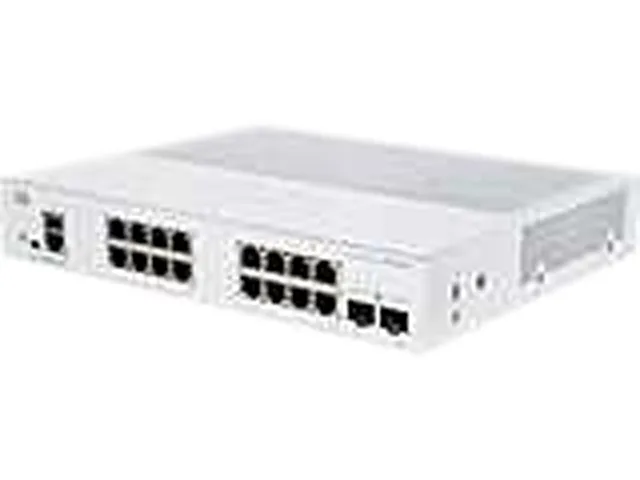
A managed desktop switch with sixteen gigabit RJ45 ports plus two SFP uplinks, 8K MAC table and 1.5 MB buffer
The CBS250-16T-2G-NA is a managed network switch built for small business or branch-office deployments that need Layer 2 control without a rack. Sixteen copper ports and two SFP uplinks give enough density for workstations, access points and a server link in one compact unit.
A fanless desktop chassis keeps the switch silent in open-plan offices or reception areas. Front-panel LEDs show system health, link activity and port speed at a glance, while a recessed reset button allows quick recovery without tools. UTP Category 5e or better cabling supports the 10/100/1000Mbps ports and the 9000-byte jumbo frames pass large data payloads efficiently.
The 8K MAC address table and 1.5 MB buffer replace unmanaged switches that drop frames under bursty loads or lack VLAN and QoS features. Managed functions such as port mirroring and link aggregation become available without moving to a rackmount platform. The jump is worth it when traffic segmentation or deterministic latency matter more than basic connectivity.
| Brand | CISCO |
|---|---|
| Model | CBS250-16T-2G-NA |
| Format | Desktop |
| Network Management Type | Managed |
| Primary Ports | 16 x RJ45 + 2 x SFP |
| Primary Port Speed | 10/100/1000Mbps |
| MAC Address Table | 8K |
| Jumbo Frames | 9000 bytes |
| Buffer Memory | 1.5 MB |
| PoE | No |
| Cabling | Unshielded Twisted Pair (UTP) Category 5e or better for 1000BASE-T |
| LEDs | System, Link/Act, PoE, Speed |
| Button | Reset button |
| Power | System power consumption 110V=24.51W 220V=25.01W |
| Dimensions | 10.56" x 10.69" x 1.73" |
| Weight | 3.92 lbs. |
| Shipping weight | 2.72 kg |
| Package size | 356 × 254 × 152 mm |
Each of the 16 RJ45 ports negotiates up to 1000Mbps full-duplex using Category 5e or better UTP cabling, so the practical ceiling is 1 Gbps per port.
The unit needs a flat surface at least 10.56 inches deep by 10.69 inches wide with 1.73 inches of vertical clearance; it weighs 3.92 lbs and has no rack ears included.
Connect power, link a PC to any RJ45 port, browse to the default IP address, then run the web-based setup wizard — the step most often missed is saving the running configuration so changes survive a reboot.
Also in this aisle
Same shelf, same checkout — eight coins and a 30-minute rate lock.
What you pay in, and what you read prices in.
Sent from your wallet at checkout
Display only — the catalogue is priced in USD
No currency matches that.
Pick the language the site speaks to you in.
No language matches that.
New here?
Already have one?
There is no automatic reset: this shop sends no mail, so there is no one-time link to ask for. Leave the address on the account and it gets picked up by hand.
Request noted
Nothing is on its way to your inbox — this shop sends no mail at all. Someone picks these up by hand.
Remembered it?