


Cherry
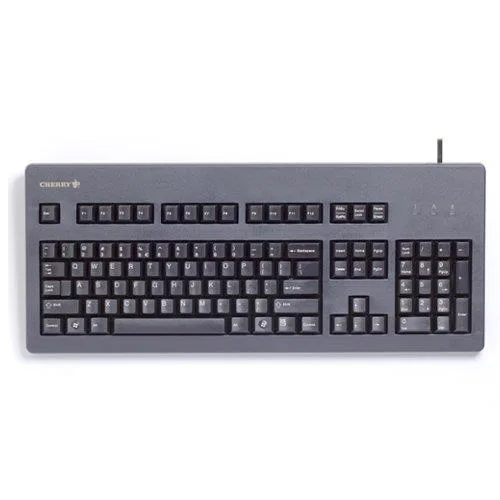
Cherry G80-3000 MX Keyboard G803000LSCEU2 104 Keys USB Black
Full-size wired keyboard with 104 Cherry MX mechanical switches and USB connection
- NameG80-3000 MX Technology Keyboard
- Keyboard InterfaceUSB
- Normal Keys104
- Keyboard ColorBlack
- FeaturesKeyboard/Keypad Connectivity Technology:Cable
- Package ContentsG80-3000 MX Technology Keyboard Quick Guide
- 104 keys support high-volume data entry
- Cherry MX switches with gold crosspoint contacts deliver reliable actuation
- USB cable connection ensures stable wired operation
- Timeless design maintains accuracy after years of use
- Black finish suits professional and gaming environments
Cherry G80-3000 MX Keyboard for High-Volume Users
The Cherry G80-3000 MX Keyboard uses USB connectivity and 104 normal keys in a black finish. It is built for high-volume data input and is suited to demanding users who type for long periods. Gamers and touch typists value the Cherry MX keyswitches with gold crosspoint contacts.
Replacing Membrane or Worn Mechanical Boards
The jump is worth it when a current keyboard feels mushy, misses strokes or has developed double-click faults after heavy use. This model supplies consistent actuation and long-term reliability that basic membrane designs cannot maintain over time. Buyers who need wireless freedom or a compact layout without a numeric block should look elsewhere.
Simple USB Plug-In Installation
Connect the attached cable to any free USB port and the keyboard works immediately without driver installation. The fixed cable means there is no battery to charge or receiver to lose, but it also prevents routing the lead through tight grommets or swapping to a custom coiled cable. Ensure the host system has a standard USB-A socket available.
Highlights
- 104 keys support high-volume data entry
- Cherry MX switches with gold crosspoint contacts deliver reliable actuation
- USB cable connection ensures stable wired operation
- Timeless design maintains accuracy after years of use
- Black finish suits professional and gaming environments
Specifications
| Brand | CHERRY |
|---|---|
| Name | G80-3000 MX Technology Keyboard |
| Model | G80-3000 |
| Keyboard Interface | USB |
| Normal Keys | 104 |
| Keyboard Color | Black |
| Features | Keyboard/Keypad Connectivity Technology:Cable |
| Package Contents | G80-3000 MX Technology Keyboard Quick Guide |
| Shipping weight | 1.18 kg |
| Package size | 470 × 195 × 44 mm |
Questions about this item
Does the G80-3000 MX Keyboard require any special mounting hardware or just a standard USB port?
It connects via a standard USB cable and needs no extra brackets or mounting hardware; simply plug it into any free USB port on your PC.
What is the correct way to install the Cherry G80-3000 MX Keyboard, and what common step do users miss?
Connect the USB cable, wait for the operating system to recognise the device, then begin typing; the step often missed is allowing the OS a few seconds to load the generic HID driver before use.
Which parts of the G80-3000 MX Keyboard are most likely to need replacement after extended use?
The Cherry MX key switches are rated for tens of millions of actuations, but individual keycaps or the USB cable may eventually wear and require replacement.
Also in this aisle
People compared these
Same shelf, same checkout — eight coins and a 30-minute rate lock.


Lenovo
Lenovo 42T3273 Black Replacement Keyboard for ThinkPad T60 T61
- Thinkpad T60 T61 Ke…
- Black
$29.99
0.00035639BTC
In stock