


Cables To Go
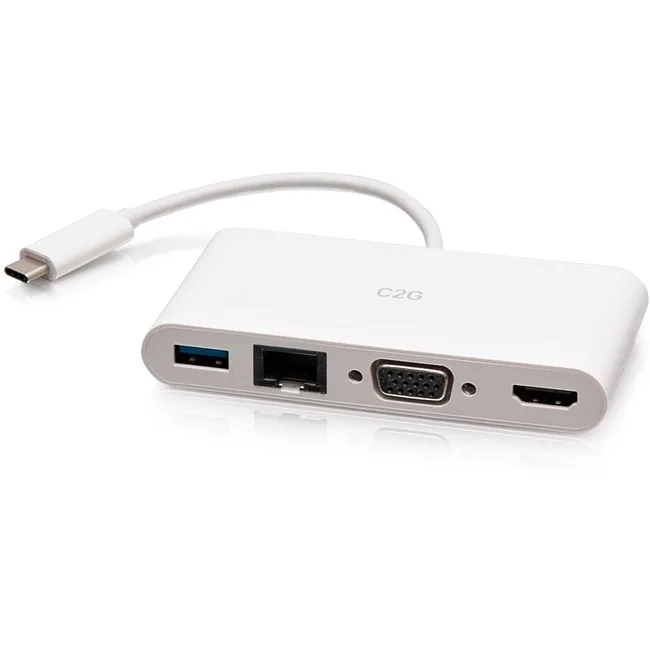
Cables To Go C2G29829 USB-C Docking Station 4K 30Hz White
Connects a USB-C notebook or tablet to HDMI, VGA, USB-A and Gigabit Ethernet at 4K 30 Hz
- ColorWhite
- Connect a 4K display at 30Hz for sharp visuals
- Add a VGA screen at 1920 x 1200 for legacy compatibility
- Link wired networks via Gigabit Ethernet for stable connectivity
- Expand peripherals with a USB 3.0 Type-A port for fast data
- Single USB-C connection powers video, data and network
What this adapter does
This white USB-C adapter connects a notebook or tablet to an external display through HDMI or VGA at up to 3840 x 2160 at 30 Hz or 1920 x 1200. It adds a USB 3.0 Type-A port for peripherals and a Gigabit Ethernet jack for wired networking. The unit draws power from the host port and requires no separate supply.
Check your host port first
Your device must provide a USB-C port that supports DisplayPort Alternate Mode for video output. A plain USB-C data-only port will not drive the HDMI or VGA connectors. Confirm the host can deliver enough bus power for the adapter plus any attached USB peripheral. The Ethernet link needs a free RJ-45 cable run to your router or switch.
Build integration
The adapter occupies one USB-C slot and replaces a tangle of single-purpose dongles. It frees the notebook’s own HDMI or VGA port for a second screen if the GPU allows it. The USB 3.0 Type-A port handles a mouse, keyboard or flash drive without using another host socket. The white finish matches light-coloured ultraportables.
Highlights
- Connect a 4K display at 30Hz for sharp visuals
- Add a VGA screen at 1920 x 1200 for legacy compatibility
- Link wired networks via Gigabit Ethernet for stable connectivity
- Expand peripherals with a USB 3.0 Type-A port for fast data
- Single USB-C connection powers video, data and network
Specifications
| Brand | C2G |
|---|---|
| Color | White |
| Shipping weight | 0.07 kg |
| Package size | 203 × 102 × 25 mm |
Questions about this item
Does the C2G29829 come with cables or do I need to buy HDMI and VGA cables separately?
The adapter is a single unit with built-in HDMI and VGA ports; you supply the video cables that match your displays.
Should I choose the 3840 x 2160 or the 1920 x 1200 output for my monitor?
Use 3840 x 2160 at 30Hz for a 4K screen, or 1920 x 1200 for a Full HD display; both are available from the same HDMI port.
What does the 4K 30Hz rating mean when I plug this into my laptop?
It means the HDMI port can drive a 3840 x 2160 display at 30 frames per second over a USB 3.1 Type-C connection.
Also in this aisle
People compared these
Same shelf, same checkout — eight coins and a 30-minute rate lock.


Kensington
Kensington Desk Mount Cable Anchor K64613WW accessory
- Black
- Provides a secure a…
$19.99
0.00023546BTC
In stock
Panasonic
Panasonic CF-VDR291U laptop cooling pad
- Optical Drive
- Buffer Size: 2 MB B…
$213.99
0.00252052BTC
In stock
eReplacements
eReplacements PB992A-ER laptop battery 14.4V
- Battery
- Lithium-Ion
$65.99
0.00077728BTC
In stock