


Brother
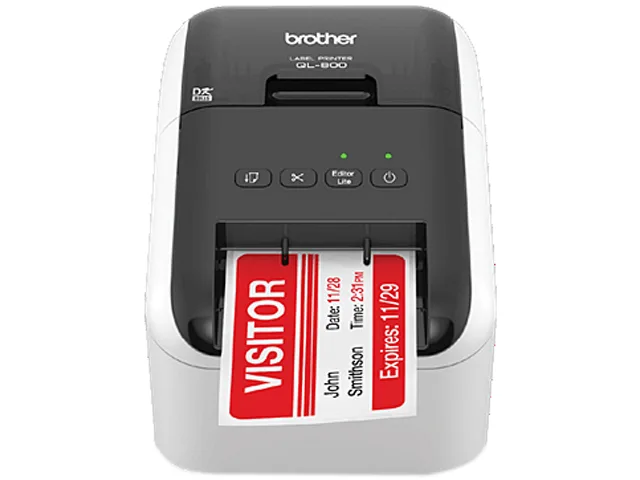
Brother QL800 2.4" Direct Thermal Label Printer 93 lpm USB
Direct thermal label printer produces up to 93 labels per minute with auto cutter and 300 x 600 dpi resolution
- Print TechnologyDirect Thermal
- Printer TypeDesktop
- Print SpeedUp to 93 labels per minute
- Max Resolution(B&W)300 x 600 dpi
- Memory64MB Flash
- Fonts IncludedFont Styles: True Type
- Prints up to 93 labels per minute for fast batch processing
- Produces crisp text and graphics at 300 x 600 dpi resolution
- Creates eye-catching black and red labels with DK-2251 tape
- Auto-cutter enables continuous banners up to 3.00 ft long
- Drop-in DK rolls eliminate ink or toner replacements
Professional direct thermal label printer
The Brother QL800 is a desktop label printer that uses direct thermal technology to produce monochrome labels at up to 93 labels per minute. It connects via USB 2.0 full-speed and includes an automatic cutter for continuous or die-cut tapes up to 2.40 inches wide. The unit ships with P-touch Editor software for Windows and Mac, a starter roll of DK-1201 address labels and a DK-2251 continuous tape for black and red printing.
Small businesses and offices needing fast.
This printer suits users who need high-volume address labels, shipping labels, file-folder tags or name badges without the cost of ink or toner. The dual-colour DK-2251 tape adds visual priority for urgent items. Buyers who require colour graphics, waterproof film labels, wireless connectivity or standalone operation without a host computer should look at other solutions.
93 labels per minute print speed
The maximum throughput of 93 standard labels per minute determines whether the QL800 can keep pace with your mailing or packing workflow. At 300 x 600 dpi resolution, text and barcodes remain sharp at this rate. If your peak demand exceeds this figure, a faster desktop or industrial model will be necessary.
Highlights
- Prints up to 93 labels per minute for fast batch processing
- Produces crisp text and graphics at 300 x 600 dpi resolution
- Creates eye-catching black and red labels with DK-2251 tape
- Auto-cutter enables continuous banners up to 3.00 ft long
- Drop-in DK rolls eliminate ink or toner replacements
Specifications
| Brand | Brother |
|---|---|
| Model | QL800 |
| Part Number | QL800 |
| Print Technology | Direct Thermal |
| Printer Type | Desktop |
| Print Speed | Up to 93 labels per minute |
| Max Resolution(B&W) | 300 x 600 dpi |
| Memory | 64MB Flash |
| Fonts Included | Font Styles: True Type |
| Barcode Type | CODE39, CODE128, UCC/EAN128(GS1-128), ITF(I-2/5), CODABAR(NW-7), UPC-A, UPC-E, EAN13, EAN8, ISBN-2(EAN13 AddOn2), ISBN-5(EAN13 AddOn5), Laser Barcode, POSTNET, RSS(RSS14 Standard, RSS14 Truncated, RSS14 Stacked, RSS14 Stacked Omni, RSS Limited, RSS Expanded, RSS Expanded Stacked), PDF417(Standard, Truncate, Micro), QR code(Model1, Model2, Micro), Data Matrix(ECC Square, ECC Rectangular), MaxiCode(Model2, Model3, Model4, Model5), GS1 Databar Composite, Aztec Barcode |
| Cutter | Auto-Cutter Cutter Life: Up to 300,000 (die-cut labels) 150,000 (continuous labels) |
| Ribbon Characteristics | Thermal |
| Media sizes supported | Tape Sizes: Die-cut and Continuous Maximum Tape Width: 2.40" Maximum Label Length: 3.00 ft. Compatible Cartridges: DK1201, DK1202, DK1203, DK1204, DK1207, DK1208, DK1209, DK1218, DK1219, DK1221, DK1234, DK1240 |
| Print Size | Maximum Print Width: 2.30" |
| Interface | USB version 2.0 full-speed |
| Windows Compatible | Windows Vista, Windows 7, Windows 8/8.1, Windows 10 |
| Macintosh Compatible | Mac OS X 10.10.5 - 10.12.x |
| Features | What's Included: Software, USB Cable, Power Cord, Quick Setup Guide, Documentation, Starter rolls: DK-1201 Die-cut Standard Address Labels (100 labels), plus DK-2251 2.40" (62.00 mm) Continuous Length Black/Red on White Paper Tape 16.40 ft. (5.00 m) |
| Dimensions | 4.90" x 5.60" x 8.40" |
| Weight | 2.50 lbs. |
| Package Contents | Brother QL800 Label Printer, P-touch editor software and driver, AC power cable, USB cable, DK1201 and DK2251 starter rolls |
| Shipping weight | 2.13 kg |
| Package size | 260 × 229 × 184 mm |
Questions about this item
What USB standard does the QL800 use and what practical limit does it set?
The printer connects via USB 2.0 full-speed, which caps the data rate at 12 Mbps and is sufficient for the 93 labels per minute print speed.
What desk space and roll width does the QL800 require to fit?
It measures 4.90 by 5.60 by 8.40 inches and accepts tape up to 2.40 inches wide, with a maximum print width of 2.30 inches.
How is the QL800 installed and which step do users often skip?
Connect the supplied USB cable and power cord, install the included P-touch Editor software or use the Windows Plug & Label feature, then load a DK roll — users often forget to insert the starter DK-1201 roll before printing.
Also in this aisle
People compared these
Same shelf, same checkout — eight coins and a 30-minute rate lock.



CHIEF MANUFACTURING
CHIEF MANUFACTURING CMS018 18" 457 mm Fixed Extension Column projector accessory
- Extension Column
- Projector
$22.99$22.99
0.0002679BTC
In stock