


Brother
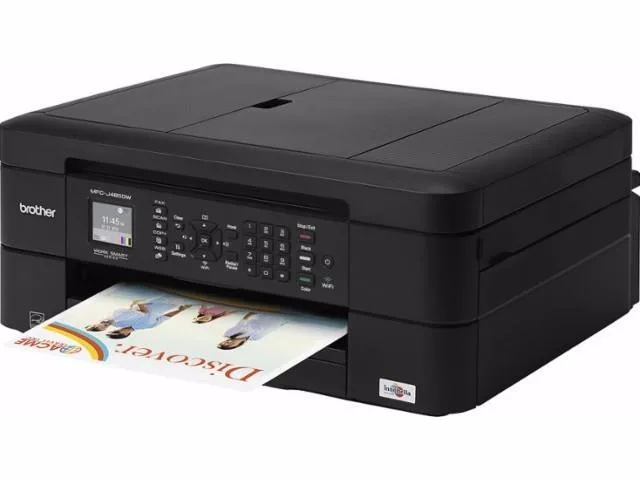
Brother MFC-J485DW 4-in-1 inkjet printer
4-in-1 colour inkjet prints up to 12 ppm, scans, copies and faxes with automatic duplex and a 100-sheet feeder
- Cartridges CompatibleLC203BK High Yield Black Ink Cartridge (approx. 550 pages) C
- Recommended UseMFC / All-In-One
- Functions4-in-1: Print, Copy, Scan & Fax
- Print TechnologyInkJet
- Output TypeColor
- Black Print SpeedUp to 12 ppm
- 4-in-1 print, copy, scan, fax for complete workflow
- Automatic duplex printing cuts paper use in half
- 100-sheet tray plus auto document feeder handles big jobs
- Wireless and mobile printing from phones, tablets, cloud
- 6000 x 1200 dpi resolution for sharp text and photos
Compact 4-in-1 inkjet for home and small office
The Brother MFC-J485DW prints, copies, scans and faxes in colour using inkjet technology. Automatic duplex printing reduces paper consumption. A 100-sheet tray handles media up to 8.5" x 14". Wireless and USB connectivity support mobile printing via AirPrint, Google Cloud Print, Brother iPrint&Scan, Mopria and Wi-Fi Direct. Cloud services such as Google Drive, Dropbox, Box and OneDrive are reachable through Brother Web Connect. A 1.8" colour display simplifies menu navigation.
Low-volume users needing fax and ADF
This multifunction suits households or small offices that print 50 to 1000 pages per month and require an automatic document feeder for multi-page scans or copies. Fax capability is built in. Buyers who need higher monthly throughput or faster copy speeds should consider a different class of device.
6000 x 1200 dpi maximum print resolution
The printer delivers up to 6000 x 1200 dpi for both black and colour output, which determines the sharpness of text and graphics. Copy resolution reaches 2400 x 1200 dpi. Print speeds are up to 12 ppm in black and 6 ppm in colour, with copy speeds of 6 cpm black and 3 cpm colour.
Highlights
- 4-in-1 print, copy, scan, fax for complete workflow
- Automatic duplex printing cuts paper use in half
- 100-sheet tray plus auto document feeder handles big jobs
- Wireless and mobile printing from phones, tablets, cloud
- 6000 x 1200 dpi resolution for sharp text and photos
Specifications
| Cartridges Compatible | LC203BK High Yield Black Ink Cartridge (approx. 550 pages) C203C High Yield Cyan Ink Cartridge (approx. 550 pages) LC203M High Yield Magenta Ink Cartridge (approx. 550 pages) LC203Y High Yield Yellow Ink Cartridge (approx. 550 pages) LC201BK Standard Black Ink Cartridge (approx. 260 pages) LC201C Standard Cyan Ink Cartridge (approx. 260 pages) LC201M Standard Magenta Ink Cartridge (approx. 260 pages) LC201Y Standard Yellow Ink Cartridge (approx. 260 pages) |
|---|---|
| Brand | Brother |
| Series | MFC series |
| Model | MFC-J485DW |
| Part Number | MFC-J485DW |
| Recommended Use | MFC / All-In-One |
| Functions | 4-in-1: Print, Copy, Scan & Fax |
| Print Technology | InkJet |
| Output Type | Color |
| Black Print Speed | Up to 12 ppm |
| Color Print Speed | Up to 6 ppm |
| Black Print Quality | 6000 x 1200 dpi |
| Color Print Quality | 6000 x 1200 dpi |
| Duplex printing | Yes |
| Max. Duty Cycle | Maximum Monthly Duty Cycle: up to 2,500 Printed Pages Recommended Monthly Print Volume: 50 - 1,000 Printed Pages |
| Copy speed, Black | Up to 6 cpm |
| Copy speed, Color | Up to 3 cpm |
| Copy Quality, Black | 2400 x 1200 dpi |
| Copy Quality, Color | 2400 x 1200 dpi |
| Copy Reduction / Enlargement | 25% - 400% |
| Copier Features | Copier Type: Flatbed Copy Color: Color |
| Scan Resolution, Optical | 2400 x 1200 dpi |
| Scan Resolution, Enhanced | 19200 x 19200 dpi |
| Scan Technology | CIS |
| Scanner Features | Scanner Type: Flatbed Scan Color: Color |
| Color Fax | Yes |
| Fax Transmission Speed (seconds per page) | Approx. 7 Sec. Per Page |
| Fax Memory | Up to 200 Page Fax Memory |
| Input Capacity, max. | Up to 100 sheets |
| Output Capacity, std. | 50 sheets |
| Media Type | Glossy Paper Borderless Media Coated Paper Index Card Inkjet Paper Photo Paper Plain Paper Recycled Paper |
| Media sizes supported | Paper Handling Size - Paper Tray: A4, Letter, Legal, Executive, A5, A6, 4.00" x 6.00" Photo, 5.00" x 8.00" Indexcard, 5.00" x 7.00" Photo, C5 Envelope, Com-10, DL Envelope, Monarch Minimum Paper Width / Length (Paper Tray): 4.00" x 6.00" Maximum Paper Width / Length (Paper Tray): 8.50" x 14.00" Sheet Weight - Paper Tray (max / min): 17.00 - 58.00 lbs. Minimum Input for ADF (Width / Height): 5.80" x 5.80" Max Input of ADF (Width / Height): 8.50" x 14.00" Sheet Weight - ADF (max / min): 17.00 - 24.00 lbs. |
| Borderless Photo Sizes | 8.5" x 11" |
| USB Ports | Hi-speed USB 2.0 |
| Other Ports | Wireless (802.11 b/g/n), Wi-Fi Direct |
| Connectivity Technology | USB / Wi-Fi |
| Modem Speed | 14.4kbps |
| Power Requirements | AC 100 - 120 V 50 / 60 Hz |
| Windows Compatible | Windows 10, 8.1, 8, 7 Windows Vista Windows XP Home Windows XP Professional Windows Server 2012, 2012 R2, 2008, 2008 R2, 2003, 2003 R2 |
| Macintosh Compatible | OS X v10.10.x, 10.9.x, 10.8.5 |
| Features | Display & Graphics: Screen Size: 1.8" Display Screen Type: LCD Power Source: AC Supply |
| Dimensions | 6.80" x 15.70" x 13.40" |
| Weight | 16.80 lbs. |
| Shipping weight | 9.71 kg |
| Package size | 711 × 457 × 356 mm |
Questions about this item
Should I buy the standard-yield LC201 or high-yield LC203 cartridges for this MFC-J485DW?
The LC203 high-yield cartridges deliver approximately 550 pages each, making them the economical choice for regular printing on this model.
What does the 6000 x 1200 dpi print resolution actually produce on paper?
It provides fine detail for text and graphics at the rated 12 ppm mono and 6 ppm colour speeds, suitable for everyday documents and photos.
Which wireless standards does the MFC-J485DW support for mobile and cloud printing?
It connects via Wi-Fi Direct and your local network to enable AirPrint, Mopria, Brother iPrint&Scan and cloud services such as Google Drive and Dropbox.
Also in this aisle
People compared these
Same shelf, same checkout — eight coins and a 30-minute rate lock.



CHIEF MANUFACTURING
CHIEF MANUFACTURING CMS018 18" 457 mm Fixed Extension Column projector accessory
- Extension Column
- Projector
$22.99$22.99
0.00026656BTC
In stock