


BONAEVER
BONAEVER A1502 13.3 inch laptop case Red
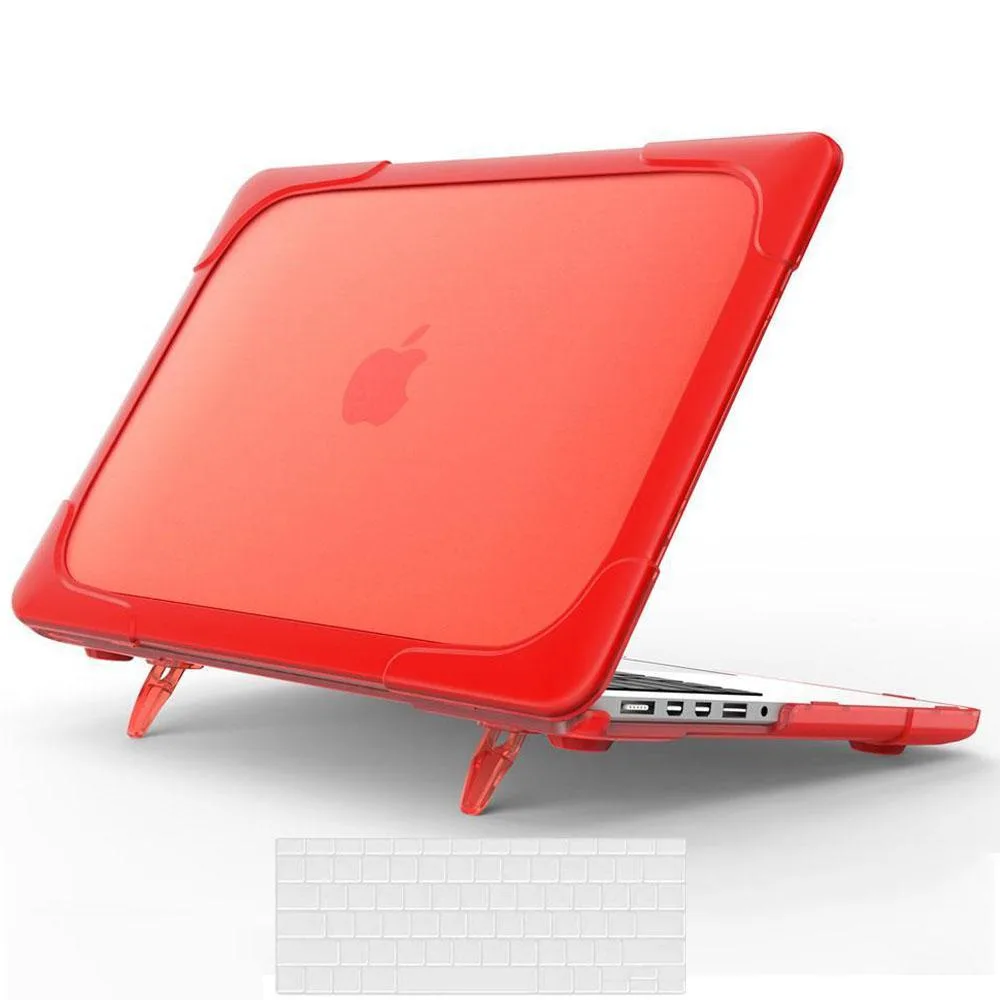
Hard dual-layer case with foldable stand and silicone keyboard cover protects 13.3-inch MacBook Pro Retina models A1502 and A1425
- Case TypeHard Case
- ColorRed
- Protects against shocks and scratches with dual-layer hard shell
- Apple logo remains visible through no-cutout design
- Full port access and charger use without removing case
- Ventilation slots and rubber feet maintain airflow and stability
- Includes silicone keyboard cover for spill protection
Compatible MacBook models
The BONAEVER A1502 hard case fits MacBook Pro 13.3 inch Retina models A1502 and A1425 released from 2012 to 2015. It snaps onto the chassis without covering the Apple logo, which remains visible through the red shell. A transparent silicone keyboard cover is included to guard against spills and dust. The case is designed for owners of these specific legacy machines who want drop-in protection.
Ventilation and thermal management
Vent slots moulded into the case allow air to follow the laptop's own cooling path so heat can escape during normal use. Rubberised feet on the bottom keep the MacBook firmly planted on a desk and prevent the vents from being blocked. The dual-layer construction absorbs shocks while still letting the original thermal system operate without added noise or restriction.
Port access and build integration
All ports remain fully accessible and the lid opens completely without removing the shell. The snap-on design lets you connect a charger, cable or headset instantly and remove the case just as quickly when needed. The keyboard cover stays in place while typing and adds no measurable thickness. Buyers needing a case for newer MacBook Pro models or other 13 inch laptops will find this product incompatible.
Highlights
- Protects against shocks and scratches with dual-layer hard shell
- Apple logo remains visible through no-cutout design
- Full port access and charger use without removing case
- Ventilation slots and rubber feet maintain airflow and stability
- Includes silicone keyboard cover for spill protection
Specifications
| Case Type | Hard Case |
|---|---|
| Color | Red |
Questions about this item
How do I install the two-piece snap-on case on my MacBook Pro 13.3 A1502 without cracking the corners?
Align the top shell with the hinge first, then press the front edge down firmly until the clips click; repeat for the bottom shell starting at the rear vents, and finally lay the silicone keyboard cover flat before closing the lid.
When should I replace the included transparent silicone keyboard cover?
Replace the keyboard cover when it becomes permanently warped, sticky, or shows tears around the key cut-outs, as a degraded cover can trap moisture against the keys.
What is the first sign that the case ventilation slots are no longer dissipating heat effectively?
The MacBook base feels noticeably hotter near the hinge and the fans spin at higher RPM during routine tasks, indicating the vent slots are clogged or the rubber feet have lost grip.
Also in this aisle
People compared these
Same shelf, same checkout — eight coins and a 30-minute rate lock.


Kensington
Kensington Desk Mount Cable Anchor K64613WW accessory
- Black
- Provides a secure a…
$19.99
0.00023112BTC
In stock
Panasonic
Panasonic CF-VDR291U laptop cooling pad
- Optical Drive
- Buffer Size: 2 MB B…
$213.99
0.0024741BTC
In stock
eReplacements
eReplacements PB992A-ER laptop battery 14.4V
- Battery
- Lithium-Ion
$65.99
0.00076296BTC
In stock