


Bogen Communications
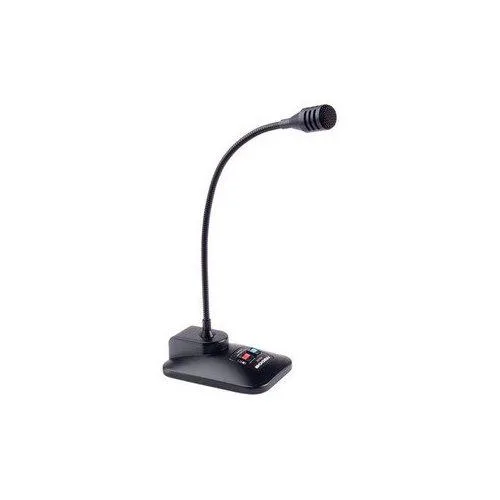
Bogen Communications DDU250 Desktop Dynamic Microphone
Desktop dynamic microphone with uni-directional pickup and push-to-talk or lock-on operation for clear voice capture
- TypeMicrophone
- Dynamic pickup isolates voice from background noise
- 100 Hz to 12 kHz range captures clear speech
- Push-to-talk with lock-on keeps hands free
- Desktop form factor sits ready on any surface
Bogen DDU250 Desktop Dynamic Microphone
The Bogen DDU250 is a desktop dynamic microphone designed for voice communication in office or dispatch environments. Its uni-directional pickup pattern focuses on the speaker while rejecting off-axis noise. A push-to-talk switch with a lock function allows for momentary or continuous transmission control.
100Hz to 12kHz Frequency Response
The 100Hz to 12kHz response range captures clear speech intelligibility for paging and intercom use. Low-frequency roll-off reduces handling rumble and HVAC noise. The dynamic element operates without external power. This microphone is not suited for wide-bandwidth music recording or applications requiring extended high-frequency detail.
Highlights
- Dynamic pickup isolates voice from background noise
- 100 Hz to 12 kHz range captures clear speech
- Push-to-talk with lock-on keeps hands free
- Desktop form factor sits ready on any surface
Specifications
| Brand | BOGEN |
|---|---|
| Model | DDU250 |
| Type | Microphone |
Questions about this item
Will the DDU250's 100 Hz low-end response work with my older mixer's line input?
The 100 Hz to 12 kHz frequency range covers standard speech, so the microphone's output will match typical line-level inputs on legacy mixers without extra equalisation.
How do I confirm the push-talk switch is functioning correctly after connecting the DDU250?
Press the push-talk button while speaking; the microphone should activate only while the button is held and mute immediately when released, confirming the switch operates as intended.
Also in this aisle
People compared these
Same shelf, same checkout — eight coins and a 30-minute rate lock.



Soundproof Store
Soundproof Store Wedge Acoustic Foam Panels Red 12 Pack
- Red
$27.99
0.00032314BTC
In stock
Soundproof Store
Soundproof Store Wedge Acoustic Foam Panels Purple 12 Pack
- Purple
$27.99
0.00032314BTC
In stock