


BFKK
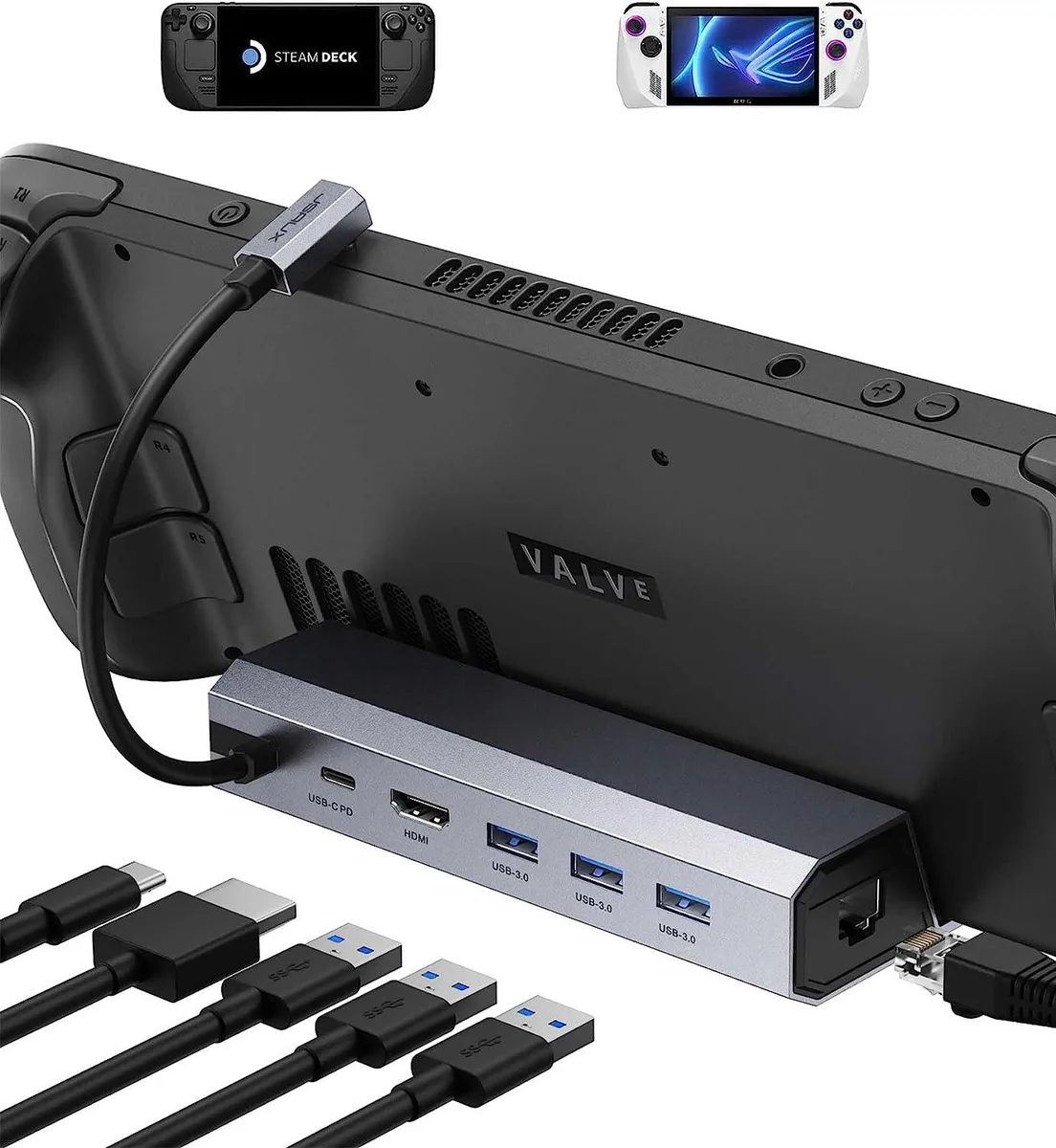
BFKK 6-in-1 Steam Deck Dock HDMI 2.0 4K@60Hz Gigabit Ethernet 3 USB-A 3.0 100W PD
A six-port docking station for Steam Deck and ROG Ally adding 4K@60Hz HDMI 2.0 output, Gigabit Ethernet, three USB-A 3.0 ports and 100W USB-C power delivery
- 4K@60Hz external display via HDMI 2.0
- Stable wired gaming with Gigabit Ethernet
- Three USB-A 3.0 ports for peripherals
- 100W USB-C power delivery charges Steam Deck at full speed
- Works with Steam Deck and ROG Ally
Steam Deck Dock with HDMI 2.0
The BFKK 6-in-1 docking station adds HDMI 2.0 4K@60Hz video, Gigabit Ethernet and three USB-A 3.0 ports to a Steam Deck or ROG Ally. A USB-C port passes up to 100W power delivery so the handheld can charge while docked. The unit is built for handheld gamers who want a desktop-style setup without carrying multiple adapters.
Upgrade from basic USB-C hubs
Most compact hubs only offer 4K@30Hz or lack wired networking. This dock supplies 4K@60Hz over HDMI 2.0 and a full Gigabit Ethernet port for lower-latency multiplayer and faster downloads. The jump is worth it when you regularly play on an external monitor and need stable wired connectivity plus several USB-A peripherals at 5 Gbps.
Plug-in install with case limits
Installation is a single USB-C connection; the dock draws power from the handheld's original charger. The enclosure does not accept protective cases thicker than 2 mm, so kickstand cases must be removed. Achieving 4K@60Hz also requires an HDMI 2.0 or 2.1 cable shorter than 15 feet, manual selection of 4K@60Hz in desktop mode, and the same setting in each game. HDMI-to-DisplayPort cables or adapters will not work.
Highlights
- 4K@60Hz external display via HDMI 2.0
- Stable wired gaming with Gigabit Ethernet
- Three USB-A 3.0 ports for peripherals
- 100W USB-C power delivery charges Steam Deck at full speed
- Works with Steam Deck and ROG Ally
Specifications
No published specifications for this item yet.
Questions about this item
How thick can my Steam Deck protective case be to still fit this dock?
The protective case must be thinner than 2mm; cases with a kickstand are not compatible.
What manual step is required on the Steam Deck to get 4K at 60 Hz over HDMI?
Switch to desktop mode and set the output to 4K@60Hz, then set the same resolution inside each game.
What charger wattage do I need to reach the dock’s 100 W power delivery limit?
Use a charger of at least 65 W; the Steam Deck itself draws up to 45 W, while ROG Ally Turbo Mode may need more than 65 W.
Also in this aisle
People compared these
Same shelf, same checkout — eight coins and a 30-minute rate lock.


Case Logic
Case Logic 3203990 briefcase for 15.6 in laptop with 10.1 in tablet pocket
$30.99
0.00037069BTC
In stock