
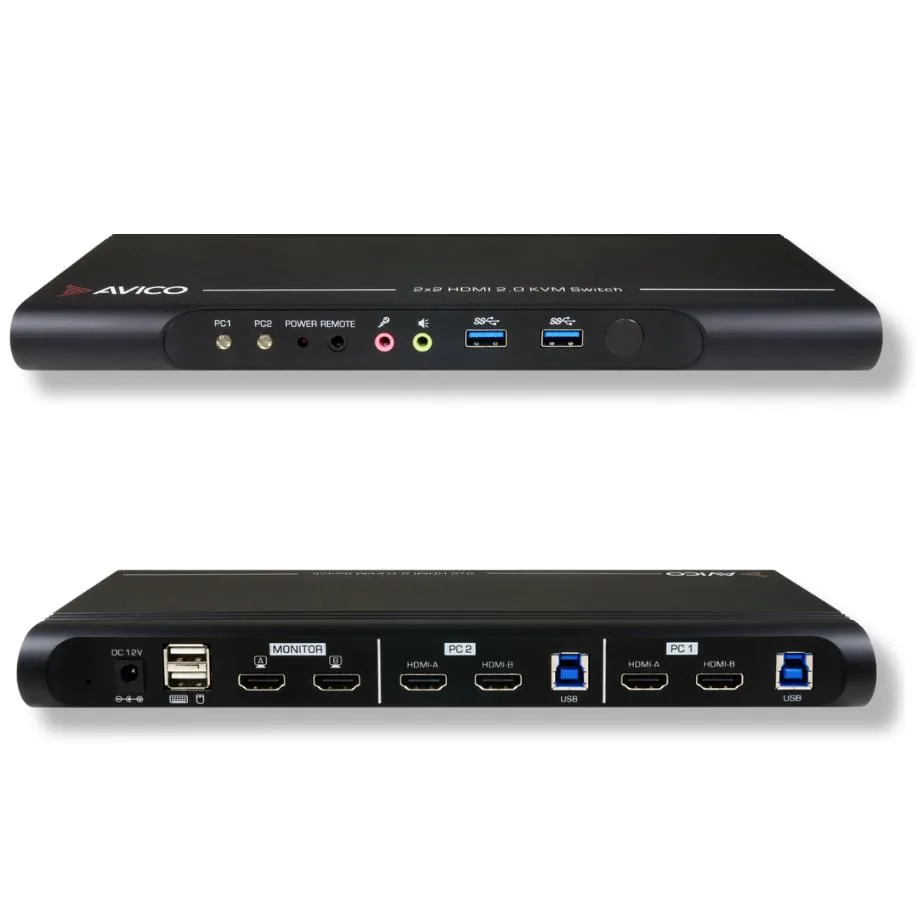


Avico
Avico Dual Monitor KVM Switch 2 Computers 2 Monitors TAA Compliant HDMI 2.0 USB 3.0 4K60 1440p144 1080p240
Connects two computers to two monitors with 4K at 60 Hz, 1440p at 144 Hz and 1080p at 240 Hz via HDMI 2.0 and USB 3.0
- TypeHDMI, USB
- Computer Connections2 Ports
- Dual 4K60 extended desktop across two monitors
- Keyboard hotkeys, front button or remote switching
- Works with Windows, macOS M1/M2/M3 and Linux
- USB 3.0 ports for fast peripheral sharing
- Supports 1080p240, 1440p144 and ultrawide 3440x1440 100Hz
Dual-Monitor KVM Switch
The Avico KVM switch lets one keyboard, one mouse and two monitors control two computers. It supports HDMI 2.0 video and USB 3.0 peripherals, delivering 4K at 60 Hz, 1440p at 144 Hz or 1080p at 240 Hz across both screens. TAA compliance makes it suitable for government and regulated procurements. No drivers are required for Windows, macOS or Linux.
Multi-platform professionals and high-refresh gamers
This unit suits users who need simultaneous dual-monitor extended desktops at high refresh rates and want hotkey, button or remote switching. It does not serve setups with more than two computers or more than two monitors. Buyers who need DisplayPort native inputs or USB-C video alt-mode should look elsewhere. Single-monitor users will find the dual-head capability unused.
Build integration and cabling
Each computer connects through one HDMI cable and one USB 3.0 cable to the switch; two HDMI cables then run to the monitors. USB 3.0 ports on the front accept keyboards, mice or other peripherals for instant sharing. EDID emulation keeps display layouts stable when switching. Approved adapters allow DisplayPort, DVI or VGA sources to connect through the HDMI ports.
Highlights
- Dual 4K60 extended desktop across two monitors
- Keyboard hotkeys, front button or remote switching
- Works with Windows, macOS M1/M2/M3 and Linux
- USB 3.0 ports for fast peripheral sharing
- Supports 1080p240, 1440p144 and ultrawide 3440x1440 100Hz
Specifications
| Type | HDMI, USB |
|---|---|
| Computer Connections | 2 Ports |
Questions about this item
What cables do I need to connect both computers to the two HDMI 2.0 inputs and the USB 3.0 ports?
Each computer requires one HDMI 2.0 cable per monitor and one USB 3.0 cable for keyboard and mouse sharing.
Will my existing 1920x1080 240 Hz and 2560x1440 144 Hz monitors run at their native rates through this switch?
Yes, the switch passes 1920x1080 at 240 Hz and 2560x1440 at 144 Hz on both outputs simultaneously.
How can I verify the switch is delivering 3840x1080 at 60 Hz to both screens after setup?
Check each monitor's on-screen display or your OS display settings to confirm 3840x1080 at 60 Hz on both outputs.
Also in this aisle
People compared these
Same shelf, same checkout — eight coins and a 30-minute rate lock.


Black Box Corporation
Black Box Corporation 4K60 HDMI Dual-Head KVM Switch 4 Port
$774.99
0.00926113BTC
In stock