


AUTYUE
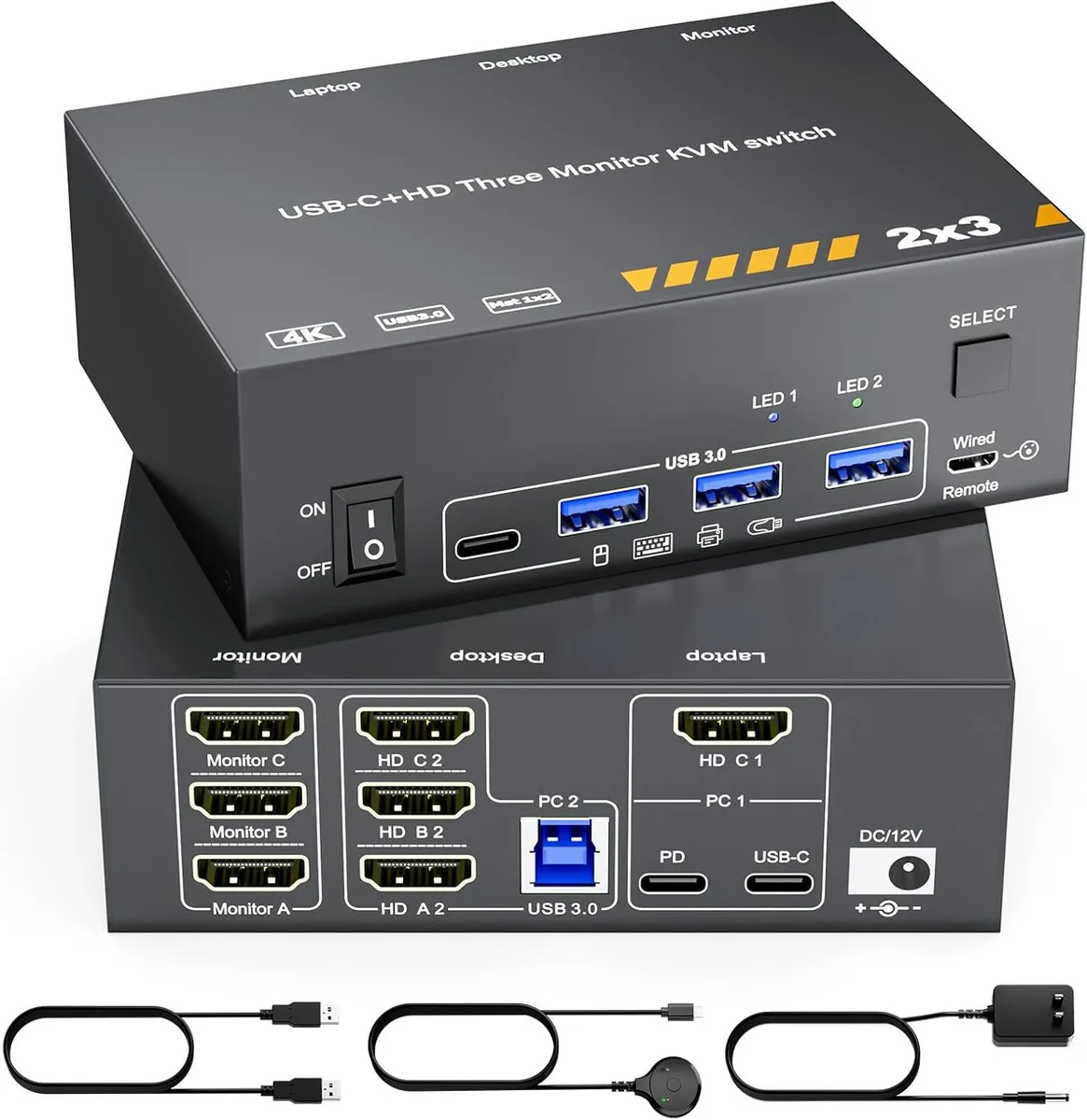
AUTYUE KVM Switch 3 Monitors MST USB-C Triple HDMI 4K@60Hz 100W PD
A KVM switch sharing three 4K@60Hz HDMI monitors and four USB 3.0 ports between two computers with 100W PD laptop charging and wired remote control
- TypeKVM Switch 3 Monitors MST USB-C & Triple HDMI
- Computer Connections2 Ports
- Monitor Connections3 Ports
- Video ResolutionThe laptop and PC triple monitor KVM switch supports outputt
- PC SelectionPush Buttons
- Monitors SupportedHDMI, HDMI, HDMI
- Triple 4K@60Hz monitors with 4:4:4 colour depth
- 100W PD port charges laptop while you work
- Four USB 3.0 ports at 5Gbps for peripherals
- Switch between two PCs via button or wired remote
- Compact 125 x 89.8 x 41.8 mm metal chassis
Three-monitor KVM for laptop and desktop
The AUTYUE KVM switch connects two computers to three HDMI monitors and four USB 3.0 peripherals. It extends a USB-C laptop with triple 4K@60Hz outputs and shares the displays and devices with a desktop PC. A wired remote and front-panel buttons provide instant switching. The unit ships with a 12V power adapter, USB-C 3.1 Gen2 cable, USB 3.0 cable and manual.
Check laptop video outputs and cable length
Your laptop must provide both USB-C and HDMI video outputs to drive three external screens. Use the supplied USB-C 3.1 Gen2 cable or an equivalent cable no longer than 1 metre. Connect the desktop with three HDMI 2.0 cables and a USB-A to USB-B cable. Plug the 12V adapter into the DC port and attach the wired remote before powering on.
Suits dual-system triple-display setups
Ideal for users who split work between a USB-C laptop and a desktop while keeping three 4K monitors, keyboard, mouse and storage permanently connected. Not suited for laptops that lack dual video outputs or for anyone needing more than two computer ports. The 100W PD port delivers up to 73 to 80W to the laptop after internal losses.
Highlights
- Triple 4K@60Hz monitors with 4:4:4 colour depth
- 100W PD port charges laptop while you work
- Four USB 3.0 ports at 5Gbps for peripherals
- Switch between two PCs via button or wired remote
- Compact 125 x 89.8 x 41.8 mm metal chassis
Specifications
| Type | KVM Switch 3 Monitors MST USB-C & Triple HDMI |
|---|---|
| Computer Connections | 2 Ports |
| Monitor Connections | 3 Ports |
| Video Resolution | The laptop and PC triple monitor KVM switch supports outputting 3 screens at 4K@60Hz with 4:4:4 color depth, and is backward compatible with 2K@120Hz, 2560x1440@120Hz/60Hz, and 1920x1440@144Hz/120Hz ect. |
| PC Selection | Push Buttons |
| Monitors Supported | HDMI, HDMI, HDMI |
| LED Indicators | Yes |
| Power Features | Come with DC 12V Power Adapter |
| USB Features | with USB support |
| Application | The laptop desktop 3 monitors KVM switch not only allows to extend your USB-C laptop with three HDMI monitor outputs and four USB 3.0 ports, but also allows you to easily share 3 monitors and 4 USB 3.0 devices between work laptop & personal desktop, which combines the functionality of a USB-C docking station and a 2 computers 3 monitors KVM switch, saving cost while creating a tidy, efficient workspace |
| Features | The laptop desktop 3 monitors KVM switch not only allows to extend your USB-C laptop with three HDMI monitor outputs and four USB 3.0 ports, but also allows you to easily share 3 monitors and 4 USB 3.0 devices between work laptop & personal desktop |
| Dimensions | 125mm x 89.8mm x 41.8mm |
| Package Contents | 1 x KVM Switch, 1 x USB C Cable, 1 x USB 3.0 Cable, 1 x Power Adapter, 1 x Wired Remote, 1 x User Manual |
Questions about this item
What cables and accessories are included in the box with the KVM switch?
The package contains the KVM switch, one USB-C 3.1 Gen 2 cable, one USB 3.0 cable, a 12V DC power adapter, a wired remote controller and a user manual.
Which video ports should I use on my laptop to drive three 4K@60Hz monitors through this switch?
Your laptop must provide both a USB-C 3.1 Gen 2 output and an HDMI 2.0 output; the switch combines these two sources to deliver three HDMI 4K@60Hz streams.
The listing says 100W PD charging — how much power will actually reach my laptop?
The switch supports up to 100W PD input, but internal and cable losses mean the laptop typically receives 73 to 80W while the unit is running three displays and USB peripherals.
Also in this aisle
People compared these
Same shelf, same checkout — eight coins and a 30-minute rate lock.


Black Box Corporation
Black Box Corporation 4K60 HDMI Dual-Head KVM Switch 4 Port
$774.99
0.00927987BTC
In stock