


AUTYUE
AUTYUE DisplayPort KVM Switch 3 PCs 2 Monitors USB 3.0 Wired Remote
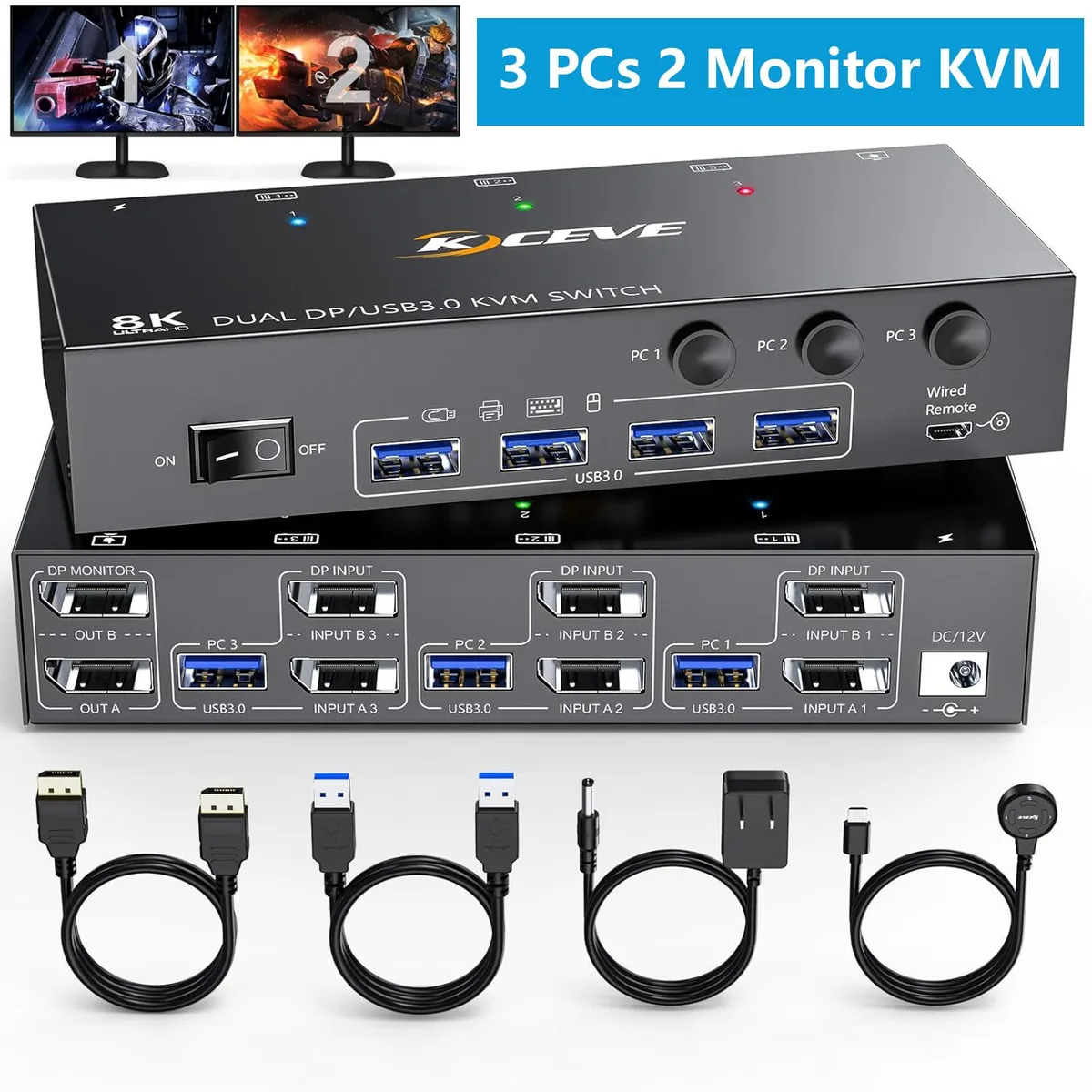
A dual-monitor DisplayPort KVM switch that lets three computers share two screens, keyboard and mouse at up to 8K@30Hz or 4K@144Hz via USB 3.0 with a wired remote
- TypeDisplayPort, USB
- PC ConnectorsDisplayport, USB
- Computer Connections3 Ports
- Monitor Connections2 Ports
- Video ResolutionSupport high resolution of 8K@30Hz, 4K@144Hz
- PC SelectionPush Buttons
- Share three computers across two DisplayPort monitors with copy and extend modes
- Four USB 3.0 ports deliver fast, stable peripheral sharing for keyboard, mouse and printers
- Switch instantly via front push buttons or the 1.5 m wired remote
- Supports 8K at 30 Hz and 4K at 144 Hz using DP 1.4 cables
- Compact metal chassis measures 16.2 x 4.4 x 2.59 cm and weighs 200 g
3-PC Dual-Monitor KVM Switch
This DisplayPort KVM switch lets three computers share two monitors, a keyboard and a mouse. It supports copy mode to duplicate the main screen and extend mode to drag windows across both displays. USB 3.0 ports provide stable connections for peripherals such as printers. The unit is powered from the attached computers and includes a wired remote for desk-side switching.
Upgrade from Single-Monitor or USB 2.0 Switches
Moving to this model adds a second DisplayPort output and USB 3.0 bandwidth, which is worthwhile when you need simultaneous dual-screen workflows or faster peripheral transfers. The switch handles resolutions up to 8K at 30 Hz and 4K at 144 Hz using DisplayPort 1.4 cables. It does not support keyboard hotkey switching, so buyers who rely on that method should stay with their current device.
Check Cables, Power and Port Types Before Ordering
Each computer needs a DisplayPort video connection and a USB 3.0 cable; the package supplies three 1 m USB cables and a 1.5 m wired remote. A power adapter is included for setups where bus power is insufficient. The switch accepts Mini DisplayPort to DisplayPort cables or USB-C to DisplayPort adapters on the input side, but it does not work with HDMI-to-DisplayPort or DVI/VGA-to-DisplayPort converters. Output can be converted to HDMI with a passive cable.
Highlights
- Share three computers across two DisplayPort monitors with copy and extend modes
- Four USB 3.0 ports deliver fast, stable peripheral sharing for keyboard, mouse and printers
- Switch instantly via front push buttons or the 1.5 m wired remote
- Supports 8K at 30 Hz and 4K at 144 Hz using DP 1.4 cables
- Compact metal chassis measures 16.2 x 4.4 x 2.59 cm and weighs 200 g
Specifications
| Type | DisplayPort, USB |
|---|---|
| PC Connectors | Displayport, USB |
| Computer Connections | 3 Ports |
| Monitor Connections | 2 Ports |
| Video Resolution | Support high resolution of 8K@30Hz, 4K@144Hz |
| PC Selection | Push Buttons |
| Monitors Supported | Dual Monitor Displayport |
| LED Indicators | Yes |
| Power Features | Requires no additional power supply |
| USB Features | with USB support |
| Application | This is a perfect KVM switch for DP ports device to share keyboard mouse and monitor. In copy mode the main screen can be copied to the second output screen. In extend mode, the window from the main screen can be dragged to the second output screen. |
| Features | 1, In copy mode the main screen can be copied to the second screen. In extend mode, the window from main screen can be dragged to the second output screen. 2, Dual monitor DP KVM switch for 3 computers to share 2 monitors. To make it work properly please connect all USB cables to give enough power. 3, Upgraded USB 3.0 version ensure data transfer more faster and stable, it's a great solution to solve many USB device disconnected issue during use. 4, Support physical button control and wired control. Please note that this model not support keyboard hotkey switch way. 5, Allow you to q |
| Dimensions | 16.2x4.4x2.59cm |
| Weight | 200g |
| Package Contents | 1 x DP KVM switch 3 x USB 3.0 cables (1m) 1 x wired control (1.5m) 1 x Power Adapter, 1 x User Manual |
Questions about this item
What desk space does the 16.2x4.4x2.59cm metal chassis need?
The unit measures 16.2 cm wide, 4.4 cm deep and 2.59 cm high, so it fits on a typical desk shelf or rack tray without blocking adjacent ports.
Which cables must be connected first to avoid the common no‑signal issue?
Plug all three 1 m USB 3.0 cables into the PCs before attaching the two DisplayPort monitors and the 1.5 m wired remote; the switch draws power from the USB links and will not start without them.
When should the included power adapter be used instead of USB power alone?
If you run 8K@30 Hz or 4K@144 Hz through long DisplayPort cables, or attach power‑hungry USB 3.0 peripherals, connect the adapter to prevent port drop‑outs.
Also in this aisle
People compared these
Same shelf, same checkout — eight coins and a 30-minute rate lock.


Black Box Corporation
Black Box Corporation 4K60 HDMI Dual-Head KVM Switch 4 Port
$774.99
0.00922497BTC
In stock