
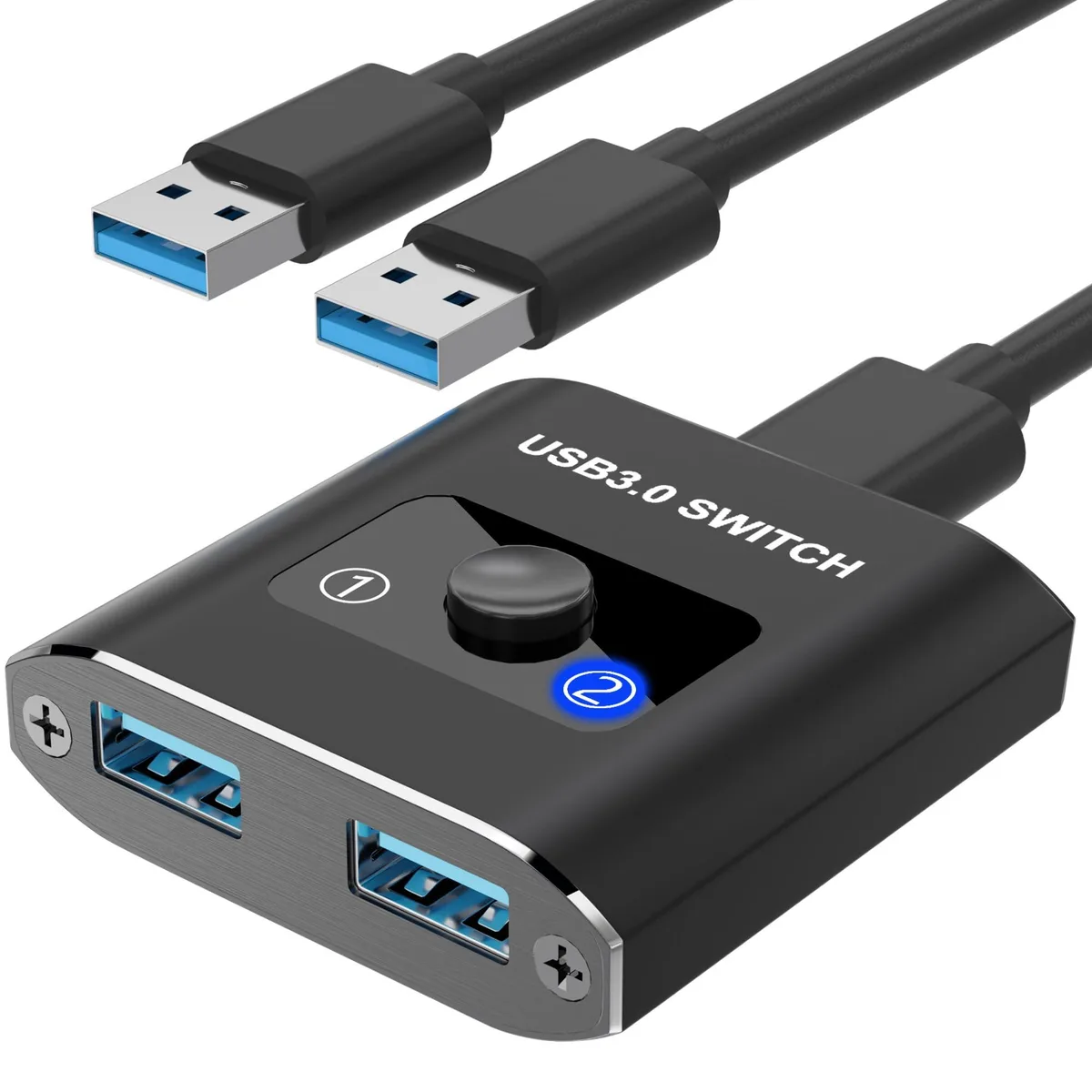


AUKOKIOULA USB 3.0 Bi-Directional Switch 2-in-1/1-in-2 KVM Switch
Bi-directional USB 3.0 switch shares one peripheral between two computers or two peripherals with one computer at 5 Gbps with push-button selection
- TypePlug In
- PC ConnectorsPlug In
- Console ConnectorsPlug In
- Computer ConnectionsPlug In
- Monitor Connections1 Port
- PC SelectionPush Buttons
- Share one USB 3.0 device between two computers with a single button press
- Switch two USB peripherals on one computer using the same bi‑directional switch
- Transfer data at up to 5 Gbps with backward compatibility to USB 2.0 and 1.1
- Driver‑free operation on Windows, Mac, Linux and Chrome OS with blue LED status lights
- Durable aluminium housing provides surge, overload and overheat protection without external power
Bi-Directional USB 3.0 Switch
This KVM switch lets two computers share one USB 3.0 peripheral or one computer toggle between two devices. It suits office workers, teachers, and technicians who move between desktops and want to avoid cable swapping. The unit operates in 2-in-1-out or 1-in-2-out modes without extra drivers or a power adapter.
Aluminium Shell With Push-Button Control
The aluminium housing resists fingerprints and helps dissipate heat during extended use. A single front button selects the active path while a blue LED shows which computer is connected. Two USB 3.0 cables are included, so the switch sits between hosts and the shared device with no additional wiring.
Replaces Manual Cable Swapping
It removes the wear of repeated plugging and unplugging on printers, scanners, keyboards, mice, drives, and webcams. The upgrade is worthwhile when two systems need regular access to the same USB 3.0 device and 5 Gbps throughput is sufficient. It does not carry video signals, so a separate display arrangement is still required.
Highlights
- Share one USB 3.0 device between two computers with a single button press
- Switch two USB peripherals on one computer using the same bi‑directional switch
- Transfer data at up to 5 Gbps with backward compatibility to USB 2.0 and 1.1
- Driver‑free operation on Windows, Mac, Linux and Chrome OS with blue LED status lights
- Durable aluminium housing provides surge, overload and overheat protection without external power
Specifications
| Brand | AUKOKIOULA |
|---|---|
| Series | Switch with USB Cable |
| Model | 1 |
| Part Number | 1 |
| Type | Plug In |
| PC Connectors | Plug In |
| Console Connectors | Plug In |
| Computer Connections | Plug In |
| Monitor Connections | 1 Port |
| PC Selection | Push Buttons |
| Monitors Supported | Plug In |
| Wire Gauge | 1 amps |
| Temperature | 120 degrees_fahrenheit to 30 degrees_fahrenheit |
| Audio Features | Plug In |
| Power Features | 5 volts, false |
| USB Features | Plug In |
| SplitterOnly | Switch with USB Cable, USB Switch |
| Application | Plug In, push_button |
| Features | Plug In, push_button, 1, IP00 |
| Dimensions | 2.2 cm x 10.7 cm x 15.4 cm |
| Package Contents | USB Switch |
Questions about this item
What practical speed does the USB 3.0 interface cap at?
The switch supports up to 5 Gbps data transmission and is backward compatible with USB 2.0 and USB 1.1.
What physical space and cabling does the unit need to fit?
The aluminum box measures 2.2 cm x 10.7 cm x 15.4 cm and includes two attached USB 3.0 cables for the computer connections.
How is it installed, and which step do people often miss?
Connect the cables to both computers and the shared peripheral, then press the button to select the active system; no driver or external power is required.
Also in this aisle
People compared these
Same shelf, same checkout — eight coins and a 30-minute rate lock.


Black Box Corporation
Black Box Corporation 4K60 HDMI Dual-Head KVM Switch 4 Port
$774.99
0.00916085BTC
In stock