


ALOGIC
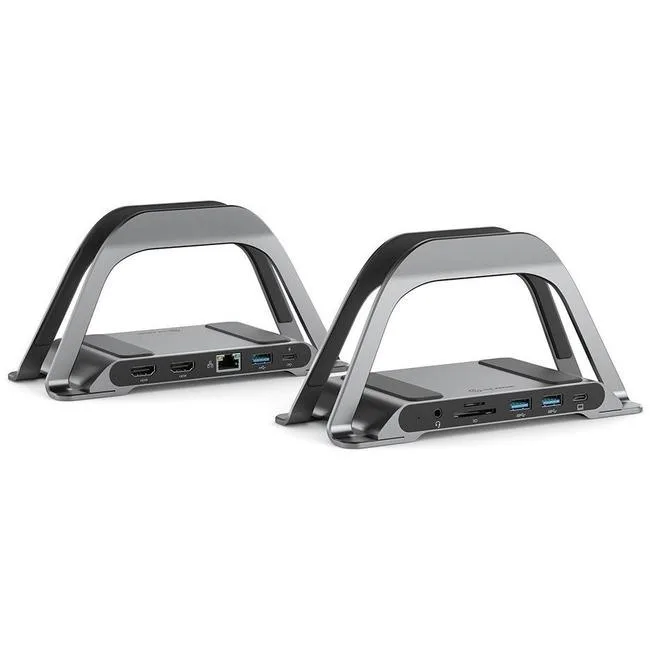
ALOGIC Bolt Plus 10-in-1 USB-C Docking Station 100W .8m cable
A 10-in-1 USB-C docking station with 100W power delivery and a .8m cable
- 10-in-1 expansion adds ten ports from one USB-C link
- 100 W power delivery charges the host laptop while you work
- Integrated stand lifts the device for better airflow and desk space
- Compact 0.8 m cable keeps the setup tidy without excess slack
- Works with Chromebook and MacBook for broad compatibility
What the dock does and who needs it
This ALOGIC Bolt Plus 10-in-1 USB-C Docking Station adds ten ports to a single USB-C connection while delivering up to 100W of power. It suits professionals who connect monitors, peripherals and wired networks through one cable on a Google Chromebook or Apple MacBook. The included .8m cable keeps the hub close to the laptop on a desk or stand.
Who benefits and who should look elsewhere
Users who want a tidy workstation with power delivery, video output and multiple USB ports in one device will benefit. Buyers who need more than ten connections or a longer tether between dock and computer should look at other solutions.
The specification that decides fit
The single figure that determines compatibility is the 100W power delivery rating; the host laptop must accept charging at that level over USB-C for the dock to power it while in use.
Highlights
- 10-in-1 expansion adds ten ports from one USB-C link
- 100 W power delivery charges the host laptop while you work
- Integrated stand lifts the device for better airflow and desk space
- Compact 0.8 m cable keeps the setup tidy without excess slack
- Works with Chromebook and MacBook for broad compatibility
Specifications
| Brand | ALOGIC |
|---|
Questions about this item
How does the 100W power delivery figure work when the dock is connected to my laptop?
The dock passes up to 100W of power from your USB-C charger through to the laptop, so the laptop charges at the rate its own port allows while the dock runs its other ports.
What does the USB-C interface on this dock actually limit in everyday use?
The single USB-C connection carries video, data and charging together, so the total bandwidth and power available to the dock's ports are shared across whatever you plug in.
What physical space does the included stand need on my desk?
The stand holds the dock upright, so you only need a footprint roughly the size of the dock itself plus room for the 0.8m cable to reach your laptop.
Also in this aisle
People compared these
Same shelf, same checkout — eight coins and a 30-minute rate lock.


Kensington
Kensington Desk Mount Cable Anchor K64613WW accessory
- Black
- Provides a secure a…
$19.99
0.00023182BTC
In stock
Panasonic
Panasonic CF-VDR291U laptop cooling pad
- Optical Drive
- Buffer Size: 2 MB B…
$213.99
0.00248159BTC
In stock
eReplacements
eReplacements PB992A-ER laptop battery 14.4V
- Battery
- Lithium-Ion
$65.99
0.00076527BTC
In stock