


allentian
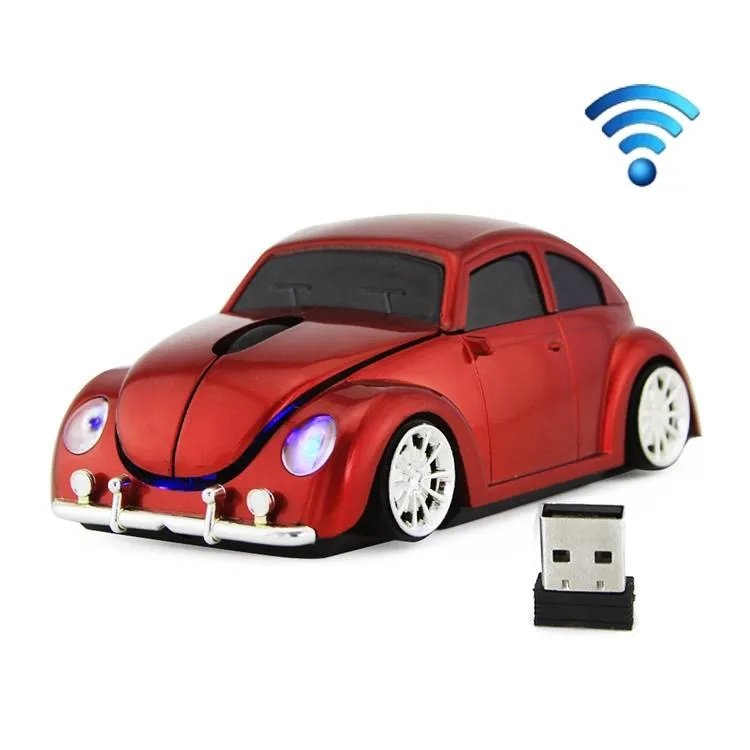
allentian CM0010B 1200 DPI 3-keys Car Shape Wireless Mouse Red
A red car-shaped wireless mouse with 1200 DPI resolution, three buttons and a 2.4 GHz receiver working up to ten metres
- ColorRed
- Precise cursor control with 1200 DPI resolution
- Reliable wireless link up to ten metres via 2.4 GHz receiver
- Comfortable grip from anti-slip rubber scroll wheel
- Mirror-finish UV coating resists fingerprints and wear
- Compact car-shaped design weighs 120 g for easy portability
Car-Shaped Wireless Mouse
The allentian CM0010B is a 1200 DPI wireless mouse moulded in a compact car shape. It connects through a 2.4 GHz receiver that works within ten metres. The ABS shell receives a UV mirror finish and the scroll wheel uses soft rubber for grip. Two AAA batteries power the device, supplied without cells.
Upgrade from Basic Office Mice
This model replaces a standard two-button mouse when a user wants a higher 1200 DPI sensor and a distinctive ergonomic silhouette. The jump is worth it for anyone who values a novelty form factor and a scroll wheel that turns freely without affecting operation. Buyers who need programmable buttons or adjustable sensitivity should look elsewhere.
Build Integration
The mouse measures 11.7 by 6 by 4.3 centimetres and weighs 120 grams, so it fits easily alongside any keyboard layout. The 2.4 GHz receiver occupies a single USB port and requires no driver installation. Because the unit ships without batteries, the builder must supply two AAA cells before first use.
Highlights
- Precise cursor control with 1200 DPI resolution
- Reliable wireless link up to ten metres via 2.4 GHz receiver
- Comfortable grip from anti-slip rubber scroll wheel
- Mirror-finish UV coating resists fingerprints and wear
- Compact car-shaped design weighs 120 g for easy portability
Specifications
| Color | Red |
|---|
Questions about this item
Does the 11.7 x 6 x 4.3 cm car-shaped body fit a standard laptop bag pocket?
At 11.7 cm long and 4.3 cm tall it slides into most accessory sleeves, but check your pocket depth before buying.
How do I pair the 2.4 GHz receiver, and what step do people miss?
Insert the receiver, add two AAA batteries, then press the connect button on the mouse underside — skipping that button press is the common mistake.
When will the two AAA batteries need replacing?
Typical office use gives several months per pair; the scroll wheel uses soft rubber that resists wear, so only the batteries need periodic swaps.
Also in this aisle
People compared these
Same shelf, same checkout — eight coins and a 30-minute rate lock.


Lenovo
Lenovo 42T3273 Black Replacement Keyboard for ThinkPad T60 T61
- Thinkpad T60 T61 Ke…
- Black
$29.99
0.00034524BTC
In stock