


AJMRTC
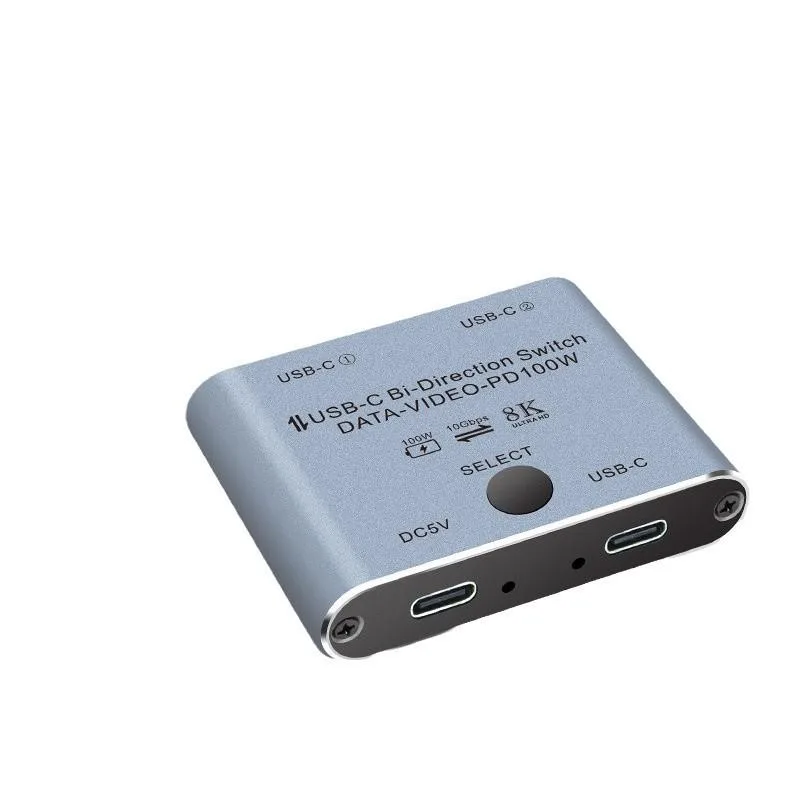
AJMRTC USBC-201 2-Port Bi-Directional USB-C KVM Switch
A bi-directional USB-C KVM switch lets two laptops share one monitor, keyboard, mouse and peripherals with 8K@60Hz video, 10Gbps data and 100W charging
- TypeBi-Directional 2 Port USB-C KVM Switcher
- Computer Connections2 × USB-C Input Ports
- Monitor Connections1 × USB-C Output Port
- Video Resolution8K@60Hz / 4K@144Hz HDR
- PC SelectionOne Button Manual Switch
- Switch two laptops to one screen with one button
- Use one laptop on two displays for presentations
- 8K@60Hz and 4K@144Hz HDR video quality
- 10Gbps data speed for fast file transfers
- 100W PD charging keeps both laptops powered
Two-way USB-C KVM for dual laptops
The AJMRTC USBC-201 is a bi-directional switch that lets two USB-C laptops share one monitor, keyboard and mouse. It also works in reverse so a single laptop can feed two displays, though only one screen shows content at a time. An aluminium chassis keeps the unit compact for desk use.
Suits users with two USB-C computers
Ideal for anyone moving between a work notebook and a personal Mac or Windows laptop who wants a single button press to swap the whole desk setup. Not suited to buyers who need both external monitors active simultaneously or who require video inputs other than USB-C.
8K 60 Hz video over USB-C
The switch passes DisplayPort Alternate Mode video up to 8K at 60 Hz and 4K at 144 Hz HDR from either connected laptop. This resolution ceiling is the deciding factor for creators and engineers who need that bandwidth; lower-resolution workflows will not need the headroom.
Highlights
- Switch two laptops to one screen with one button
- Use one laptop on two displays for presentations
- 8K@60Hz and 4K@144Hz HDR video quality
- 10Gbps data speed for fast file transfers
- 100W PD charging keeps both laptops powered
Specifications
| Brand | AJMRTC |
|---|---|
| Series | AJMRTC USB-C KVM Switch Series |
| Model | USBC-201 |
| Part Number | AJMRTC-KVM-USBC201 |
| Type | Bi-Directional 2 Port USB-C KVM Switcher |
| Computer Connections | 2 × USB-C Input Ports |
| Monitor Connections | 1 × USB-C Output Port |
| Video Resolution | 8K@60Hz / 4K@144Hz HDR |
| PC Selection | One Button Manual Switch |
Questions about this item
What cables are included and what must I provide to connect two laptops and one monitor?
The switch includes the selector unit only; you need three USB-C cables supporting DP Alt Mode, USB 3.1 Gen2 data and up to 100W PD — two for the laptop inputs and one for the monitor output.
When should I use the 2-in-1-out mode versus the 1-in-2-out mode?
Choose 2-in-1-out to share one monitor, keyboard and mouse between two laptops; choose 1-in-2-out to send a single laptop's signal to either of two monitors one at a time for presentations.
What does the 8K@60Hz rating mean for my daily 4K workflow?
It guarantees full 4K@144Hz HDR bandwidth through the switch, so creative work, video playback and high-refresh gaming run without compression or frame drops.
Also in this aisle
People compared these
Same shelf, same checkout — eight coins and a 30-minute rate lock.


Black Box Corporation
Black Box Corporation 4K60 HDMI Dual-Head KVM Switch 4 Port
$774.99
0.00923707BTC
In stock