


AccuBANKER
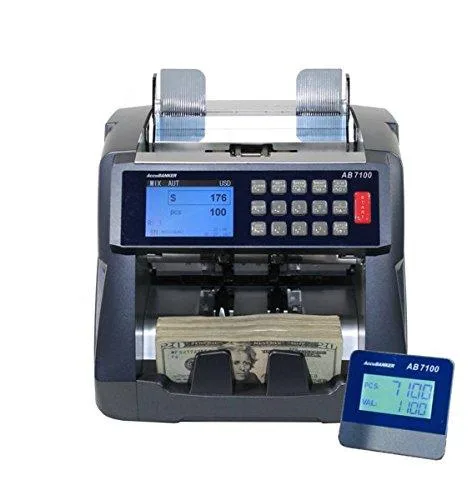
AccuBANKER AB7100 Mixed Bill Value Counter
Counts mixed bills, sorts by denomination, totals value, and detects counterfeits with five security checks
- TypeCounters & Sorters
- ColorBlue
- Quantity1 each
- Parts3 Years
- Labor3 Years
- Counts mixed bills and totals value automatically
- Detects counterfeits with five security checks
- Captures serial numbers for audit trails
- Operates in Count, Mix, Sort and Local modes
- Includes AccuClips and auxiliary display
Mixed denomination value counter
The AccuBANKER AB7100 is a mixed denomination value counter designed for businesses that need to process stacks of assorted bills quickly. It counts, sorts, and provides a total value with a detailed breakdown by denomination. Four operating modes — Count, Mix, Sort, and Local — cover daily cash-handling workflows. It ships with AccuClips and an external auxiliary display for flexible placement.
Thermals noise and power
The unit runs on standard mains power and operates at a noise level suitable for a back-office or teller station. No special cooling or ventilation is required beyond normal room airflow. Power draw is consistent with desktop cash-handling equipment of this class. The three-year parts and labour coverage supports continuous daily use.
Build quality and connectivity
A blue chassis houses the feed mechanism and sensor array, with the external auxiliary display connecting via a dedicated cable for remote viewing. AccuClips attach to the output stacker to keep counted bundles organised. The serial-number capture function logs each bill for audit trails. This device is not suited for operations that require coin handling or cheque processing.
Highlights
- Counts mixed bills and totals value automatically
- Detects counterfeits with five security checks
- Captures serial numbers for audit trails
- Operates in Count, Mix, Sort and Local modes
- Includes AccuClips and auxiliary display
Specifications
| Type | Counters & Sorters |
|---|---|
| Brand | AccuBANKER |
| Color | Blue |
| Quantity | 1 each |
| Parts | 3 Years |
| Labor | 3 Years |
Questions about this item
How do I set up the AB7100 and what step is often missed?
Place the unit on a stable surface, connect power, and select the correct operating mode — Count, Mix, Sort, or Local — before loading bills; skipping mode selection is the most common error.
What maintenance will the AB7100 need over time?
The sensor array and feed rollers require periodic cleaning to maintain the five counterfeit detection methods; the included AccuClips assist with routine roller access.
What limit appears first during long counting sessions?
Continuous high-volume use can cause the feed mechanism to overheat, triggering an automatic pause until the unit cools.
Also in this aisle
People compared these
Same shelf, same checkout — eight coins and a 30-minute rate lock.


ID TECH
ID TECH IDMB-333133B credit card reader
- MagStripe Reader
- Keyboard Wedge
$52.99
0.00061093BTC
In stock
Brother
Brother TZES121 9mm Black on Clear Extra Strength Adhesive Tape pos accessory
- Label Accessories
- Black on Clear Indu…
$10.99
0.00012671BTC
In stock
Intermec
Intermec E23067 DuraTran II Gloss Polyester Thermal Transfer Labels pos accessory
- Thermal Transfer Pr…
- Desktop
$107.99
0.00124504BTC
In stock