
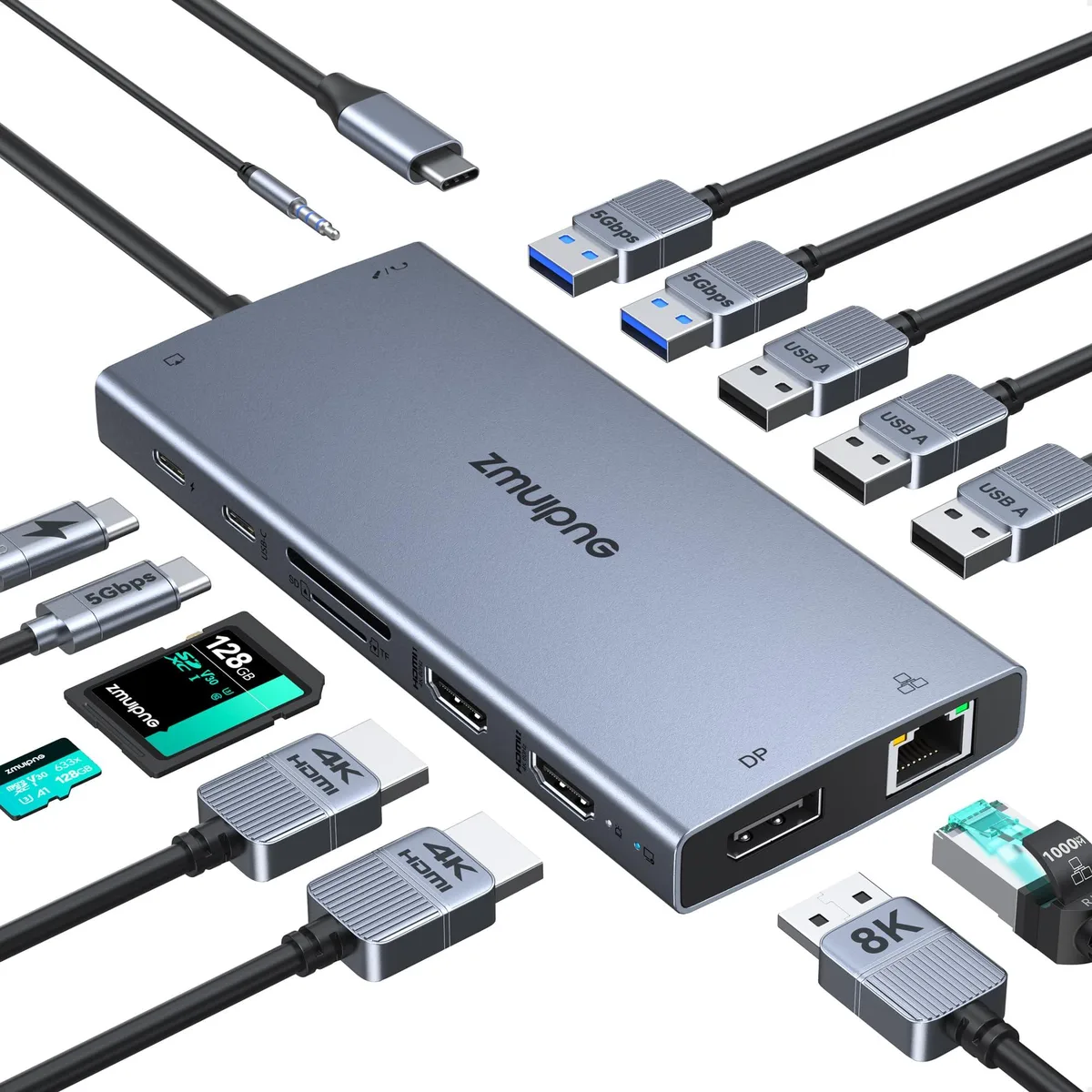


5550/ 15-in-1 docking station 2×HDMI 4K DP 8K 100W PD
Connects up to three external displays via two HDMI 4K and one DP 8K ports, adds 15 ports including gigabit Ethernet and 100 W pass-through charging
- ColorGrey
- CompatibilityCompatible with all laptops with thunderbolt3,4,USB C 3.1 Ge
- Thunderbolt 3usb2.0
- Ports Spechdmi, displayport, usb3.0, usb_c, usb2.0, 7, 15
- FunctionCompatible with all laptops with thunderbolt3,4,USB C 3.1 Ge
- Triple display support via 2×HDMI 4K and DP 8K
- 100 W Power Delivery keeps laptop charged while working
- 15 ports include Gigabit Ethernet and SD readers
- Compatible with Thunderbolt 3, 4 and USB-C PD laptops
- Compact grey design with power button and status lamp
15-in-1 USB-C docking station
The ZMUIPNG 5550/ docking station adds fifteen ports to a laptop through a single USB-C connection. It provides two HDMI outputs, one DisplayPort, three USB 3.0 ports, two USB 2.0 ports, one USB-C 3.0 port, gigabit Ethernet, SD and Micro SD card readers and a 3.5 mm audio jack. The unit is aimed at professionals who need multi-monitor productivity and legacy peripheral support from a compact hub.
Thermals, noise and power
The dock draws up to 100 W of Power Delivery to charge the host laptop while simultaneously driving attached displays and peripherals. Passive cooling keeps operation silent during typical office workloads. Power consumption scales with the number of active ports and connected displays, but the aluminium chassis dissipates heat without a fan.
Build integration
A single USB-C cable carrying Thunderbolt 3, USB 3.1 Gen 1, Gen 2 or USB 3.2 Gen 1, Gen 2 with DisplayPort Alt Mode is the only host link required. The dock frees up the laptop's native ports and replaces multiple single-purpose adapters. It is not suited for users who need more than three external monitors or who require a second upstream USB-C port for daisy-chaining.
Highlights
- Triple display support via 2×HDMI 4K and DP 8K
- 100 W Power Delivery keeps laptop charged while working
- 15 ports include Gigabit Ethernet and SD readers
- Compatible with Thunderbolt 3, 4 and USB-C PD laptops
- Compact grey design with power button and status lamp
Specifications
| Brand | ZMUIPNG |
|---|---|
| Series | 15 IN 1 Docking Station, ZMUIPNG |
| Model | MH19 |
| Color | Grey |
| Compatibility | Compatible with all laptops with thunderbolt3,4,USB C 3.1 Gen 1,Gen2 and USB-C 3.2 Gen1,Gen 2 with Power Delivery DisplayPort functions: Dell XPS 17 Laptop 9730 9710, XPS 16 Laptop 9640, XPS 15 Laptop 9530 9550 9560, Dell Latitude 3540 Laptop, Latitude 3440 3450 3550 5450 5550 7440 7640 7650 E7470 Laptop, Inspiron 15 7580; HP Spectre Laptop 13-af001TU, Spectre x360 13t, HP EliteBook 860 G9 G10 16 inch, EliteBook 1040 G9 G10 14inch, ThinkPad E15 Gen 4, ThinkPad E16 Gen 1, etc. Note: if your laptop has HDMI port, it is not compatible even if it meets the above conditions |
| Thunderbolt 3 | usb2.0 |
| Ports Spec | hdmi, displayport, usb3.0, usb_c, usb2.0, 7, 15 |
| Function | Compatible with all laptops with thunderbolt3,4,USB C 3.1 Gen 1,Gen2 and USB-C 3.2 Gen1,Gen 2 with Power Delivery DisplayPort functions: Dell XPS 17 Laptop 9730 9710, XPS 16 Laptop 9640, XPS 15 Laptop 9530 9550 9560, Dell Latitude 3540 Laptop, Latitude 3440 3450 3550 5450 5550 7440 7640 7650 E7470 Laptop, Inspiron 15 7580; HP Spectre Laptop 13-af001TU, Spectre x360 13t, HP EliteBook 860 G9 G10 16 inch, EliteBook 1040 G9 G10 14inch, ThinkPad E15 Gen 4, ThinkPad E16 Gen 1, etc. Note: if your laptop has HDMI port, it is not compatible even if it meets the above conditions |
Questions about this item
How do I connect three monitors to the 5550/ dock and which port should I plug in first?
Plug the DP 8K port in first, then connect the two HDMI 4K ports; Windows will then enable triple display with all three monitors active.
Will the 100W USB-C PD port need a firmware update or a new power adapter over time?
The 100W PD port draws power from your laptop’s original charger, so no separate adapter or firmware update is required for the dock itself.
What resolution limit appears first when I run all three displays for long periods?
With three monitors connected the dock caps every output at 4K resolution, so 4K is the ceiling you hit before any higher mode could be attempted.
Also in this aisle
People compared these
Same shelf, same checkout — eight coins and a 30-minute rate lock.


Kensington
Kensington Desk Mount Cable Anchor K64613WW accessory
- Black
- Provides a secure a…
$19.99
0.0002367BTC
In stock
Panasonic
Panasonic CF-VDR291U laptop cooling pad
- Optical Drive
- Buffer Size: 2 MB B…
$213.99
0.00253381BTC
In stock
eReplacements
eReplacements PB992A-ER laptop battery 14.4V
- Battery
- Lithium-Ion
$65.99
0.00078137BTC
In stock