


WRIARICH
WRIARICH Triple Monitor KVM Switch 2 DP + HDMI 8K@60Hz 4K@144Hz Wired Remote
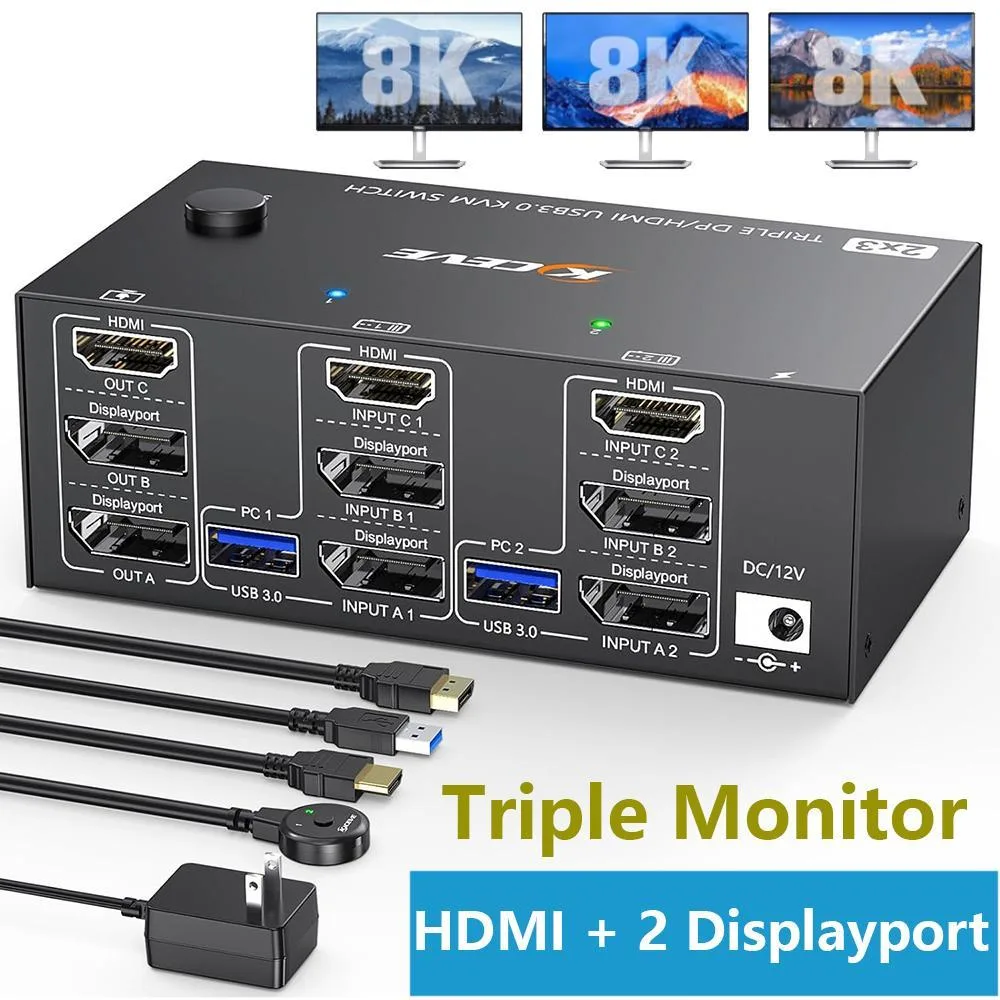
A KVM switch that lets two computers share three monitors at up to 8K 60 Hz or 4K 144 Hz, plus four USB 3.0 ports, switched by front button or 1.5 m wired remote
- TypeHDMI + 2 Displayport
- PC Connectors2 PCs
- Computer Connections2 Ports
- Monitor Connections3 Ports
- Video Resolution7680 x 4320
- PC SelectionPush Buttons
- Control two PCs with one keyboard, mouse and triple monitors
- 8K 60 Hz via HDMI 2.1 and 4K 144 Hz via DisplayPort 1.4
- Four USB 3.0 ports deliver 5 Gbps for peripherals
- Driver-free on Windows, Mac and Linux with button or 1.5 m wired remote
- Compact 4.72 x 2.56 x 1.77 in unit weighs 260 g
Triple-monitor KVM for two PCs
This KVM switch lets two desktops or laptops share three monitors and four USB 3.0 peripherals. It supports both extended and mirror display modes across the three screens. The unit works with Windows, Linux and Mac OS without driver installation. A wired remote and front-panel buttons provide two ways to change the active computer.
Plug-and-play with included cables
The package supplies two DisplayPort 1.4 cables, one HDMI 2.1 cable and two USB 3.0 cables so each PC can be connected immediately. Each computer requires one HDMI and two DisplayPort links plus a USB cable for triple-screen operation. No external power supply is needed beyond the provided adapter. Switching takes two to four seconds and is indicated by two-colour LEDs.
Check your graphics outputs before ordering
Verify that each source machine has one HDMI and two DisplayPort outputs available simultaneously. Monitors must accept the corresponding inputs for the desired resolution and refresh rate. The wired remote cable is 1.5 metres long, so confirm the switch can sit within that distance of your usual position. Buyers needing single- or dual-monitor setups or more than two computers will require a different device.
Highlights
- Control two PCs with one keyboard, mouse and triple monitors
- 8K 60 Hz via HDMI 2.1 and 4K 144 Hz via DisplayPort 1.4
- Four USB 3.0 ports deliver 5 Gbps for peripherals
- Driver-free on Windows, Mac and Linux with button or 1.5 m wired remote
- Compact 4.72 x 2.56 x 1.77 in unit weighs 260 g
Specifications
| Type | HDMI + 2 Displayport |
|---|---|
| PC Connectors | 2 PCs |
| Computer Connections | 2 Ports |
| Monitor Connections | 3 Ports |
| Video Resolution | 7680 x 4320 |
| PC Selection | Push Buttons |
| Monitors Supported | Triple Monitors |
| LED Indicators | Yes |
| Power Features | Requires no additional power supply |
| USB Features | with USB support |
| Application | This 3 monitors KVM switch allows 2 desktops or laptops to share 3 monitors and 4 USB 3.0 ports(for wired/wireless keyboard,mouse,webcam,Hard disk, etc.).support mirror and extended display modes. |
| Features | 2 computers share one set of keyboard mouse and 3 monitors. KVM triple monitors support extended and mirror display. Support wired or wireless keyboard and mouse. Cross support most major OS including Windows, Linux, Mac OS. USB KVM switch with 4 USB 3.0 ports for keyboard, mouse, printer, etc. Switching modes: Button switch and wired remote (1.5m),switch between 2 computers just need 2-4 seconds, fast and convenient. |
| Dimensions | 4.72 x 2.56 x 1.77 inches |
| Weight | 260g |
| Package Contents | 1x Triple Monitor KVM Switch, 2x DP1.4 Cable, 1x HDMI2.1 Cable, 2x USB 3.0 Cable, 1x Power Adapter, 1x Wired Remote, 1x User's Manual |
Questions about this item
How do I verify the KVM is delivering 7680x4320 at 60Hz after connecting my three monitors?
Open the display settings on each PC and confirm the resolution shows 7680x4320 at 60Hz; the two front-panel LEDs will switch colour when you change the active computer using the button or the wired remote.
Which cables and accessories are included, and what must I supply myself?
The box contains the KVM switch, two DP 1.4 cables, one HDMI 2.1 cable, two USB 3.0 cables, a power adapter, a 1.5 m wired remote, and a manual; you must provide the second HDMI cable and the second DisplayPort cable for the other PC.
Should I choose the DisplayPort or HDMI input for 4K at 144Hz gaming?
Use the DisplayPort inputs, which support 4K at 144Hz, while the HDMI input is limited to 4K at 60Hz.
Also in this aisle
People compared these
Same shelf, same checkout — eight coins and a 30-minute rate lock.


Black Box Corporation
Black Box Corporation 4K60 HDMI Dual-Head KVM Switch 4 Port
$774.99
0.00923927BTC
In stock