


WRIARICH
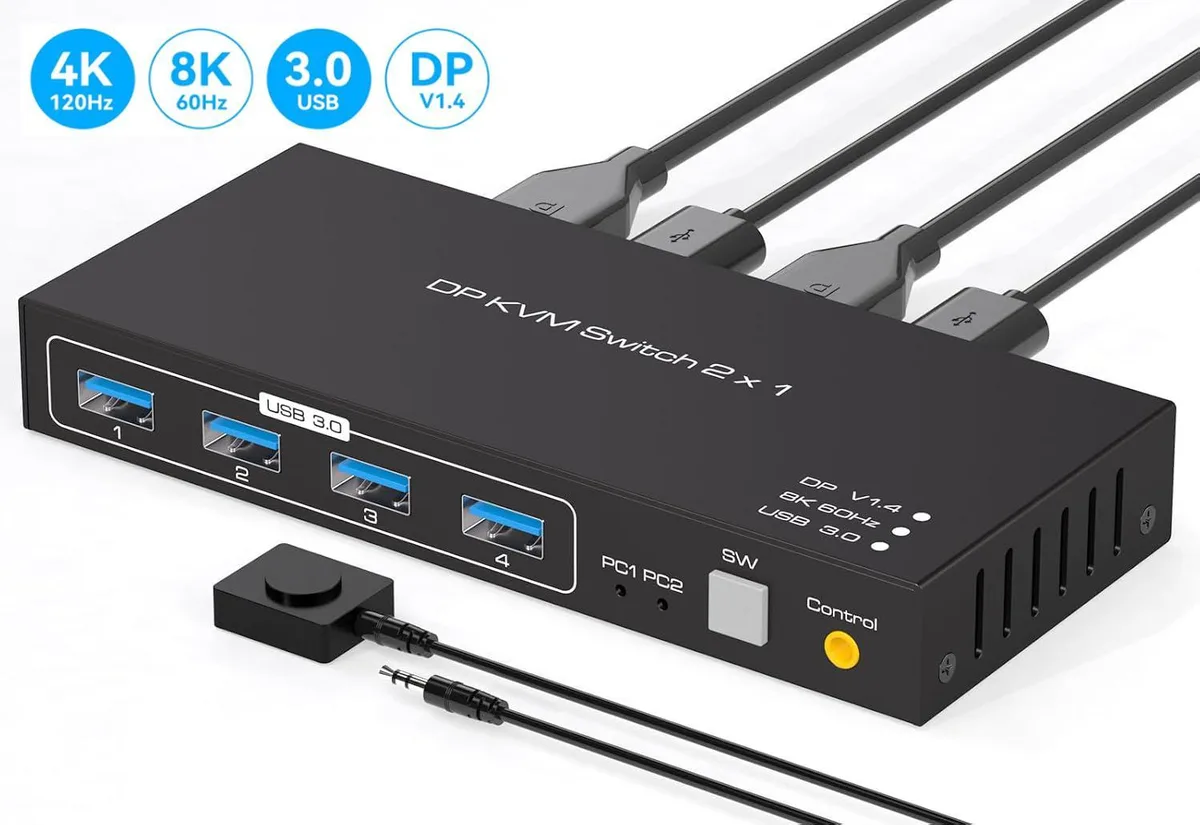
WRIARICH SW204N DP1.4 KVM Switch 2-Port 8K60Hz 4K120Hz 4×USB 3.0
Switches two computers to one DisplayPort monitor at up to 8K60Hz or 4K120Hz with four USB 3.0 ports for shared peripherals
- TypeDisplayPort, USB
- PC ConnectorsDP1.4, USB 3.0
- Computer Connections2 Ports
- Monitor Connections1 Port
- Video ResolutionThe Displayport 1.4 Switch supports 8K60Hz 4K120HZ, DP1.4 ba
- PC SelectionPush Buttons and Wired Remote
- Switch two PCs on one monitor with push-button or wired remote
- Share keyboard, mouse and four USB 3.0 devices between both computers
- Drive 8K at 60 Hz or 4K at 120 Hz over DisplayPort 1.4
- USB 3.0 ports deliver 5 Gbps data bandwidth for peripherals
- Compact 15 × 6.5 × 2.2 cm unit powered by included DC adapter
Two-Port DisplayPort KVM Switch
This DisplayPort 1.4 KVM switch lets two computers share one monitor, one keyboard and one mouse. It supports video resolutions up to 7680×4320 at 60 Hz and 4K at 120 Hz. Four USB 3.0 ports provide up to 5 Gbps data transfer for shared peripherals. A wired remote and front push buttons give instant source selection.
Suited For Dual-System Desks, Not Single-PC Users
The switch is built for operators who move between two workstations — developers, editors or office staff sharing a printer or scanner across both machines. It removes the need to swap cables or reach behind the monitor. Buyers with only one computer or who need more than two host connections will not benefit from this device.
Compact Hub That Needs External Power
The unit measures 15 × 6.5 × 2.2 cm and weighs 200 g, so it fits on a crowded desk without blocking airflow. It requires the included DC power adapter for stable 48 Gbps video bandwidth and reliable USB 3.0 operation. Two USB cables and two DisplayPort cables (not included) connect the host PCs, freeing up ports on each machine for other tasks.
Highlights
- Switch two PCs on one monitor with push-button or wired remote
- Share keyboard, mouse and four USB 3.0 devices between both computers
- Drive 8K at 60 Hz or 4K at 120 Hz over DisplayPort 1.4
- USB 3.0 ports deliver 5 Gbps data bandwidth for peripherals
- Compact 15 × 6.5 × 2.2 cm unit powered by included DC adapter
Specifications
| Model | SW204N KVM Switch |
|---|---|
| Type | DisplayPort, USB |
| PC Connectors | DP1.4, USB 3.0 |
| Computer Connections | 2 Ports |
| Monitor Connections | 1 Port |
| Video Resolution | The Displayport 1.4 Switch supports 8K60Hz 4K120HZ, DP1.4 backwards compatible with DP1.2,DP1.1. |
| PC Selection | Push Buttons and Wired Remote |
| LED Indicators | Yes |
| Power Features | Come with DC Power Adapter |
| USB Features | This KVM Switch displayport 2 computer 1 monitor has 4 USB 3.0 for sharing a set of keyboard and mouse devices. Supports video bandwidth up to 48Gbps, USB 3.0 data transfer rates up to 5Gbps and backward compatible with USB 2.0 and USB 1.1 devices. |
| Application | The Displayport Switch 2 port allows free switching between two sets of sources, controlling 2 computers and sharing 1 monitor with just 1 set of keyboard and mouse. There are 4 USB 3.0 ports for connecting barcode scanners, USB hard drives or other USB devices to the KVM. |
| Features | Using only 1 set of keyboard, mouse and monitor to control 2 computer devices Available to use keyboard and mouse without any delay after switch input sources. With 4 USB 3.0 hub port, it is possible to connect bar code scanner, USB hard drive or other USB devices to KVM Support resolution up to 7680*4320@60Hz 4:4:4 Support front panel buttons and External switch button to control KVM to switch inputs. |
| Dimensions | 15 x 6.5 x 2.2 cm |
| Weight | 200g |
| Package Contents | 1 x 8K DP KVM Switch, 1 x Wired Remote, 2 x USB Cable, 1 x Power Adapter, 1 x User Manual |
Questions about this item
What DisplayPort cables do I need to connect my two computers to this KVM switch?
Each computer requires a DisplayPort 1.4 cable to reach the 48 Gbps video bandwidth; the switch is backward compatible with DP 1.2 and 1.1 cables at lower resolutions.
Will my existing USB 2.0 keyboard and mouse work through the four USB 3.0 ports?
Yes, the four USB 3.0 ports are backward compatible with USB 2.0 devices, so older keyboards and mice function normally.
How can I confirm the switch is delivering 8K at 60 Hz after setup?
Check your monitor’s on-screen information or OS display settings; they should report 7680 × 4320 at 60 Hz when the switch is on the correct input.
Also in this aisle
People compared these
Same shelf, same checkout — eight coins and a 30-minute rate lock.


Black Box Corporation
Black Box Corporation 4K60 HDMI Dual-Head KVM Switch 4 Port
$774.99
0.00932285BTC
In stock