


WRIARICH
WRIARICH OZK1-New 8K 120Hz 2-Port HDMI KVM Switch
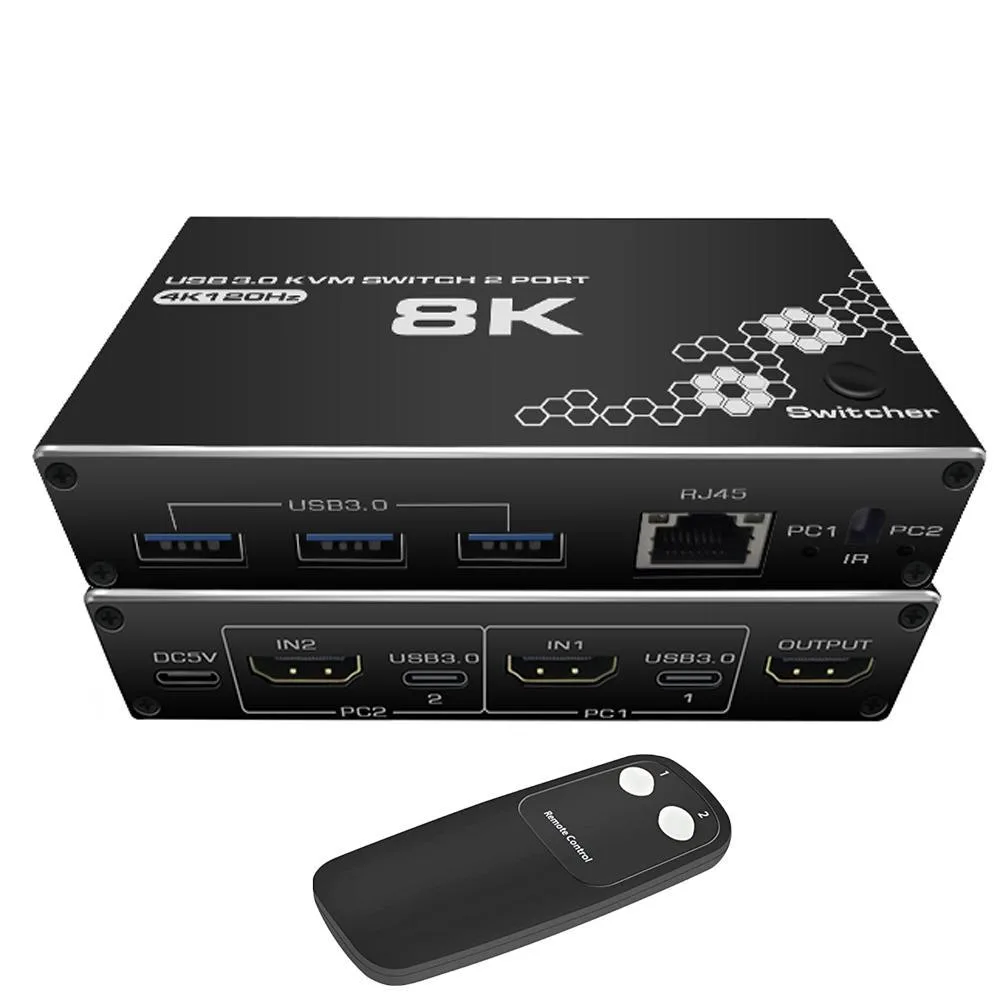
Two-port HDMI KVM switch shares one 8K monitor, keyboard, mouse, three USB 3.0 devices and an RJ45 link between two computers with manual or remote switching
- TypeHDMI, USB
- PC ConnectorsHDMI and USB
- Computer Connections2 Ports
- Monitor Connections1 Ports
- Video Resolution7680 x 4320
- PC SelectionManual Switch and Remote Control
- Control two computers with one monitor and peripherals
- 8K resolution at 7680 x 4320 @ 30 Hz for sharp detail
- 4K at 120 Hz and 1080p at 240 Hz for high-refresh gaming
- Three USB 3.0 ports share devices at up to 5 Gbps
- Switch via front button or included remote control
What this KVM switch does
The WRIARICH OZK1-New lets you operate two computers from one monitor, one keyboard, one mouse and a single RJ45 network connection. It supports video up to 7680 x 4320 at 30 Hz and drops back to 3840 x 2160 at 120 Hz or 1920 x 1080 at 240 Hz for higher refresh rates. Three USB 3.0 ports share printers, drives or cameras at up to 5 Gbps. A 12 V power adapter keeps high-draw peripherals stable.
Check your cables and ports first
Each computer must supply an HDMI output and a USB link to the switch; the monitor plugs into the single HDMI output. Verify that your sources can send 7680 x 4320 at 30 Hz or 3840 x 2160 at 120 Hz if you need those modes. The box includes two USB data cables and a remote, so no extra cabling is required for basic operation. The switch measures 5.43 x 5.35 x 1.46 inches and weighs 9.52 ounces.
Steady sharing under load
The HDCP 2.3 compliant HDMI 2.0b path maintains 48 Gbps bandwidth during long sessions without signal drop. USB 3.0 ports sustain 5 Gbps transfers for large file moves or backup drives while the RJ45 port holds a constant network link. Manual button or remote switching changes sources in 2 to 5 seconds, and the 3-second auto-scan cycles cleanly without blanking the display. The external 12 V supply prevents the voltage sag that can disconnect power-hungry USB devices over time.
Highlights
- Control two computers with one monitor and peripherals
- 8K resolution at 7680 x 4320 @ 30 Hz for sharp detail
- 4K at 120 Hz and 1080p at 240 Hz for high-refresh gaming
- Three USB 3.0 ports share devices at up to 5 Gbps
- Switch via front button or included remote control
Specifications
| Brand | WRIARICH |
|---|---|
| Series | OZK1-New |
| Model | OZK1-New |
| Type | HDMI, USB |
| PC Connectors | HDMI and USB |
| Computer Connections | 2 Ports |
| Monitor Connections | 1 Ports |
| Video Resolution | 7680 x 4320 |
| PC Selection | Manual Switch and Remote Control |
| AutoScan Interval | 3 seconds |
| LED Indicators | Yes |
| USB Features | with USB support |
| Application | 4K 120Hz 2 Ports USB KVM HDMI Switch Box: 8K HDMI KVM Switcher Box allows you to control 2 computer with only one set of controls and display screen (mouse and keyboard) and one RJ45 port. Built-in high-performance chips, using high technology to decode, plug and play, no need to drive. This will be a good choice for Enterprise, Office, Multimedia Teaching, Meeting Room, Gaming Room, Home Theater, Research Test, etc. ? |
| Features | 2 PCs Share Multiple Devices:2 in 5 out USB 3.0 HDMI RI45 kvm switch, supports 2 computers sharing 3 USB devices, 1 RJ45 device and 1HDMI device like keyboards, mouses, U disk, printers, scanners, USB cameras, etc. 4K@120Hz HD display:This usb 3.0 kvm switch 2 port supports resolution up to 4K@120Hz and backward compatible. Kvm switch also support HDMI 2.0 and RJ45 Internet connection.Make your image display more delicate and lifelike, and your experience richer and more convenient. RJ45 Network Switch: The KVM switch is outfitted with 1 RJ45 port, offering a network for one of your |
| Dimensions | 5.43 x 5.35 x 1.46 inches |
| Weight | 9.52 Ounces |
| Package Contents | KVM switch body*1pc, USB data Cable*2PCS, USB Manual* 1PC, Remote Controller *1PC |
Questions about this item
Does the box include the cables needed to connect two computers and a monitor?
The package contains the KVM unit, two USB data cables for the computer links, a remote control and a manual. You must supply your own two HDMI cables for the video connections.
When should I pick the 8K 30 Hz mode instead of the 4K 120 Hz mode?
Choose 7680 x 4320 at 30 Hz for maximum desktop space on an 8K display. Choose 3840 x 2160 at 120 Hz for smoother motion in fast-paced games on a 4K monitor.
What does the 48 Gbps bandwidth figure mean for my gaming monitor?
It provides enough throughput for 4K at 120 Hz with full colour depth, so a high-refresh gaming screen will run at its native timing without compression.
Also in this aisle
People compared these
Same shelf, same checkout — eight coins and a 30-minute rate lock.


Black Box Corporation
Black Box Corporation 4K60 HDMI Dual-Head KVM Switch 4 Port
$774.99
0.00933228BTC
In stock