


WRIARICH
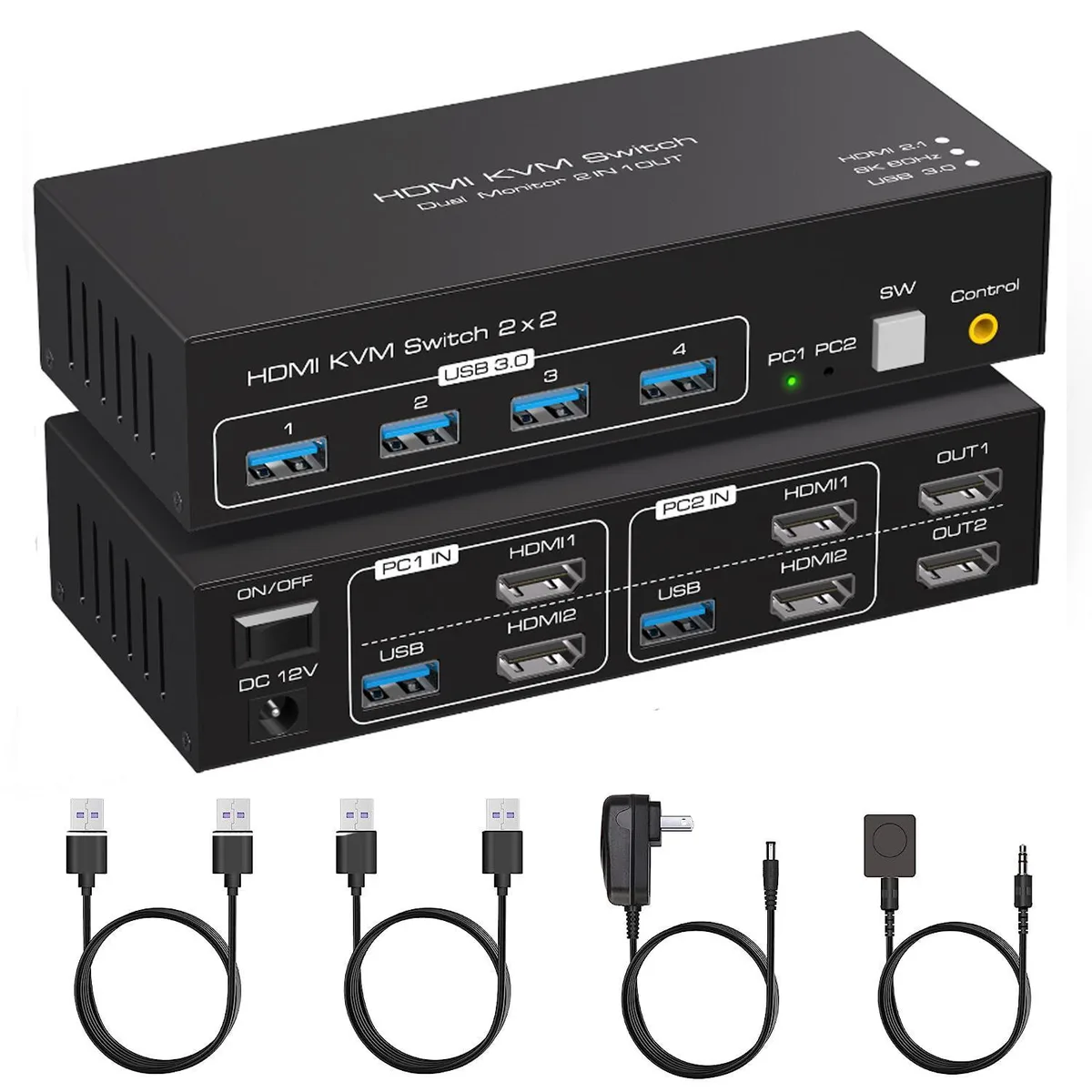
WRIARICH Dual Monitor HDMI KVM Switch 2 PCs 8K60Hz/4K120Hz 4 USB 3.0 Ports
Dual-monitor HDMI KVM switch lets two PCs share two displays, a keyboard, mouse and four USB 3.0 peripherals at up to 8K60Hz or 4K120Hz, with push-button and wired remote switching
- TypeHDMI, USB
- PC Connectors2 PCs
- Computer Connections2 Ports
- Monitor Connections2 Ports
- Video Resolution8K@60Hz/4K@120Hz
- PC SelectionPush Buttons
- Control two computers from one keyboard, mouse and dual-monitor setup
- Switch instantly via front buttons or wired remote with LED status
- USB 3.0 hub shares four peripherals at up to 5.0 Gbps
- Drives two displays at 8K 60 Hz or 4K 120 Hz
- Works with Windows, Mac, Linux and Unix plug-and-play
Dual-monitor HDMI KVM switch for two PCs
This HDMI KVM switch lets two computers share one keyboard, one mouse and two monitors. It provides two HDMI inputs and two HDMI outputs so each PC can drive both displays. Four USB 3.0 ports handle peripherals such as keyboards, mice, printers, scanners or USB drives. The unit works with Windows, macOS, Linux and Unix without driver installation.
Replaces separate cables and manual swapping
Instead of unplugging HDMI and USB cables when moving between workstations, you press a front-panel button or use the wired remote to change the active PC. LED indicators show which computer is selected. The switch requires no extra power supply for basic operation, though a DC 12 V adapter is included for demanding USB loads. It upgrades setups that previously relied on single-monitor KVMs or constant cable changes.
Sustained 8K 60 Hz or 4K 120 Hz video
The HDMI 2.1 interface maintains 8K at 60 Hz or 4K at 120 Hz continuously across both monitors during extended sessions. USB 3.0 ports sustain 5 Gbps transfer rates for external drives or high-speed peripherals without throttling. Extended desktop mode is supported so each monitor shows independent content; mirror mode is not available. The metal enclosure aids heat dissipation during all-day operation.
Highlights
- Control two computers from one keyboard, mouse and dual-monitor setup
- Switch instantly via front buttons or wired remote with LED status
- USB 3.0 hub shares four peripherals at up to 5.0 Gbps
- Drives two displays at 8K 60 Hz or 4K 120 Hz
- Works with Windows, Mac, Linux and Unix plug-and-play
Specifications
| Type | HDMI, USB |
|---|---|
| PC Connectors | 2 PCs |
| Computer Connections | 2 Ports |
| Monitor Connections | 2 Ports |
| Video Resolution | 8K@60Hz/4K@120Hz |
| PC Selection | Push Buttons |
| Monitors Supported | 2 Monitors |
| LED Indicators | Yes |
| Power Features | Requires no additional power supply |
| USB Features | with USB support |
| Application | HDMI KVM Switch 2 in 2 out support 2 PCs sharing 4 set USB devices like mouse, keyboard, printers, scanners, USB drives, and 2 PCs could be control by one sets USB devices. |
| Features | With four USB 3.0 hub ports, a barcode scanner, USB hard drive or other USB device can be connected to the KVM. Supports Windows/Vista/XP and Mac operating systems, Linux and Unix, plug and play. Supports front panel buttons and external switch buttons to control KVM switching input sources. Supports USB 3.0 transfer rates of up to 5Gbps. |
| Dimensions | 5.83 x 2.56 x 1.42 inches |
| Weight | 1.19 Pounds |
| Package Contents | 1*Dual Monitor USB3.0 HDMI KVM Switch + 2*USB3.0 cables + 1*Wired remote control + 1*DC12V power adapter + 1*User's manual. |
Questions about this item
What desk space does the 5.83 x 2.56 x 1.42 inch KVM unit need?
The switch measures 5.83 by 2.56 by 1.42 inches and weighs 1.19 pounds, so it fits on a typical desk or shelf without brackets.
Which cables must be plugged in first to get both monitors and USB 3.0 working?
Connect each PC with one HDMI cable and one USB 3.0 cable, attach both monitors via HDMI, then plug peripherals into the four USB 3.0 ports before pressing the front button or wired remote.
When should the included DC12V power adapter be used instead of bus power?
Use the 12 V adapter when high-draw devices such as a barcode scanner or USB hard drive are connected to the four USB 3.0 ports, because bus power alone may not supply enough current.
Also in this aisle
People compared these
Same shelf, same checkout — eight coins and a 30-minute rate lock.


Black Box Corporation
Black Box Corporation 4K60 HDMI Dual-Head KVM Switch 4 Port
$774.99
0.00922706BTC
In stock