


WRIARICH
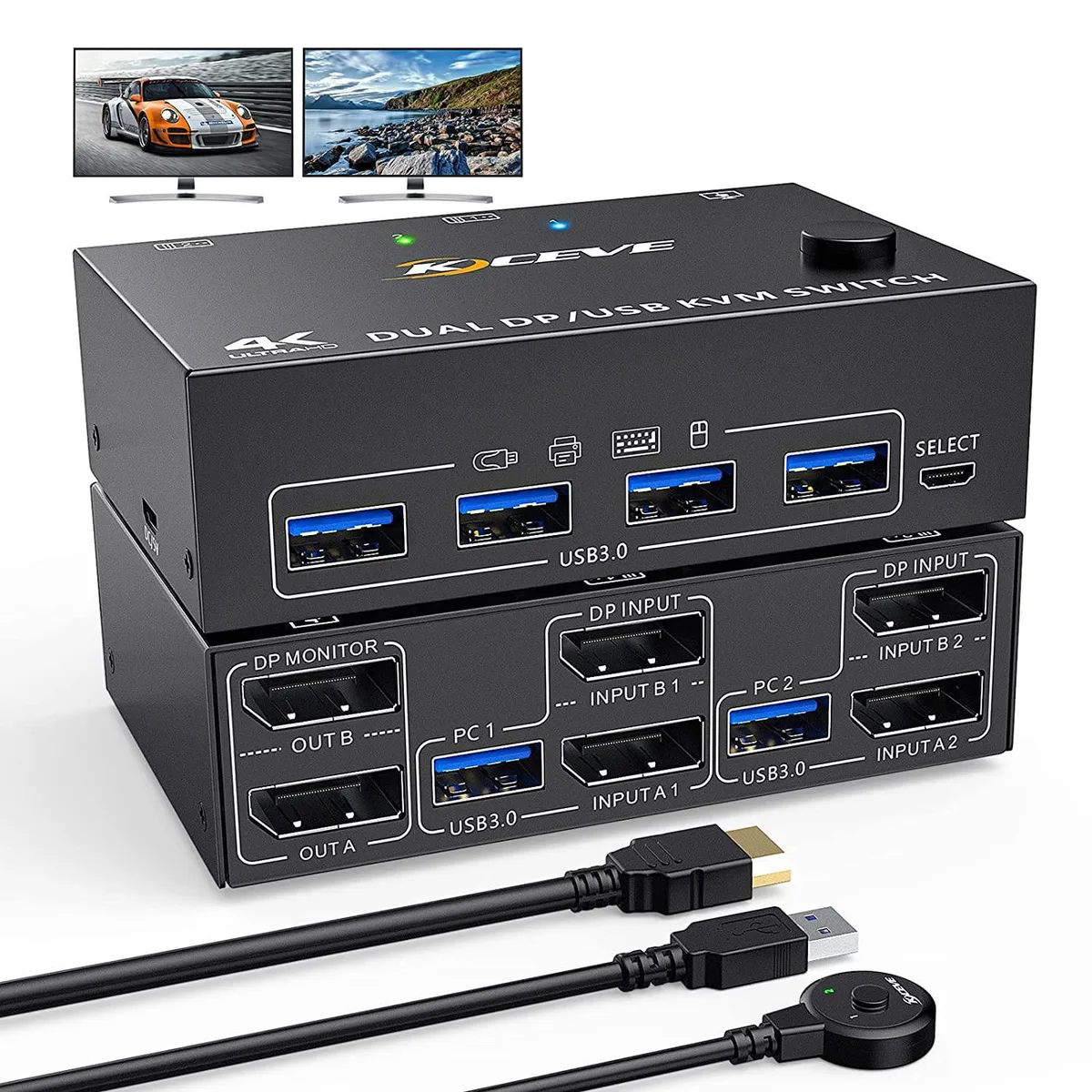
WRIARICH Dual Monitor DP KVM Switch 2 PC 2 Monitors 4 USB 3.0 8K@30Hz 4K@60Hz 2K@144Hz
Dual-monitor DisplayPort KVM switch shares one keyboard, mouse and two displays between two computers at up to 8K@30Hz, 4K@60Hz or 2K@144Hz with four USB 3.0 ports and no external power required
- TypeDisplayPort, USB
- Computer Connections2 Ports
- Monitor Connections2 Ports
- Video Resolution3840 x 2160
- Monitors SupportedDual Monitor Displayport
- Power FeaturesRequires no additional power supply
- Control two computers with one keyboard, mouse and dual monitors
- Supports up to 8K at 30 Hz, 4K at 60 Hz, 2K at 144 Hz
- Four USB 3.0 ports connect peripherals at 5 Gbps
- Driver-free operation on Windows, macOS and Linux
- Switch instantly via front-panel buttons or wired remote
Dual-PC DisplayPort KVM Switch
This DisplayPort 1.4 KVM switch lets two computers share one keyboard, one mouse and two monitors. It supports mirrored or extended desktop modes for home office, gaming and streaming workflows. No driver installation is required on Windows, macOS or Linux. A wired remote controller and front-panel buttons both change the active system.
DisplayPort 1.4 bandwidth and resolution limits
The link handles up to 8K at 30 Hz, 4K at 60 Hz and 2K at 144 Hz, while remaining backward compatible with DisplayPort 1.2 sources and displays. Final resolution depends on the graphics card, monitor and cable combination in use. USB 3.0 ports deliver up to 5 Gbps for peripherals such as printers or scanners. The unit draws power from the connected computers so no external supply is needed.
Metal enclosure with front USB ports and remote
A compact metal chassis provides shielding and durability for daily switching. Four USB 3.0 ports sit on the front for easy access to keyboards, mice and other devices. Two DisplayPort cables and two USB cables are included for immediate two-PC setup. The wired desktop controller lets you toggle systems without reaching the back of the desk.
Highlights
- Control two computers with one keyboard, mouse and dual monitors
- Supports up to 8K at 30 Hz, 4K at 60 Hz, 2K at 144 Hz
- Four USB 3.0 ports connect peripherals at 5 Gbps
- Driver-free operation on Windows, macOS and Linux
- Switch instantly via front-panel buttons or wired remote
Specifications
| Type | DisplayPort, USB |
|---|---|
| Computer Connections | 2 Ports |
| Monitor Connections | 2 Ports |
| Video Resolution | 3840 x 2160 |
| Monitors Supported | Dual Monitor Displayport |
| Power Features | Requires no additional power supply |
| USB Features | with USB support |
| Application | This dual monitor KVM switches controls 2 PCs or laptops with just one set of keyboard, mouse and 2 monitors. Can view mirrored and extended desktops or display information from two PCs for home office setup, gaming, and streaming device support. No more plugging and unplugging, no more Tangle Terminator. |
| Features | DP 1.4 KVM switch supports up to 8K@30Hz, 4K@60Hz, 2K@144Hz, backward compatible with DP 1.2. DisplayPort Dual Monitor USB Switch with built-in 4 USB 3.0 ports, which can detect keyboard, mouse, printer, scanner and other USB devices. USB 3.0 port provides file transfer speeds of up to 5Gbps. |
| Package Contents | 1 x KVM Switch, 2 x DP Cable, 2 x USB Cable, 1 x Power Cable, 1 x Wired Controller, 1 x User Manual |
Questions about this item
Which WRIARICH dual-monitor KVM version should I pick for two PCs and two displays?
The single model listed handles 2 PCs and 2 monitors with 4 USB 3.0 ports, 8K@30Hz, 4K@60Hz and 2K@144Hz support.
What does the 8K@30Hz headline figure mean once the switch is in my system?
It is the maximum resolution and refresh rate the DP 1.4 link can carry; actual output depends on your graphics cards, monitors and cables working together.
What interface standard does the switch use and what does it cap in practice?
DisplayPort 1.4 caps video at 8K@30Hz, 4K@60Hz or 2K@144Hz and provides 5 Gbps USB 3.0 bandwidth for peripherals.
Also in this aisle
People compared these
Same shelf, same checkout — eight coins and a 30-minute rate lock.


Black Box Corporation
Black Box Corporation 4K60 HDMI Dual-Head KVM Switch 4 Port
$774.99
0.0093196BTC
In stock