


WRIARICH
WRIARICH 8K 60Hz Triple Monitor KVM Switch HDMI 2 DP 2 PC 4 USB 3.0
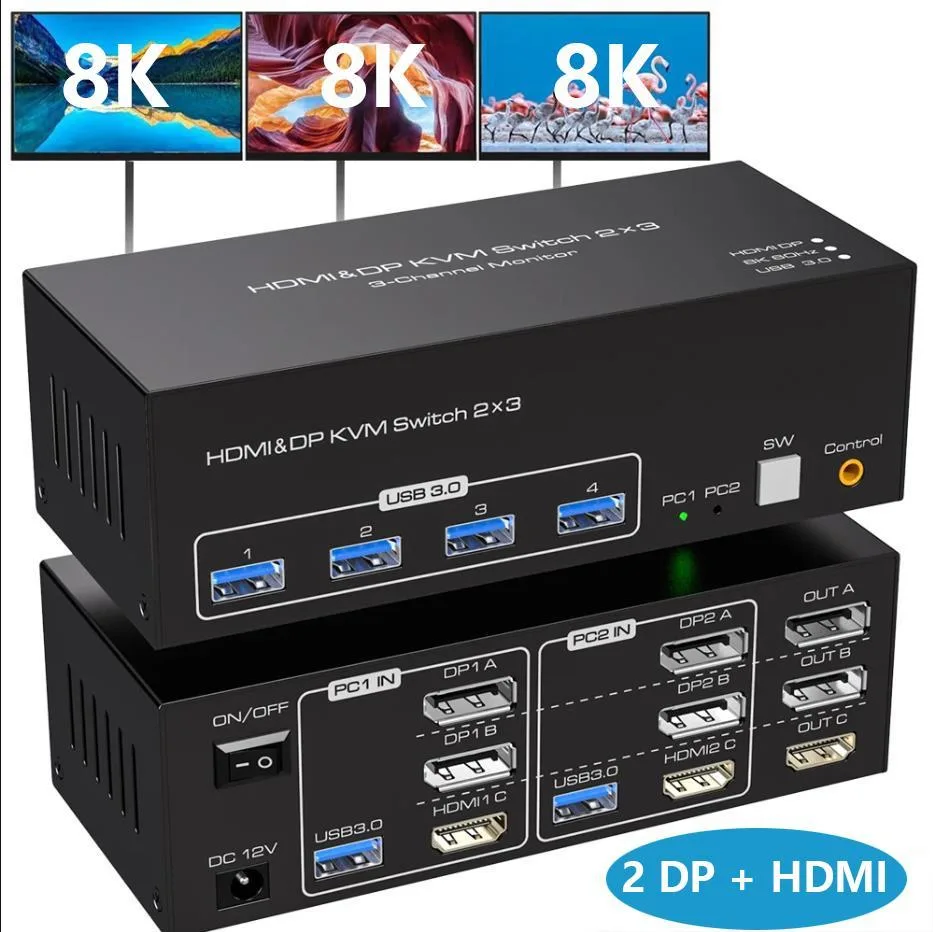
Share one keyboard, mouse and three monitors (HDMI plus two DisplayPort) between two computers at up to 8K 60Hz with four USB 3.0 ports
- Type2 Displayport + HDMI
- PC Connectors2 Computers
- Computer Connections2 Ports
- Monitor Connections3 Ports
- Video Resolution7680 x 4320
- PC SelectionPush Buttons
- Share one keyboard, mouse and three monitors across two computers
- Triple-monitor output up to 7680 x 4320 at 60 Hz via HDMI 2.1 and DP 1.4
- Switch instantly with front-panel buttons or the wired remote controller
- Four USB 3.0 ports deliver 5 Gbps data transfer for peripherals
- Works with Windows, Linux and Mac without extra drivers
Triple-Monitor KVM for Two Computers
This WRIARICH switch lets two PCs or laptops share one keyboard, one mouse and three displays — one HDMI and two DisplayPort outputs. It is built for users who need extended or mirrored desktop space across three screens without duplicating peripherals. Each connected system must already support three simultaneous video outputs.
Passive Cooling and USB 3.0 Power
The unit draws the power it needs from the included 12 V adapter and has no fan, so it adds no audible noise to the desk. Four USB 3.0 ports provide up to 5 Gbps bandwidth for keyboards, mice, printers or storage, all backward compatible with earlier USB standards.
Rear-Facing Ports and Wired Remote
All HDMI, DisplayPort and USB cables plug into the back of the metal chassis, keeping the work surface clear. Switching between the two computers is done either with the front-panel push buttons or the supplied wired remote button, and LED indicators show the active source at a glance.
Highlights
- Share one keyboard, mouse and three monitors across two computers
- Triple-monitor output up to 7680 x 4320 at 60 Hz via HDMI 2.1 and DP 1.4
- Switch instantly with front-panel buttons or the wired remote controller
- Four USB 3.0 ports deliver 5 Gbps data transfer for peripherals
- Works with Windows, Linux and Mac without extra drivers
Specifications
| Type | 2 Displayport + HDMI |
|---|---|
| PC Connectors | 2 Computers |
| Computer Connections | 2 Ports |
| Monitor Connections | 3 Ports |
| Video Resolution | 7680 x 4320 |
| PC Selection | Push Buttons |
| Monitors Supported | Triple Monitor |
| LED Indicators | Yes |
| Power Features | Requires no additional power supply |
| USB Features | with USB support |
| Application | 8K 60Hz 2x3 HDMI + Displayport USB 3.0 KVM Switch allows you to share one USB keyboard, USB mouse, and One HDMI monotor and Two DP monitor to control 2 computers, laptops, game consoles. It is designed for multitask with four computers at your necessary, increasing productivity in the office or at home ; You can switch between 2 computers using a manual switch located on the top of the KVM unit. |
| Features | 1. 2 computers/laptops share one set of keyboard, mouse, and 3 monitors (HDMI+2 DisplayPort) 2. Triple monitors output support up to 8K@60Hz for extended and mirror display, support HDMI 2.1 and DP 1.4 standards. 3. 2 Switching modes: Button switch and wired remote. 4. With extra 4 x 5Gbps USB 3.0 ports . 5. Cross-support most major OS including Windows, Linux, Mac, and more. 6. The ports that need to plug in HDMI/DisplayPort/USB cables are all hidden behind the 3 monitor kvm switch, so the desktop doesn't get cluttered, you can enjoy the clean work space. |
| Package Contents | 1x USB 3.0 HDMI + 2 DisplayPort Triple Monitor KVM Switch, 2x USB 3.0 Cables, 1x Power Adapter, 1x Wired Button Switch, 1x User's manual |
Questions about this item
How do I install the WRIARICH KVM switch and what is the step people often miss?
Connect each computer using one USB 3.0 cable, one HDMI cable, and two DisplayPort cables, then attach the 12 V power adapter — the step people miss is powering the unit before switching.
What maintenance or replacement will the WRIARICH KVM switch need later?
No scheduled maintenance is required; only the 12 V power adapter or the wired remote button may need replacement if they fail after extended use.
What limit appears first during sustained use of the WRIARICH KVM switch?
The 5 Gbps USB 3.0 bandwidth ceiling is reached before the 8K@60 Hz video paths saturate, so heavy peripheral traffic becomes the first bottleneck.
Also in this aisle
People compared these
Same shelf, same checkout — eight coins and a 30-minute rate lock.


Black Box Corporation
Black Box Corporation 4K60 HDMI Dual-Head KVM Switch 4 Port
$774.99
0.00923927BTC
In stock