


WRIARICH
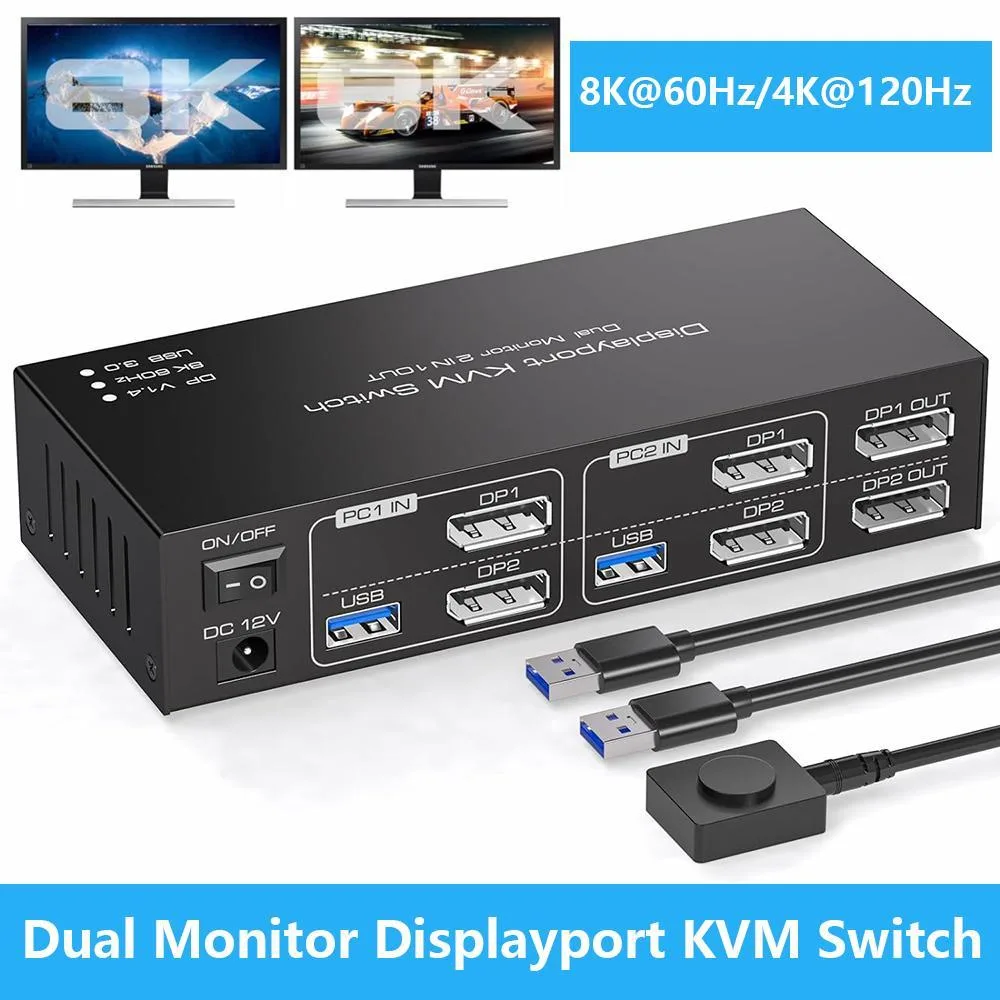
WRIARICH 8K@60Hz 4K@120Hz Dual Monitor DisplayPort KVM Switch 2 PC 2 Monitor USB 3.0
Control two computers across dual monitors at up to 8K 60 Hz or 4K 120 Hz with push-button switching and four USB 3.0 ports
- TypeDisplayPort, USB
- PC ConnectorsDisplayport 1.4, USB 3.0
- Computer Connections2 Ports
- Monitor Connections2 Ports
- Video Resolutionup to 8K@60Hz4K@120Hz and are backward compatible
- PC SelectionPush Buttons
- Control two PCs with one keyboard and mouse using dual DisplayPort outputs
- Switch instantly between computers via front push buttons or wired remote
- Share four USB 3.0 peripherals across both systems at 5 Gbps bandwidth
- Drive dual monitors at 8K 60 Hz or 4K 120 Hz with backward compatibility
- Compact 5.8 × 2.5 × 1.4 in design powered by included adapter
Dual DisplayPort KVM Switch
This dual-monitor KVM switch lets you control two computers with one keyboard, mouse and two DisplayPort displays. It supports video up to 8K at 60 Hz and 4K at 120 Hz with backward compatibility. Four USB 3.0 ports allow shared peripherals such as printers or storage devices. The unit operates in extended or duplicate display modes.
Replaces two single-head KVMs or software switching
Instead of juggling separate switches for each monitor, this unit handles both DisplayPort channels in one box. The jump is worth it when you need true dual-head extended desktop across two PCs without re-plugging cables. It also removes the latency and driver dependence of network-based control software.
Install in minutes with included cables
Connect each PC using the supplied USB 3.0 and DisplayPort 1.4 cables, attach monitors to the labelled DP1 OUT and DP2 OUT ports, then plug in the bundled power adapter. Switch via front push buttons or the wired remote. Note that displays blank for a few seconds during each swap and each DP input must match its correspondingly numbered output.
Highlights
- Control two PCs with one keyboard and mouse using dual DisplayPort outputs
- Switch instantly between computers via front push buttons or wired remote
- Share four USB 3.0 peripherals across both systems at 5 Gbps bandwidth
- Drive dual monitors at 8K 60 Hz or 4K 120 Hz with backward compatibility
- Compact 5.8 × 2.5 × 1.4 in design powered by included adapter
Specifications
| Type | DisplayPort, USB |
|---|---|
| PC Connectors | Displayport 1.4, USB 3.0 |
| Computer Connections | 2 Ports |
| Monitor Connections | 2 Ports |
| Video Resolution | up to 8K@60Hz4K@120Hz and are backward compatible |
| PC Selection | Push Buttons |
| Monitors Supported | Displayport Dual Monitor |
| LED Indicators | Yes |
| Power Features | Requires no additional power supply |
| USB Features | with USB support |
| Application | This KVM Switch 2 monitors 2 computers display port allows you to control 2 computers or laptops by 1 set of keyboard mouse, share 4 USB 3.0 devices and 2 monitors, support extend mode and copy mode. (Note: It is required that your computer has dual graphics cards (with 2 DP output ports) and that each monitor has a DP port input.) |
| Features | It is possible to control two computers and two monitors directly with one set of keyboard and mouse. Two monitors can support two modes:duplicate and extend. Supports resolutions up to 8K 60Hz and backward compatible. Equipped with four USB 3.0 ports, allowing you to connect scanners, hard drives, and other USB devices. Equipped with a 12V/1A power supply, ensuring stable operation even when high-power devices are connected. Compatible with Windows/Vista/XP, Mac OS, Linux, and Unix, plug-and-play. |
| Dimensions | About 5.8 x 2.5 x 1.4 inches |
| Weight | About 1.19 Pounds |
| Package Contents | 1 x Dual Monitor KVM Switch, 2 x USB 3.0 Cable, 1 x Wired Remote, 1 x Power Adapter, 1 x User Manual |
Questions about this item
What desk space does the 5.8 x 2.5 x 1.4 inch unit need?
The switch measures 5.8 by 2.5 by 1.4 inches and weighs 1.19 pounds, so it fits on a typical desk without a rack or bracket.
Which cables must match which ports during setup?
Connect each computer’s DisplayPort 1.4 output to DP1 or DP2 on the switch, then run DP1 OUT to monitor one and DP2 OUT to monitor two; the USB 3.0 cables link the PCs to the front USB ports.
What ongoing upkeep does the external power adapter require?
The included power adapter powers the unit; keep its ventilation clear and replace the adapter only if the LED indicators stop lighting or the switch fails to change inputs.
Also in this aisle
People compared these
Same shelf, same checkout — eight coins and a 30-minute rate lock.


Black Box Corporation
Black Box Corporation 4K60 HDMI Dual-Head KVM Switch 4 Port
$774.99
0.00932577BTC
In stock