


WRIARICH
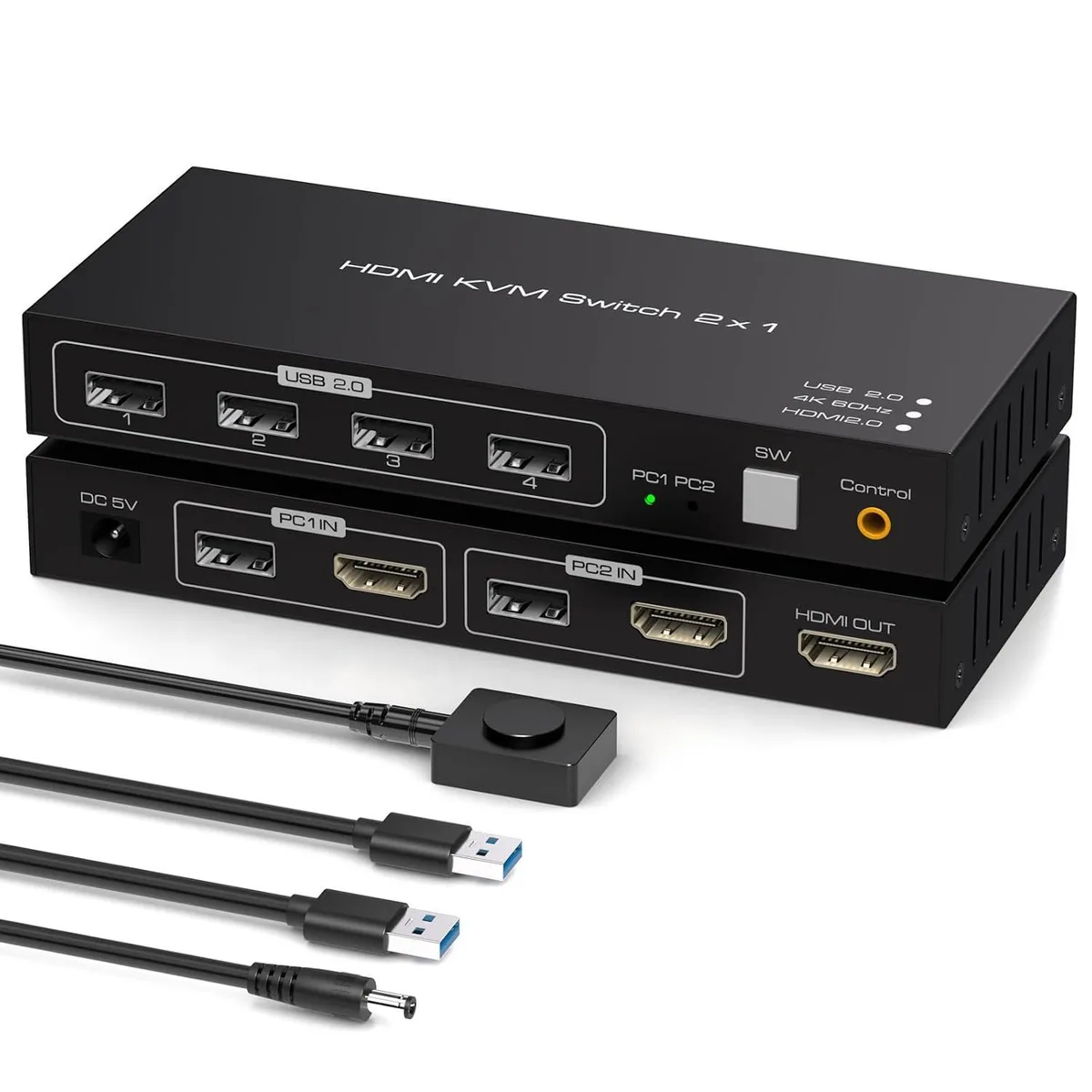
WRIARICH 4K@60Hz HDMI KVM Switch 2 Ports 1 Monitor 2 Computers 4 USB 2.0 Wired Remote
Two-port HDMI KVM switch lets two computers share one 4K@60Hz monitor, keyboard, mouse and four USB 2.0 peripherals, switched by push button or wired remote
- TypeHDMI, USB
- PC ConnectorsHDMI 2.0, USB 2.0
- Computer Connections2 Port Display
- Monitor Connections1 Port
- Video ResolutionThis kvm switches 2 pc 1 monitor supports up to 4K@60Hz reso
- PC SelectionPush Buttons and Wired Remote
- Share one monitor, keyboard and mouse between two computers with a single button press
- View ultra-sharp 4K visuals at 60 Hz, also compatible with 1080P and 720P
- Switch instantly via push button on the unit or the wired remote controller
- Connect keyboards, mice, printers and other peripherals through four USB 2.0 ports
- Works with Windows, Linux and Mac without installing any drivers
WRIARICH 4K HDMI KVM Switch
This WRIARICH KVM switch lets two computers share one monitor, keyboard, mouse and up to four USB 2.0 peripherals. It supports video resolutions up to 4K at 60 Hz and is backward compatible with 4K at 30 Hz, 1080P and 720P. Switching is handled by a front-panel push button or the included wired remote for desk-side convenience. No external power supply is required for operation.
Upgrade from manual cable swapping
Replaces the need to physically unplug and reconnect HDMI and USB cables when moving between two systems. The jump is worth it when you regularly use two computers with a single display and want instant switching without signal degradation up to 4K at 60 Hz. LED indicators show the active port at a glance. The wired remote allows the main unit to be tucked away while keeping control within reach.
Check your existing setup
Verify each computer has an HDMI 2.0 output and a free USB 2.0 port for the supplied cables. Confirm your monitor accepts 4K at 60 Hz over HDMI if you need the maximum resolution. Ensure the four USB 2.0 ports on the switch cover the keyboard, mouse and any other peripherals you plan to share. The package includes two USB cables, a wired remote, a USB power cable and a user manual.
Highlights
- Share one monitor, keyboard and mouse between two computers with a single button press
- View ultra-sharp 4K visuals at 60 Hz, also compatible with 1080P and 720P
- Switch instantly via push button on the unit or the wired remote controller
- Connect keyboards, mice, printers and other peripherals through four USB 2.0 ports
- Works with Windows, Linux and Mac without installing any drivers
Specifications
| Type | HDMI, USB |
|---|---|
| PC Connectors | HDMI 2.0, USB 2.0 |
| Computer Connections | 2 Port Display |
| Monitor Connections | 1 Port |
| Video Resolution | This kvm switches 2 pc 1 monitor supports up to 4K@60Hz resolution and is backward compatible with 4K@30Hz, 1080P, and 720P, providing flexibility to meet a variety of display needs. |
| PC Selection | Push Buttons and Wired Remote |
| LED Indicators | Yes |
| Power Features | Requires no additional power supply |
| USB Features | with USB support |
| Application | This kvm switch 1 monitor 2 computers supports two computers sharing a set of mouse and keyboard and a monitor. It can easily switch between two PCs by pressing the switch button without the need to plug and unplug cables back and forth, say goodbye to cumbersome multi-device operation, significantly improve the smoothness and efficiency of work |
| Features | Equipped with 4 USB Ports; 4K@60Hz Resolution; Two Switching Methods; Widely Compatible |
| Dimensions | 150mm x 65mm x 22mm |
| Package Contents | 1 x KVM Switch, 2 x USb Cable, 1 x Wired Remote 1 x USB Power Cable, 1 x User Manual |
Questions about this item
What cable lengths and connectors are needed to attach two computers and one monitor to this 150 mm × 65 mm × 22 mm KVM switch?
Each computer requires an HDMI 2.0 cable and a USB 2.0 cable; the monitor needs one HDMI 2.0 cable. The box includes two USB cables and a USB power cable, so only the three HDMI cables must be sourced separately.
How do I switch between the two connected PCs using the wired remote, and what is the common mistake to avoid?
Press the button on the wired remote to change the active computer; the LED on the main unit shows which port is selected. The frequent error is pressing the front-panel SW button instead of the remote when the switch is mounted out of reach.
Which peripherals can stay permanently plugged into the four USB 2.0 ports, and when might they need replacement?
Keyboards, mice, printers and USB hard drives can remain connected and will be shared across both PCs. Replace any peripheral only when it fails or when a faster USB standard is required for that device.
Also in this aisle
People compared these
Same shelf, same checkout — eight coins and a 30-minute rate lock.


Black Box Corporation
Black Box Corporation 4K60 HDMI Dual-Head KVM Switch 4 Port
$774.99
0.00927798BTC
In stock