


WRIARICH
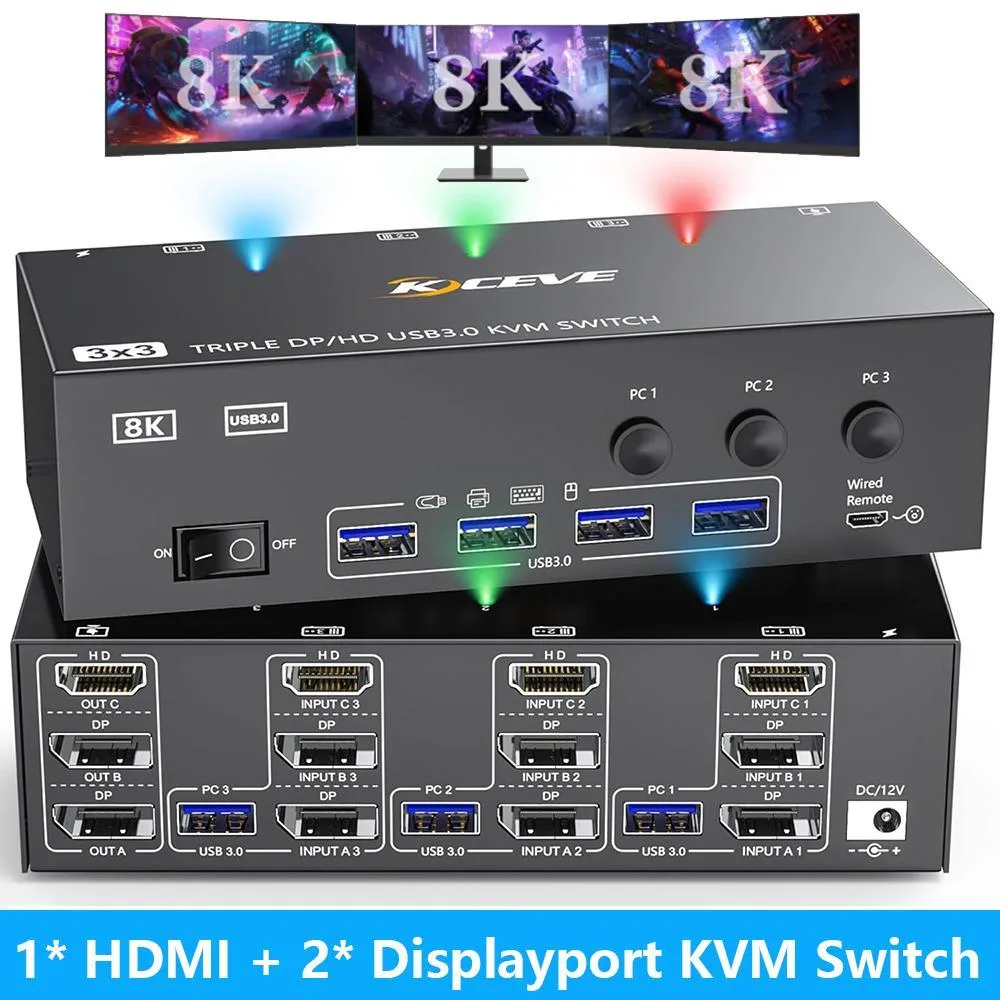
WRIARICH 3-Monitor 3-Computer KVM Switch HDMI+2DP 8K@60Hz 4K@144Hz 4×USB 3.0 Wired Remote
Controls three computers across three monitors with HDMI and dual DisplayPort outputs up to 8K@60Hz and 4K@144Hz plus four USB 3.0 ports
- Type1* HDMI + 2* Displayport
- PC ConnectorsHDMI2.1, DP1.4, USB 3.0
- Computer Connections3 Ports
- Monitor Connections3 Ports
- Video ResolutionDisplayport: support resolution up to 8K@30Hz /4K@144Hz; HDM
- PC SelectionPush Buttons and Wired Remote
- Control three computers across three monitors with one keyboard and mouse set
- DisplayPort handles 8K at 30 Hz and 4K at 144 Hz for sharp high-refresh visuals
- HDMI delivers 8K at 60 Hz and 4K at 120 Hz for compatible sources
- Four USB 3.0 ports share peripherals at 5 Gbps without extra hubs
- Switch instantly using front buttons or the included wired remote
Triple-monitor KVM for three computers
This KVM switch lets three computers share three monitors and four USB 3.0 peripherals. It accepts one HDMI and two DisplayPort connections per system and supports both extended and mirrored desktop modes. Driver-free operation works with Windows, macOS, Linux, Unix and Ubuntu. The unit includes a wired remote and front-panel buttons for instant switching.
Upgrade from single-display or dual-system switches
Replacing a single-monitor KVM or a two-computer switch removes the need to swap cables when moving between three workstations. The jump is worthwhile when each computer already provides one HDMI and two DisplayPort outputs; otherwise adapters or docking stations are required to fill the missing video ports. Integrated 5 Gbps USB 3.0 ports keep keyboards, mice, printers and flash drives accessible across all systems.
Limits of HDMI 2.1 and DisplayPort 1.4
HDMI 2.1 reaches 8K at 60 Hz and 4K at 120 Hz, while DisplayPort 1.4 tops out at 8K 30 Hz and 4K 144 Hz. Higher refresh rates or resolutions beyond those figures are not supported. Each computer must supply one HDMI and two DisplayPort signals natively or through compatible adapters to drive three displays simultaneously.
Highlights
- Control three computers across three monitors with one keyboard and mouse set
- DisplayPort handles 8K at 30 Hz and 4K at 144 Hz for sharp high-refresh visuals
- HDMI delivers 8K at 60 Hz and 4K at 120 Hz for compatible sources
- Four USB 3.0 ports share peripherals at 5 Gbps without extra hubs
- Switch instantly using front buttons or the included wired remote
Specifications
| Type | 1* HDMI + 2* Displayport |
|---|---|
| PC Connectors | HDMI2.1, DP1.4, USB 3.0 |
| Computer Connections | 3 Ports |
| Monitor Connections | 3 Ports |
| Video Resolution | Displayport: support resolution up to 8K@30Hz /4K@144Hz; HDMI: support resolution up to 8K@60Hz/4K@120Hz. |
| PC Selection | Push Buttons and Wired Remote |
| Monitors Supported | 1 HDMI, 2 Displayport |
| LED Indicators | Yes |
| Power Features | with Power Adapter |
| USB Features | USB port only |
| Application | With this KVM, you can control 3 computers sharing 3 monitors and 4 USB devices. For the sake of customers, HDMI and DP ports are very common and can be used by most customers without any effort. Not only a switch, but also a USB3.0 switch. One product to solve all needs. |
| Features | 3 computers share 3 monitors and 4 USB 3.0 devices. Supports wired or wireless keyboard and mouse. Switching mode: button switch and wired remote. Driver-free for Windows, Mac, Linux, Unix, Ubuntu. |
| Dimensions | 6.29 x 2.56 x 1.33 inch |
| Weight | 1.81 Pounds |
| Package Contents | 1x Triple Monitor KVM Switch, 3 x USB 3.0 Cable, 1x Power Adapter, 1x Wired remote, 1x User's manual |
Questions about this item
What cables does each computer need to connect for triple-monitor output?
Each PC requires one HDMI 2.1 cable, two DisplayPort 1.4 cables, and one USB 3.0 cable to drive three screens properly.
How do I switch between the three computers, and what step is often missed?
Use the front-panel buttons or the included wired remote; the step often missed is connecting the USB 3.0 cable from each PC so keyboard and mouse switching works.
When should I replace the external power adapter?
Replace the adapter if the unit loses video on all three monitors or USB devices disconnect while the LED indicators stay dark.
Also in this aisle
People compared these
Same shelf, same checkout — eight coins and a 30-minute rate lock.


Black Box Corporation
Black Box Corporation 4K60 HDMI Dual-Head KVM Switch 4 Port
$774.99
0.00932274BTC
In stock