


SMA
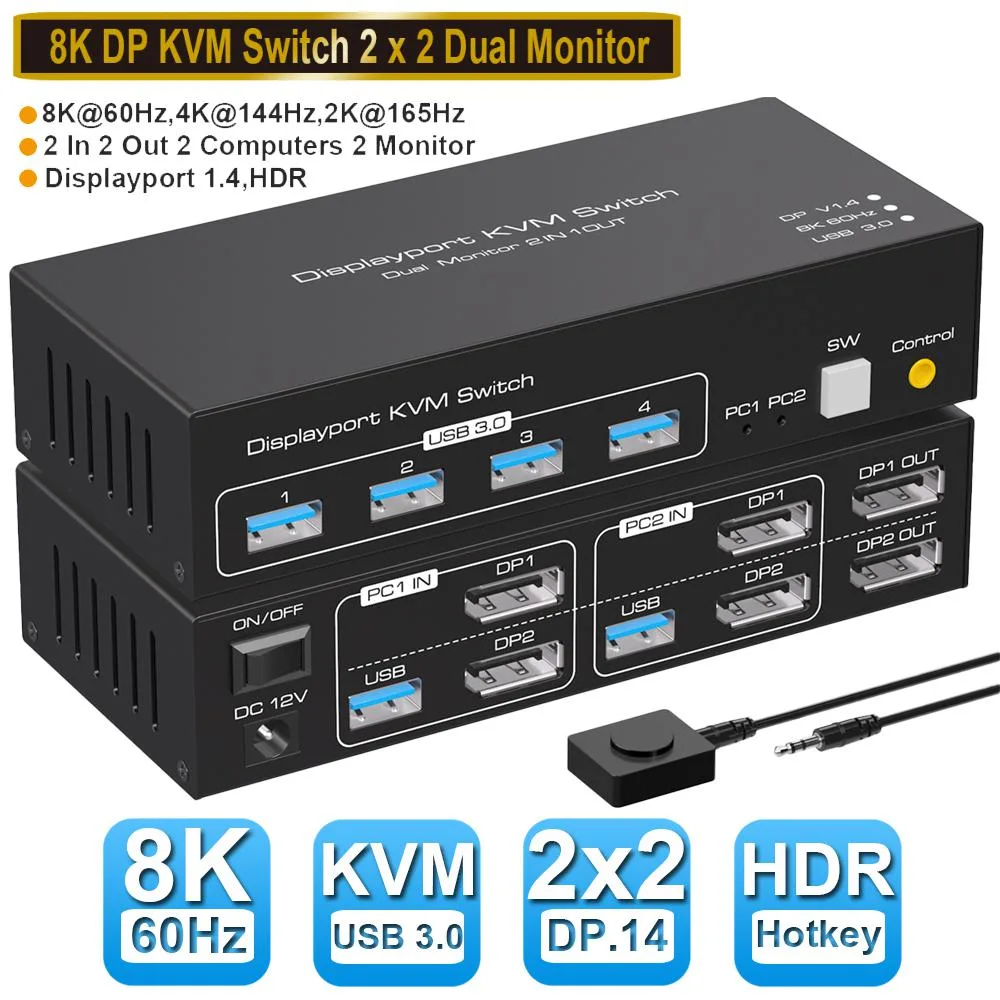
SMA Dual Monitor DisplayPort 1.4 KVM Switch 2x2 8K@60Hz USB 3.0
A dual-monitor DisplayPort 1.4 KVM switch lets two computers share one keyboard, mouse and two displays at up to 8K 60 Hz or 4K 144 Hz with four USB 3.0 ports and push-button or external switching
- TypeDisplayPort, USB
- PC Connectors2 Computers
- Computer Connections2 Port DisplayPort - Dual Monitor
- Monitor ConnectionsDual Monitor
- Video Resolution7680x4320
- PC SelectionPush Buttons
- Controls two computers with one keyboard, mouse and dual monitors via 2-in-2-out DP 1.4 switching
- Delivers 8K at 60 Hz plus 4K at 144 Hz and 1080p at 240 Hz for crisp visuals
- Four USB 3.0 ports at 5 Gbps connect keyboards, mice, scanners or cameras
- Push-button and external switch kit give instant source selection without software
- Aluminium alloy chassis measures 150 x 65 x 35 mm and weighs 550 g
Dual-Monitor KVM for Two Computers
This DisplayPort 1.4 switch lets a single keyboard, mouse and dual-monitor setup control two PCs, laptops or game consoles. It handles resolutions up to 7680x4320 at 60 Hz, plus 4K at 144 Hz and 1080P at 240 Hz. Both extended and mirror display modes are supported for flexible multitasking. No driver installation is required on Windows, Mac, Linux or Unix systems.
Aluminium Shell with Front and Remote Switching
The alloy housing resists corrosion and electromagnetic interference while measuring 150x65x35 mm and weighing 550 g. Four USB 3.0 hub ports accept keyboards, mice, scanners or cameras at up to 5 Gbps. Source selection works via the front-panel button or the included external switch cable. The unit draws power from the attached computers, so no separate supply is needed for basic operation.
Cables and External Switch Included
The package supplies two USB 3.0 data cables for the computer links, a DC power adapter for high-draw peripherals, an external switch kit for remote toggling, and a user manual. The extra power adapter ensures stable operation when multiple bus-powered devices are connected. Plug-and-play compatibility means the switch is ready as soon as the cables are seated.
Highlights
- Controls two computers with one keyboard, mouse and dual monitors via 2-in-2-out DP 1.4 switching
- Delivers 8K at 60 Hz plus 4K at 144 Hz and 1080p at 240 Hz for crisp visuals
- Four USB 3.0 ports at 5 Gbps connect keyboards, mice, scanners or cameras
- Push-button and external switch kit give instant source selection without software
- Aluminium alloy chassis measures 150 x 65 x 35 mm and weighs 550 g
Specifications
| Type | DisplayPort, USB |
|---|---|
| PC Connectors | 2 Computers |
| Computer Connections | 2 Port DisplayPort - Dual Monitor |
| Monitor Connections | Dual Monitor |
| Video Resolution | 7680x4320 |
| PC Selection | Push Buttons |
| Monitors Supported | Dual Monitor |
| LED Indicators | Yes |
| Power Features | Requires no additional power supply |
| USB Features | with USB support |
| Application | 8K DP USB 3.0 KVM Switch allows you to share one USB keyboard, USB mouse, and two DP Monitor to control 2 computers, laptops, game consoles with extended mode and mirror mode. It is designed for multitask with two computers at your necessary, increasing productivity in the office or at home ; You can switch between 2 computers using a manual switch located on the top of the KVM unit. |
| Features | [UHD 8K Visual Enjoyment]: The kvm switch supports Displayport 1.4. Support max resolution up to 8K@60Hz,4K@144Hz,2K@144/165Hz,1080@240Hz, also support 1080P@165Hz or lower resolution, makes image display more exquisite and realistic. [Dual DP KVM Switch with 4 x USB 3.0 Port]- Supports Connecting your USB 3.0 port device such as Mechanical Keyboard,Bluetooth Mouse,Scanner,USB driver,3D Printer,USB Camera |
| Dimensions | 150x65x35mm |
| Weight | 550g |
| Package Contents | 1 x DP KVM USB Switch 2x2 2 x USB 3.0 data cable 1 x DC power adapter 1 x External switch kit 1 x User Manual |
Questions about this item
What bandwidth does the DisplayPort 1.4 interface provide for each 8K monitor?
The DisplayPort 1.4 link delivers up to 8K at 60 Hz per output, with RGB 4:4:4 colour sampling.
How much desk space and clearance does the 150 x 65 x 35 mm aluminium chassis need?
The unit measures 150 mm wide, 65 mm deep and 35 mm high, so allow that footprint plus cable bend radius behind it.
Which cables go to the PCs and which go to the monitors during first-time hookup?
Connect each computer to the two USB 3.0 data cables and its pair of DP 1.4 inputs; plug both monitors into the two DP 1.4 outputs, then power the switch with the supplied DC adapter.
Also in this aisle
People compared these
Same shelf, same checkout — eight coins and a 30-minute rate lock.


Black Box Corporation
Black Box Corporation 4K60 HDMI Dual-Head KVM Switch 4 Port
$774.99
0.00933071BTC
In stock